8

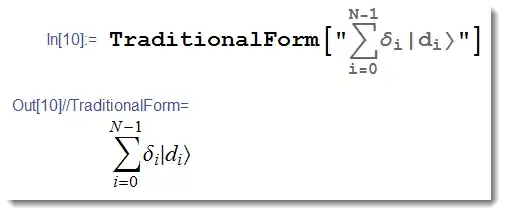
In TraditionalForm, Mathematica formats kets incorrectly in certain expressions.

For example, if used in a summation with indices indicated, a ket becomes too "tall" (red) compared to the rest of the expression:
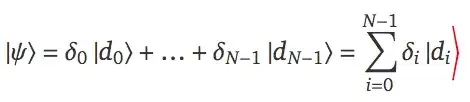
see the big ket

Is there a way to prevent this gigantism?


Cell[BoxData[
 FormBox[
  RowBox[{
   RowBox[{
    RowBox[{
     RowBox[{
      RowBox[{
       RowBox[{
        RowBox[{
         RowBox[{"\[LeftBracketingBar]", "\[Psi]"}], "\[RightAngleBracket]"}], "=", 
        RowBox[{
         SubscriptBox["\[Delta]", "0"], 
         RowBox[{"\[LeftBracketingBar]", 
          SubscriptBox["d", "0"]}]}]}], "\[RightAngleBracket]"}], "+", "\[Ellipsis]", "+", 
      RowBox[{
       SubscriptBox["\[Delta]", 
        RowBox[{"N", "-", "1"}]], 
       RowBox[{"\[LeftBracketingBar]", 
        SubscriptBox["d", 
         RowBox[{"N", "-", "1"}]]}]}]}], "\[RightAngleBracket]"}], "=", 
    RowBox[{
     UnderoverscriptBox["\[Sum]", 
      RowBox[{"i", "=", "0"}], 
      RowBox[{"N", "-", "1"}]], 
     RowBox[{
      SubscriptBox["\[Delta]", "i"], 
      RowBox[{"\[LeftBracketingBar]", 
       SubscriptBox["d", "i"]}]}]}]}], 
   StyleBox["\[RightAngleBracket]",
    FontColor->RGBColor[1, 0, 0]]}], TraditionalForm]], "DisplayFormula"]
J. M.'s missing motivation
  • 124,525
  • 11
  • 401
  • 574
orome
  • 12,819
  • 3
  • 52
  • 100

3 Answers3

18

To prevent this from happening, you may be able to make use of the new-in-8 keyboard shortcut EscketEsc, and similarly for the other symbols, EscbraEsc, EscbraketEsc. These shortcuts bring up a template which is already delimited appropriately. After entering this, you have to press Tab to get "teleported" into the placeholder where the contents of the ket is entered:

picture of the ket as it appears in the notebook

This approach works equally well in TraditionalForm or in normal Input cells, since it relies on the new (but undocumented) symbols Bra, Ket, and BraKet for its display form.

Oleksandr R.
  • 23,023
  • 4
  • 87
  • 125
Jens
  • 97,245
  • 7
  • 213
  • 499
  • That was the problem. I was using the characters from the palette to build a ket "from scratch". I didn't know that there was built-in support. – orome Feb 21 '13 at 17:07
  • 1
    Thanks - there is a hole in the docs for this. If you say ?Ket you get nothing. – Jens Feb 21 '13 at 17:18
  • @Jens When I run Options[$FrontEnd, InputAliases], "ket", "bra" and "braket" are not in the list. I am not sure if it is because you have loaded some package before that defines them, but they are not built-in alias for Mathematica. I like you idea anyway. So I have provided the code to define these alias in my answer. – Everett You May 10 '13 at 21:03
  • @EverettYou Jens' answer works perfectly fine here on mma9 and I haven't loaded anything. – rm -rf May 11 '13 at 01:23
  • @EverettYou these aliases are new in Mathematica 8. While it might be a good idea to edit the answer to point this out (as I have just done), personally I wouldn't downvote. (That said, I don't think it's reasonable to downvote your answer either, since it is quite valid if you use version 7 or below.) Of course, people are absolutely entitled to cast their votes as they see fit, but it's worth remembering that not everyone is necessarily able to test their answers in all relatively recent versions of Mathematica. – Oleksandr R. May 11 '13 at 01:54
  • 2
    @EverettYou let me make a suggestion. Before you take such an aggressive stance, like "the answer simply does not work so I'm downvoting you", try providing extra information, such as version and os. That way, we can diagnose why it doesn't work, and make corrections as necessary. In particular, I wonder what OS you're running because I know you have access to v9. – rcollyer May 11 '13 at 02:31
  • Sorry everyone, and sorry to the author. I am regretful that I had down-vote this nice answer in an angry mood. I have corrected this mistake by an up-vote of this answer. I am using v9 on Mac, but could not figure out why the alias not working. I guess my code could be useful for those who is suffering from the same problem, and definitely for those with v7 or older versions. – Everett You May 11 '13 at 06:55
13

Your are in computational mode, when Mathematica cares that you do not have any corresponding bra. It seems to me that you do not really care for computation and a reasonable thing would be to got to a typesetting realm. Then what about entering things as strings?

enter image description here

I used palettes to type it, but the code for this is:

TraditionalForm["\!\(\*UnderoverscriptBox[\(\[Sum]\), \(i = 0\), \(N \
- 1\)]\)\!\(\*SubscriptBox[\(\[Delta]\), \(i\)]\)|\!\(\*SubscriptBox[\
\(d\), \(i\)]\)\[RightAngleBracket]"]
Vitaliy Kaurov
  • 73,078
  • 9
  • 204
  • 355
3

Jens's answer provides a good idea, but for some users (with v7 or older versions), "ket", "bra" and "braket" are not built-in Mathematica input aliases. To define these aliases in Mathematica, one may execute the following code:

SetOptions[$FrontEnd, 
 InputAliases -> 
  Join[{"ket" -> 
     TemplateBox[{"\[Placeholder]"}, "Ket", 
      DisplayFunction -> (RowBox[{"\[LeftBracketingBar]", #1, 
           "\[RightAngleBracket]"}] &)], 
    "bra" -> 
     TemplateBox[{"\[Placeholder]"}, "Bra", 
      DisplayFunction -> (RowBox[{"\[LeftAngleBracket]", #1, 
           "\[RightBracketingBar]"}] &)], 
    "braket" -> 
     TemplateBox[{"\[Placeholder]", "\[Placeholder]"}, "BraKet", 
      DisplayFunction -> (RowBox[{"\[LeftAngleBracket]", #1, "|", #2, 
           "\[RightAngleBracket]"}] &)]}, 
   OptionValue[Options[$FrontEnd], InputAliases]]]

Then you can use Esc ket Esc to enter the ket. The TemplateBox is used to delimit the template. One may change the DisplayFunction to specify the desired box appearance.

J. M.'s missing motivation
  • 124,525
  • 11
  • 401
  • 574
Everett You
  • 2,277
  • 1
  • 17
  • 19
  • 5
    So you downvoted my "good idea" even though it's the accepted answer? What's the logic in that? If the alias doesn't work for you in particular, maybe you should first ask a question to clarify why it doesn't. – Jens May 10 '13 at 21:03
  • @Jens If you had provide the definition of these non-standard alias, that would be a wonderful answer. I was so annoyed to find that the alias not working. I am sorry to down-vote your answer in a bad mood. I am now willing to up-vote your answer if you could accommodate my code in your answer for those who did not have the alias predefined in their system. – Everett You May 10 '13 at 21:19
  • On v9, enter Options[EvaluationNotebook[], InputAliases] and see what you get. – rcollyer May 10 '13 at 21:55
  • I'm using v9 and [Esc]ket[Esc] works perfectly. – RunnyKine May 10 '13 at 23:30