I'd like to control the appearance of the components of a TabView[] control.
Such a control appears constructed of Buttons, ButtonBar, and Panel.
Some examples follow to illustrate my problem.
appearances = {"DialogBox", "Palette", "FramedPalette", "Frameless"};
Button[1, Print[1], Appearance -> #] & /@ appearances
ButtonBar[{1 :> Print[1], 2 :> Print[2]}, Appearance -> #] & /@ appearances
TabView[{a, b}, Appearance -> #] & /@ appearances

In the above code I can change the appearances of an individual Button[] but not buttons in a ButtonBar[] or a TabView[].
Button[1, Print[1], Background -> Yellow]
ButtonBar[{1 :> Print[1], 2 :> Print[2]}, Background -> Yellow]
TabView[{a, b}, Background -> Yellow]

The above presents a similar problem. Note that in the ButtonBar[] you can see a yellow halo around the entire control.
Finally:
Panel[a, ImageSize -> 100, Background -> Yellow]
TabView[{a, b}, ImageSize -> 100, Background -> Yellow]
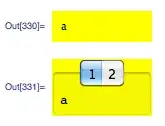
A similar problem, I can affect Panel[] but not the panel component of a TabView[].
So, does anyway exist to reach settings that affect the component levels of a complex control?
Any workarounds appreciated.
...
As this seems relevant, I run version 9 on OS X.


TabView[{a, b}, Background -> Yellow]http://i.stack.imgur.com/zwTYn.png – Dr. belisarius Feb 21 '13 at 20:12