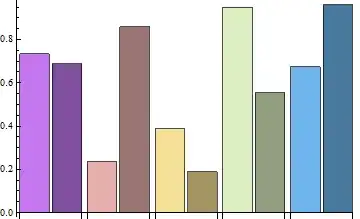
2

I'm trying to control the color of individual bars in a BarChartwhen I pass a 2 dimensional list of data to plot. What I want to accomplish is that for each pair of adjacent bars I want to use a ColorScheme overall, however, make the right bar to be slightly Darker (see the last image for an example). No color is repeated.

I've tried various combinations of {..., {None}, etc...}, however, I can't figure out how to do what I want without flattening the list.

BarChart[RandomReal[1, {5, 2}], ChartStyle -> "Pastel"]

Mathematica graphics

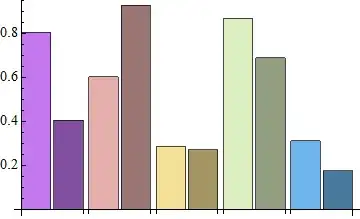
BarChart[RandomReal[1, {5, 2}], ChartStyle -> {"Pastel", None}]

Mathematica graphics

I thought these might work:

colorfunc = ColorData["Pastel"];
colors = colorfunc /@ Range[0, 1, 1/4];
BarChart[RandomReal[1, {5, 2}], 
 ChartStyle -> {{colors, Darker/@colors}, None}]

but it returns an error.

BarChart[RandomReal[1, {5, 2}], ChartStyle -> {Riffle[colors, Darker[#, 0.1] & /@ colors]}]
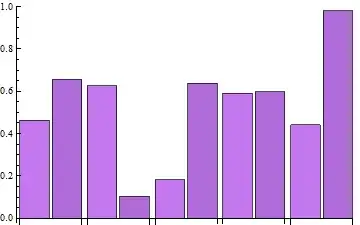
Mathematica graphics

As I said I can accomplish what I want by flattening the list but this breaks the nice bar spacing and a lot of the automated features of the plotting.

BarChart[Flatten@RandomReal[1, {5, 2}], ChartStyle -> Riffle[colors, Darker[#, 0.1] & /@ colors]]

Mathematica graphics

How can I control specific specific bars in a BarChart with multi-dimensional data?

kglr
  • 394,356
  • 18
  • 477
  • 896
s0rce
  • 9,632
  • 4
  • 45
  • 78

3 Answers3

3

From what the documentation says, ChartStyle accepts no functions but only styles, so if it's acceptable for you, Opacity might be a possible replacement:

BarChart[RandomReal[1, {5, 2}], 
   ChartStyle -> {"Pastel", {Opacity[.234], Opacity[1]}}]

Mathematica graphics

And you can process to what you want from the above one:

% /. {Directive[pre___, RGBColor[rgb__], Opacity[op_], post___] :> 
   Directive[pre, If[op - .234 == 0, RGBColor[rgb], Darker[RGBColor[rgb]]], post]}

Mathematica graphics

Silvia
  • 27,556
  • 3
  • 84
  • 164
  • I was writing a comment that the Opacity causes the GridLines to show through half the bars but with your post-processing strategy the problem is solved! – s0rce Feb 24 '13 at 05:18
  • @s0rce Always have fun with post-processing :) – Silvia Feb 24 '13 at 05:19
  • Clever approach. +1 – Mr.Wizard Feb 24 '13 at 06:25
  • @Mr.Wizard Thanks~ – Silvia Feb 24 '13 at 06:37
  • I believe your replacement rule may be simplified. May I make the edit? – Mr.Wizard Feb 24 '13 at 06:37
  • @Mr.Wizard of course! please! :D – Silvia Feb 24 '13 at 06:37
  • I realize that what I was thinking would require either losing the simplicity of the first graphic (which without GridLines etc. works fine) or changing the second so that the left bar is Lighter rather than making the right bar Darker. (It would look more like the first graphic then, but work with GridLines.) I don't know if this it suitable. At least you can use If[op == .234, . . . which is a minor simplification. – Mr.Wizard Feb 24 '13 at 06:49
  • @Mr.Wizard yes indeed. It's only my personal preference to choose ... == 0 than ... == .... (the attendance of exact 0 makes me mentally feel safe :) – Silvia Feb 24 '13 at 06:58
  • @Mr.Wizard btw I think it deserves an answer for so much differences of your procedure than mine. – Silvia Feb 24 '13 at 07:06
  • I decided to take this in a different direction. (See my answer.) I hope it does not detract from your answer; it is my intention to complement it, not replace it. – Mr.Wizard Feb 24 '13 at 07:09
  • It's totally fine. I think we're hanging out on this site for not reputations but having fun with Mathematica! ;) – Silvia Feb 24 '13 at 07:19
2

This is a tangential answer.

Silvia's answer shows a nice and clever method but it is somewhat complicated by the replacement rule needed for post-processing. This made me realize that a new kind of directive would be convenient here, one which could be used in-line. For example: {. . ., Red, . . ., mkDarker[], . . .} would replace mkDarker[] with Darker@Red. First an illustration of the directive in use, using Silvia's method (I'll use Glow instead of Opacity just because I can):

ch = BarChart[RandomReal[1, {5, 2}], ChartStyle -> {"Pastel", {Glow[], Glow[0]}}];
ch /. Glow[0] :> mkDarker[]

Mathematica graphics

Or darker by a different amount:

ch /. Glow[0] :> mkDarker[0.6]

Mathematica graphics

And here is the code for the directive and mkLighter too while we're at it:

mkDarker /: (h : List | Directive)[Longest[a___], 
  color : _RGBColor | _Hue | _CMYKColor | _GrayLevel, b___, 
  mkDarker[n : (_?NumericQ) : 1/3], c___] := h[a, color, b, Darker[color, n], c]

mkLighter /: (h : List | Directive)[Longest[a___], 
  color : _RGBColor | _Hue | _CMYKColor | _GrayLevel, b___, 
  mkLighter[n : (_?NumericQ) : 1/3], c___] := h[a, color, b, Lighter[color, n], c]
Mr.Wizard
  • 271,378
  • 34
  • 587
  • 1,371
  • Great +1! This is what it should be! I thought about similar things but gave up mainly because TagSetDelayed didn't come to my mind. – Silvia Feb 24 '13 at 07:25
  • Would it be possible to use mkDarker directly in ChartStyle? Or maybe it will require a hack of option-check process of BarChart? – Silvia Feb 24 '13 at 07:30
  • @Silvia I think it would require some kind of modification to BarChart and I thought it was best to avoid that, given how simple the post-processing rule can be when using this. – Mr.Wizard Feb 24 '13 at 07:34
  • 1
    I traced to a function Charting`generalDirective, setting it to Charting`generalDirective[mkDarker[_?NumericQ]] := True, than it's OK to use BarChart[RandomReal[1, {5, 2}], ChartStyle -> {"Pastel", {mkDarker[0], mkDarker[.4]}}]. It looks pretty safe to me. – Silvia Feb 24 '13 at 09:51
  • @Silvia That sounds very useful. You dug that out yourself? – Mr.Wizard Feb 24 '13 at 11:37
  • I Trace-ed the entire BarChart[...], found something like Charting`padMarkerStyle[BarChart, {2, 2}, {{Red, Blue}, {Opacity[.5], mkDarker[]}}], then I traced it with TraceInternal -> True. – Silvia Feb 24 '13 at 11:52
2

Using the same tricks in this answer to a related Q/A:

 data = RandomReal[1, {5, 2}]; 
 styles = {#, Darker[#, .1]} & /@ colors;
 BarChart[MapThread[Style[#1, #2] &, {data, styles}, 2], BarSpacing -> {0, 0.4}]

or

 BarChart[ Partition[Inner[Style, Flatten@data, Flatten@styles, List], 2], 
 BarSpacing -> {0, 0.4}]

or, for Version 9,

  BarChart[ ArrayReshape[Inner[Style, Flatten@data, Flatten@styles, List], {5, 2}],
  BarSpacing -> {0, 0.4}]

enter image description here

kglr
  • 394,356
  • 18
  • 477
  • 896