Fixed in version 12.1.1
Needs["MeshTools`"]
mesh2D = AnnulusMesh[{0, 0}, {1, 2}, {-Pi, Pi}, {36, 10}];
NIntegrate[1, Element[{x, y}, mesh2D]]
9.37700159401424`
Old Answer:
AnnulusMesh does not set the region hole of the mesh region. Then, in NIntegrate the mesh when the mesh is re-meshed that region hole is fully meshed.
Needs["MeshTools`"]
mesh2D = AnnulusMesh[{0, 0}, {1, 2}, {-Pi, Pi}, {36, 10}];
mesh2D["RegionHoles"]
Automatic
SetRegionHoles[mesh2D, {{0, 0}}]
{{0., 0.}}
NIntegrate[1, Element[{x, y}, mesh2D]]
9.37700159401424`
Note that an annulus meshed with ToElementMesh automatically sets that region hole property.
ToElementMesh[Annulus[{0, 0}, {1, 2}]]["RegionHoles"]
{{2.5326962749261384`*^-16, 2.7929047963226594`*^-16}}
I think the best way forward is to add a region hole to AnnulusMesh. I'll have a look how time consuming it would be for NIntegrate to auto search for region holes if the mesh["RegionHoles"] is Automatic; but that may be prohibitive.
In other words this is happening:
ToElementMesh[mesh2D]["Wireframe"]
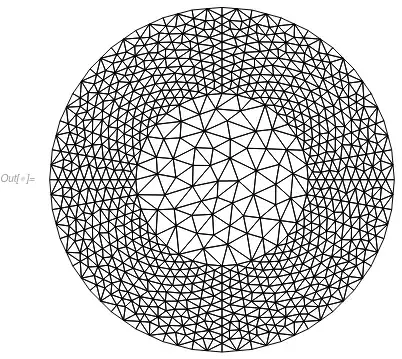
But you want this to happen:
ToElementMesh[mesh2D, "RegionHoles" -> {{0, 0}}]["Wireframe"]
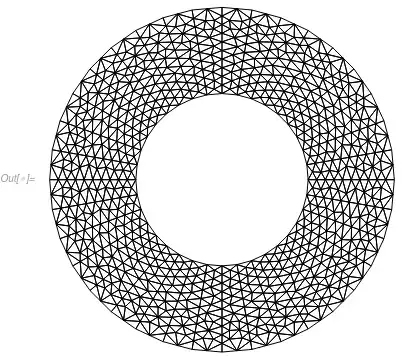
The reason NIntegrate converts quad and hex meshes to triangle and tet meshes is that the main mechanism for NIntegrate is to do adaptive refinement which is only available for triangle and tet meshes. So for a quad or hex meshes an additional cost of conversion comes into play because we want this to work and give good results:
Needs["MeshTools`"]
mesh2D = AnnulusMesh[{0, 0}, {1, 2}, {-Pi, Pi}, {36, 10}];
SetRegionHoles[mesh2D, {{0, 0}}];
nr = ToNumericalRegion[Annulus[{0, 0}, {1, 2}]];
SetNumericalRegionElementMesh[nr, mesh2D];
\[Pi] (2^2 - 1^1) - FEMNIntegrate[1, {x, y}, nr]
-6.6228668185175366`*^-6
Note, how the quality is much better than for the original annulus mesh. Probably the design of AnnulusMesh could be improved by allowing
AnnulusMesh[Annulus[{0,0},{1,2}],{-Pi,Pi},{36,10}]
Because then that same symbolic description used for the creation of an AnnulusMesh could be used to create the numerical region.


NIntegratethinksAnnulusis aDiskin this case. If you create mesh for only half on annulusAnnulusMesh[{0, 0}, {1,2}, {0,Pi}, {36,10}]then the value ofNIntegrateis ok. – Pinti Dec 03 '19 at 15:54