Here's a quick solution.
Note that it's only tested in Ubuntu - please test it in other operating systems and make any changes that are necessary.
First we define a sendNotification command and then show how to create a style of input cell that automatically calls it. Also included is a palette that will modify any cell to have the appropriate CellEpilog option.
sendNotification[txt_String, opts___] :=
 Module[{text = " \"" <> txt <> "\"", icon},
  icon = FileNameJoin[{$InstallationDirectory, "SystemFiles", "FrontEnd",
     "SystemResources", Switch[$OperatingSystem,
     "Unix", "X", "MacOSX", "OSX", "Windows", "Windows"], "Mathematica.png"}];
  Switch[$OperatingSystem,
   "Unix",
   Run["(" <> "notify-send" <> " -i " <> icon <> " Mathematica" <> text <> ")&"],
   "MacOSX",
   Run["(" <> "growlnotify" <> " -n \"Mathematica.app\"" <>
     " -a \"Mathematica\"" <> text <> ")&"],
   "Windows",
   Run["start /b " <> "growlnotify" <> " /s:true" <> " /p:2" <>
      " /i:" <> icon <> " /t:Mathematica" <> text]]]
The code assumes that:
Notify-send (which in Ubuntu plugs into NotifyOSD) does not play with the GNTP so it can not easily be used to interact with other systems and mobile devices. An alternative is to use Growl on Linux with gntp-send. In KDE there is also KNotify. For notify-send, another possible networking solution is this SO answer.
In Windows, you could also (maybe) use Snarl.
You can test the notifier using
sendNotification["test"]
You can create a modified Input style that automatically calls sendNotification after it has finished evaluating. Simply add the following style to your stylesheet
Cell[StyleData["InputNotify", StyleDefinitions -> StyleData["Input"]],
  CellEpilog :> sendNotification["Evaluation of line " <> ToString[$Line-1]
     <> " is complete"],
  MenuCommandKey -> "-",
  CellDingbat->"\[LightBulb]"]
Then you can insert a InputNotify cell by pressing Alt--
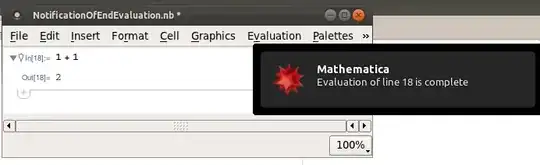
Alternatively, here's a palette that will modify a cell to have the appropriate CellEpilog. Run the code and then, if you want to keep the palette, you can install it via the palette menu.
CreatePalette[{
  Button["Make Cell Growl!", SelectionMove[InputNotebook[], All, Cell];
   With[{cell = NotebookSelection[InputNotebook[]]},
    SetOptions[cell, TaggingRules -> Options[cell, {CellDingbat, CellEpilog}],
     CellDingbat -> "\[LightBulb]",
     CellEpilog :> sendNotification["Evaluation of line "
                    <> ToString[$Line - 1] <> " is complete"]]]],
  Button["Stop Cell Growling", SelectionMove[InputNotebook[], All, Cell];
   With[{opts = TaggingRules /.
       Options[NotebookSelection[InputNotebook[]], TaggingRules]},
    SetOptions[NotebookSelection[InputNotebook[]],
     Sequence @@ opts, TaggingRules -> {}]]]},
 Saveable -> False, WindowTitle -> "Growl"]


InputNotifystyle with a CellEpilog that runs the notification code. Not sure how to make it cross platform and work on all mobile devices. Maybe just have it send you an email or tweet... – Simon Feb 22 '12 at 22:12EvaluationCompletionActionbut this currently only takes predetermined options rather than user code. – Mike Honeychurch Feb 22 '12 at 23:20EvaluationCompletionActionis so limited? – Simon Feb 23 '12 at 13:28