8

Suppose we have a long list of 3D Cartesian coordinates, defining a distribution of random points in 3D space. How could we remove all the points inside a sphere of radius sphereRadius located at coordinates sphereLocation = {X, Y, Z}?

This Boolean subtraction is probably trivial, but I didn't found any useful info on how to do it with Mathematica 7.0. Maybe it isn't trivial, after all.


Generalisation : How can we do the same with an arbitrary closed surface, instead of a sphere, if the hole is defined as a deformed sphere ?

holeLocation = {X, Y, Z};
hole[theta_, phi_] = holeLocation  + 
    radius[theta, phi] {Sin[theta]Cos[phi], Sin[theta]Sin[phi], Cos[theta]};

where theta and phi are the usual spherical coordinates.

J. M.'s missing motivation
  • 124,525
  • 11
  • 401
  • 574
Cham
  • 4,093
  • 21
  • 36
  • 1
    Have a look at Select or DeleteCases, EuclideanDistance or Norm... For instance, using these, here's a box of points with the points falling within a sphere of radius 1/Sqrt@2 and center (1,1,1) missing http://i.stack.imgur.com/Rkoc7.png – rm -rf Mar 20 '13 at 15:42
  • DeleteCases[points, p_ /; EuclideanDistance[p, {1, 2, 3}] < 10] – Szabolcs Mar 20 '13 at 15:43
  • What about the generalisation for a closed surface, with -Pi < theta < Pi and 0 < phi < 2 Pi ? – Cham Mar 20 '13 at 15:53
  • For speed,you can use my solution from here, which will be faster than using Norm or EuclideanDistance. – Leonid Shifrin Mar 20 '13 at 15:54

2 Answers2

14

Using my solution to a similar question asked on StackOverflow some time ago,

Pick[dalist,UnitStep[criticalRadius^2-Total[(Transpose[dalist]-frameCenter)^2]],0]

which is for any number of (Euclidean) dimensions and should be quite fast.

EDIT

Ok, here is a generalization of the vectorized approach I proposed:

ClearAll[cutHole];
cutHole[relativeData_, holdRadiusF_] :=
  Module[{r, theta, phi, x, y, z},
    {x, y, z} = Transpose[relativeData];
    r = Sqrt[Total[relativeData^2, {2}]];
    theta = ArcCos[z/r];
    phi = ArcTan[x,y];
    Pick[relativeData, UnitStep[r - holdRadiusF[theta, phi]], 1]];

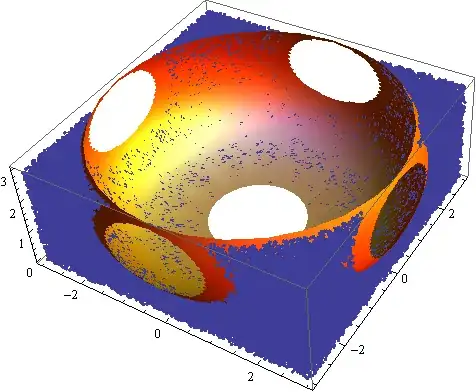
Here is an illustration:

data = RandomReal[6, {10^6, 3}];
holeLoc = {3, 3, 3};
relativeData = Transpose[ Transpose[data] - holeLoc];

Define some particular shape of the hole:

holeRad[theta_, phi_] := 1 + 4 Sqrt[Abs[Cos[theta]]]

Pick the points:

kept =cutHole[relativeData,holeRad];//AbsoluteTiming

(* {0.631836,Null}  *)

Visualize:

Show[{
  ListPointPlot3D[Cases[kept, {_, _, _?Positive}]], 
  SphericalPlot3D[
    holeRad[\[Theta], \[Phi]], {\[Theta], Pi/4, Pi/2}, {\[Phi], 0, 2 Pi}, 
    PlotStyle -> Directive[Orange, Specularity[White, 10]], Mesh -> None]}]

enter image description here

The main point here is that the filtering function is vectorized and therefore quite fast.

Leonid Shifrin
  • 114,335
  • 15
  • 329
  • 420
  • I'm impressed with speed of the generalization--a big +1. – whuber Mar 20 '13 at 17:39
  • 3
    A plot? In Leonid's answer? o_O – rm -rf Mar 20 '13 at 17:54
  • @rm-rf The fact that my habits changed in the last few years does not mean that I don't have the relevant experience. In fact, you'd be surprised :-). – Leonid Shifrin Mar 20 '13 at 18:02
  • @Leonid, your solution appears to work great on my system. A question : Can we make the hole fuzzy ? i.e. can it be a distribution ? – Cham Mar 20 '13 at 19:30
  • @Leonid : I mean a fuzzy ball, instead of a sharp sphere, for example. So the cut has smooth edges (fuzzy). – Cham Mar 20 '13 at 19:37
  • @Cham How do you define a notion to be inside or outside of such an object, for a given point? – Leonid Shifrin Mar 20 '13 at 19:43
  • @Leonid : Hmm, yep it's undefined. Ok forget about it. Anyway, your answer above is a complete solution to my question. One hundred thanks ! :-) – Cham Mar 20 '13 at 19:44
  • @LeonidShifrin I guess what the OP wants is that within some radial range, the probability of dropping the points goes from one to zero? – chris Mar 20 '13 at 21:04
  • @chris If you mean to allow points within some radial range to be kept or dropped probabilistically, then I can understand this, in such a formulation. – Leonid Shifrin Mar 20 '13 at 22:59
  • 1
    @whuber Thanks. The speedup comes from vectorization, to which functions such as Norm or EuclideanDistance are not directly amenable (Norm can be however compiled). I have been using similar constructs quite a bit in the past when dealing with similar problems. – Leonid Shifrin Mar 20 '13 at 23:02
  • 1
    I avoid Norm, etc., as well, for many reasons: but many of these functions are more expressive, which is advantageous when the coding is tricky or it is being used to convey ideas. I have been making programming mistakes for so very long that my habit has been first to write code that clearly works, and only then--if it does not work fast enough--modify it for speed. – whuber Mar 20 '13 at 23:17
  • @whuber Actually, I totally agree. Normally, I follow the practice you described. So, your answer really deserves to be accepted, not mine. – Leonid Shifrin Mar 21 '13 at 01:00
  • 1
    Shouldn't that be phi = ArcTan[x, y];? – J. M.'s missing motivation Apr 14 '13 at 14:34
9

Because the question refers to points using both Cartesian coordinates $(x,y,z)$ and spherical coordinates $(\theta, \phi)$, we need to convert between them:

spherical[{x_, y_, z_}] := {ArcTan[z, Norm[{x, y}]], ArcTan[x, y]};

A point p is inside the "hole" when its distance from the origin (computed with Norm) is less than the value given by the function radius. For flexibility, I have included an optional argument threshold that multiplies the value of radius:

inside[p_, origin_, radius_, threshold_: 1] :=  
  threshold radius @ spherical @ (p - origin) >= Norm[p - origin];

Use this to Select the points inside the hole (or, by negating inside, to exclude them):

pointsInside = Select[points, inside[#, origin = {0, 0, 0}, radius] &];

(I have chosen an origin of {0,0,0} for this example to make it easy to plot the hole using SphericalPlot3D.)


Example

Let's define a hole to illustrate:

radius[{\[Theta]_, \[Phi]_}] := (1 + Cos[\[Theta]]^2) (1 + Sin[ \[Phi]]^2);

We will need some points:

points = RandomReal[NormalDistribution[0, 1], {3000, 3}];

For the illustration, let's plot all those points, distinguishing those inside the hole from those outside it:

pointPlot = Graphics3D[{Opacity[0.3], Gray, Point @ points, 
  PointSize[0.01], Red, Opacity[0.5], Point @ pointsInside, 
  Black, Opacity[1], Point @ origin}];

Here is the hole's boundary for reference:

hole = SphericalPlot3D[radius[{\[Theta], \[Phi]}], {\[Theta], 0, \[Pi]}, {\[Phi], 0, 2 \[Pi]},
 PlotStyle -> Opacity[0.25], Mesh -> None]

Put them together:

Show[pointPlot, hole]

Figure

whuber
  • 20,544
  • 2
  • 59
  • 111
  • Why the threshold parameter ? – Cham Mar 20 '13 at 19:01
  • So you can vary the size of the hole while fixing its basic shape: it gives you an easy way to create a succession of layers of points, like rings of an onion, without having to change the definition of radius. – whuber Mar 20 '13 at 19:38
  • Aah ! Yes, good point ! Thanks. – Cham Mar 20 '13 at 19:46