~ 6 years ago, I wrote a little routine for gnomonically projecting a spherical texture onto a polyhedron:
(* Newell's algorithm for face normals *)
newellNormals[pts_List?MatrixQ] := With[{tp = Transpose[pts]},
      Normalize[MapThread[Dot, {ListConvolve[{{-1, 1}}, tp, {{2, -1}, {2, -1}}],
                                ListConvolve[{{1, 1}}, tp, {{-2, -1}, {-2, -1}}]}]]]

(* https://mathematica.stackexchange.com/a/167114 *)
    vectorRotate[vv1_?VectorQ, vv2_?VectorQ] :=
     Module[{v1 = Normalize[vv1], v2 = Normalize[vv2], c, d, d1, d2, t1, t2},
            d = v1.v2;
            If[TrueQ[Chop[1 + d] == 0],
               c = UnitVector[3, First[Ordering[Abs[v1], 1]]];
               t1 = c - v1; t2 = c - v2; d1 = t1.t1; d2 = t2.t2;
               IdentityMatrix[3] - 2 (Outer[Times, t2, t2]/d2 -
               2 t2.t1 Outer[Times, t2, t1]/(d2 d1) + Outer[Times, t1, t1]/d1),
               c = Cross[v1, v2];
               d IdentityMatrix[3] + Outer[Times, c, c]/(1 + d) - LeviCivitaTensor[3].c]]

Options[polyhedronProjection] = {Padding -> 1., Resampling -> Automatic};
polyhedronProjection[Polygon[pts_?MatrixQ], img_Image, opts : OptionsPattern[]] :=
    Module[{eps = 0.05, h, ptp, tex, trf, tri},
           tri = AffineTransform[{vectorRotate[{0, 0, 1}, newellNormals[pts]],
                                  Mean[pts]}];
           trf = InverseFunction[tri];
           ptp = Drop[trf /@ pts, None, -1]; h = Max[Abs[ptp]];
           tex = ImageTransformation[img,
                                     If[Graphics`PolygonUtils`InPolygonQ[(1 + eps) ptp, #],
                                        Function[{x, y, z},
                                                 {Arg[x + I y], ArcSin[z] + π/2}] @@
                                        Normalize[tri[Append[#, 0.]]], -{4, 1}] &,
                                     AspectRatio -> Automatic,
                                     DataRange -> {{-π, π}, {0, π}},
                                     PlotRange -> {{-h, h}, {-h, h}},
                                     Sequence @@ FilterRules[{opts} ~Join~
                                                          Options[polyhedronProjection],
                                                          Options[ImageTransformation]]];
           {Texture[tex],
            Polygon[pts, VertexTextureCoordinates -> Rescale[ptp, {-h, h}]]}]
Using, for instance, the ETOPO1 global relief,
etopo1 = Import["http://www.ngdc.noaa.gov/mgg/image/color_etopo1_ice_low.jpg"];
we can do the following:
ico = First @ Normal[MapAt[ScalingTransform[{1, 1, 1}/
                                            PolyhedronData["Icosahedron", "Circumradius"]],
                           N[PolyhedronData["Icosahedron", "GraphicsComplex"]], 1]];

Graphics3D[{EdgeForm[], polyhedronProjection[#, etopo1] & /@ ico},
           Boxed -> False, Lighting -> "Neutral"]

The method works for any polyhedron that can be inscribed in a unit sphere. For example, one of my previous Gravatars was based on "TruncatedIcosahedron":
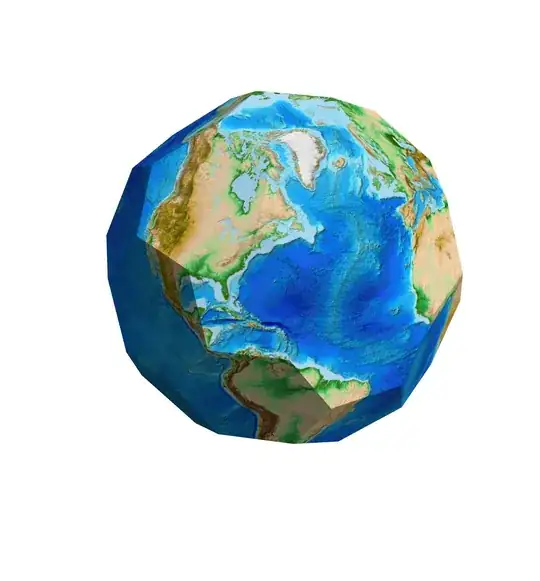
See this reference as well.
However, I have not been successful in modifying this method so that it can be used on the result of PolyhedronData["Icosahedron", "Net"]; I'd be interested in seeing someone else do so.
Additionally, there are other possible projections of a sphere onto a polyhedron. Snyder devised an equal-area map projection, while Lee gives a conformal projection onto the dodecahedron, which can be mapped onto an icosahedron as well by virtue of duality. I'll leave all those for someone else to do.


