8

I am familiar with Mathematica to a certain extent, but its subtleties still elude me.

Currently I am trying to solve the following problem:
The function $f(x,y)$ is continuous. I know how to create a contourplot of it. I also have a list of points {{x,y}, ...} which I would like to insert into my contour plot.

Background:
I am working on some genetic algorithms and would like to visualize how the population converges to the global optimum. This is why I would like to show the population (or at least the best candidate of each generation) in the contour plot.

How could this be done?

rm -rf
  • 88,781
  • 21
  • 293
  • 472
Probabilitnator
  • 285
  • 1
  • 3
  • 9
  • 2
    A contour plot is 2D. How do you want to include 3D points in it? – Dr. belisarius Mar 29 '13 at 11:26
  • contour plot projects onto the x-y plane the levels of a function in two variables. It is 2D as opposed to your triples. You could project them too using ListContourPlot or use a the contour plot as a texture for the x-y plane (see related) – gpap Mar 29 '13 at 11:31
  • i did not mean to use 3D data - my question was perhaps somewhat confusion. Just wanted to plot the population - only (x,y) values. I will adjust the phrasing accordingly – Probabilitnator Mar 29 '13 at 11:56

2 Answers2

12

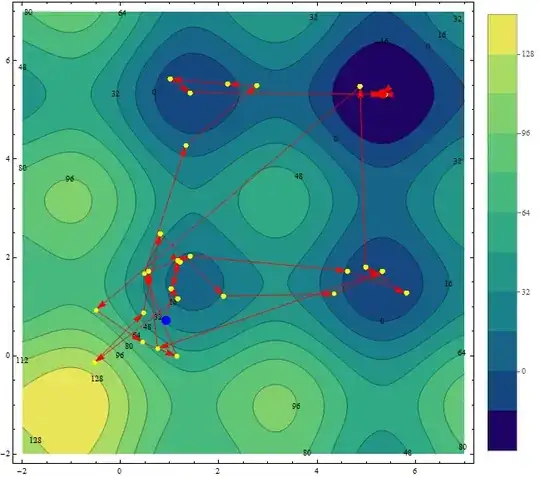
I guess one should use the following plot to visualize convergence. For optimization consider this example, and collect the points during NMinimize evaluation.

Clear[f]
f[x_, y_] := 20 Sin[\[Pi]/2 (x - 2 \[Pi])] +
20 Sin[\[Pi]/2 (y - 2 \[Pi])] + (x - 2 \[Pi])^2 + (y - 2 \[Pi])^2;
pts = Reap[sol = NMinimize[f[x, y], {x, y}, 
  Method -> {"SimulatedAnnealing", "PerturbationScale" -> 3, 
    "BoltzmannExponent" -> 
     Function[{i, df, f0}, -df/(Exp[i/10])]}, 
  StepMonitor :> (Sow[{x, y}])];];

Let's visualize it. Here blue is the starting point and red is the global optimum.

ContourPlot[f[x, y], {x, -2, 7}, {y, -2, 7}, Contours -> 10, 
ColorFunction -> "BlueGreenYellow", PlotLegends -> Automatic, 
Epilog -> ({Red, PointSize[.01], Arrowheads[0.025], 
Arrow /@ Partition[pts[[2, 1]], 2, 1], Yellow, 
Point /@ pts[[2, 1]], Blue, PointSize[.02], Point[pts[[2, 1, 1]]],
 Red, PointSize[.02], Point[{x, y} /. sol[[2]]]}),ContourLabels -> True]

enter image description here

Note:

For plotting 3D points on a 2D surface, check out this wonderful post by Rahul Narain.

BR

PlatoManiac
  • 14,723
  • 2
  • 42
  • 74
2

Since presumably f[x,y] is the same for the GA result as the contour plot, you can display the points at which your GA has been evaluated on the contour plot in this way:

gaPoints= Tuples[Range@12, 2];
f[{x_, y_}] := {Sin@x, Cos@y}

g1 = ListPlot[gaPoints];
g2 = ContourPlot[f[{x, y}], {x, 0, 4 Pi}, {y, 0, 4 Pi}];

And plot the two graphs as:

Show[g2, g1]

Mathematica graphics

image_doctor
  • 10,234
  • 23
  • 40