9

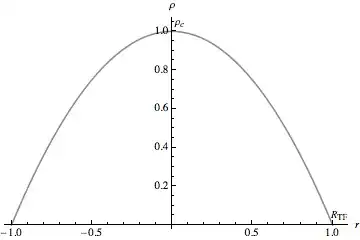
I'm a newbie at Mathematica and I couldn't find how to label the maximum and the zero of a simple function in Plot with their names:

rho[r_] = 1 - r^2;
Plot[rho[r], {r, -1, 1}, AxesLabel -> {r, \[Rho]}] 

and i want to show the maximum on the plot with

Subscript[\[Rho], c]

and the point rho[1] with

Subscript[R, TF]
Verbeia
  • 34,233
  • 9
  • 109
  • 224
cherzieandkressy
  • 339
  • 1
  • 2
  • 8

3 Answers3

7

How about:

 rho[r_] = 1 - r^2;
 pl = Plot[rho[r], {r, -1, 1}, AxesLabel -> {r, \[Rho]}];

then

Show[{pl, Graphics[Text[Subscript[\[Rho], c], {0.05, 1.05}]],
Graphics[Text[Subscript[R, TF], {1.05, 0.05}]]}, PlotRange -> All]

Mathematica graphics

chris
  • 22,860
  • 5
  • 60
  • 149
7

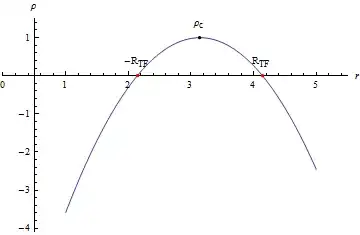
You can put Text and Point on a plot with Epilog.

Plot[rho[r - Pi], {r, 1, 5},
 AxesLabel -> {r, \[Rho]},
 Epilog -> {
   PointSize[.01], Red, Point[zero],
   Black, Point[max], Map[Text[#[[1]], #[[2]], {0, -2}] &,
    Transpose[{{-Subscript["R", "TF"],
       Subscript["R", "TF"], Subscript["\[Rho]", "c"]},
      Join[zero, {max}]}]]},
 PlotRange -> All,
 PlotRangePadding -> .5]

plot

Calculated maximum and zeroes:

max = {r /. Last@#, First@#} &[FindMaximum[rho[r - Pi], r]]
{3.14159, 1.}

zero = {r, 0} /. NSolve[rho[r - Pi] == 0, r]
{{2.14159, 0}, {4.14159, 0}}
BoLe
  • 5,819
  • 15
  • 33
6

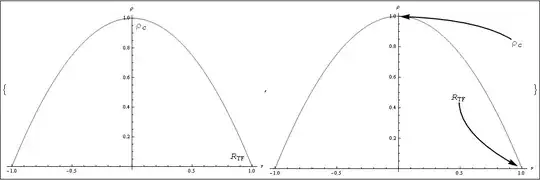
Using my answer to this question, you can generate any of the following interactively:

Mathematica graphics

The only change needed is to remove the "String" in

InputField[Dynamic[lbl1[[#]]],String]

and

InputField[Dynamic[lbl2[[#]]],String]

to be able to type expressions.

The interactive interface looks like this:

Mathematica graphics

Dr. belisarius
  • 115,881
  • 13
  • 203
  • 453