2

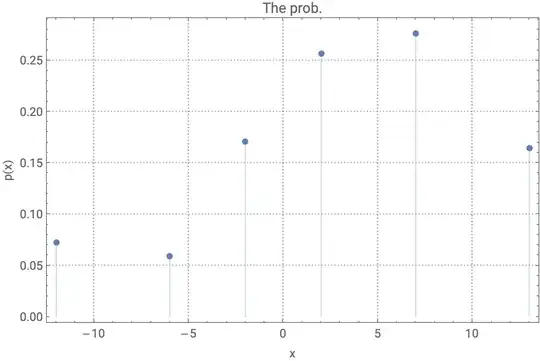
I would like to draw a list plot with the Y-axis from from 0.00 to 0.40 (rounded to two decimal points). However, it turned out to be that the numbers on the Y-axis have too many numbers after the decimal point. Could you please help me with the issue?

enter image description here

ListPlot[
  {{-12, .072368}, {-6, .059211}, {-2, 0.1710532}, {2, .2565797}, 
   {7, .27631613}, {13, .164474}}, 
  Filling -> Axis, PlotRange -> All, PlotTheme -> "Detailed", 
  ImageSize -> 500, PlotLabel -> "The prob.", 
  FrameLabel -> {"x", "p(x)"}, 
  LabelStyle -> {FontFamily -> "Roboto", FontSize -> 11}]
m_goldberg
  • 107,779
  • 16
  • 103
  • 257
  • 7
    Without the code that generated the plot, it will be very difficult to tell what went wrong and how to fix it – Lukas Lang Sep 16 '20 at 21:22
  • 2
    Try to use the option: FrameTicks -> {{{0, 0.1, 0.2, 0.3, 0.4}, None}, {Automatic, None}}. As a variant giving a bit more control try this: FrameTicks -> {{{{0, "0.0"}, {0.1, "0.1"}, {0.2, "0.2"}, {0.3, "0.3"}, {0.4, "0.4"}}, None}, {Automatic, None}} . – Alexei Boulbitch Sep 17 '20 at 07:46
  • Thank you! I would update the results and codes here. – ZHONGLI WANG Sep 17 '20 at 12:36
  • Original Codes: ListPlot[{{-12, .072368}, {-6, .059211}, {-2, 0.1710532}, {2, .2565797}, {7, .27631613}, {13, .164474}}, Filling -> Axis, PlotRange -> All, PlotTheme -> "Detailed", ImageSize -> 500, PlotLabel -> "The prob.", FrameLabel -> {"x", "p(x)" }, LabelStyle -> {FontFamily -> "Roboto", FontSize -> 11}] – ZHONGLI WANG Sep 17 '20 at 12:37
  • The graph looks well according to Alexei's suggestion (after we apply "FrameTicks"). – ZHONGLI WANG Sep 17 '20 at 12:38
  • 2
    I do not reproduce the issue: https://imgur.com/a/TZPq6Rn – corey979 Sep 17 '20 at 16:51
  • 1
    Try SetOptions[$FrontEndSession, PrintPrecision -> 6] and rerun your code. – Michael E2 Sep 20 '20 at 15:24
  • Possibly related: https://mathematica.stackexchange.com/q/143937/4999, https://mathematica.stackexchange.com/a/3752/4999 – Michael E2 Sep 20 '20 at 17:05

2 Answers2

2

ListPlot from 0 to 0.40 with FrameTicks to the second decimal

ListPlot[{{-12, .072368}, {-6, .059211}, {-2, 
   0.1710532}, {2, .2565797}, {7, .27631613}, {13, .164474}}, 
 Filling -> Axis, PlotRange -> {All, {0, 0.4}}, 
 PlotTheme -> "Detailed", ImageSize -> 500, PlotLabel -> "The prob.", 
 Frame -> True, FrameLabel -> {"x", "p(x)"}, 
 LabelStyle -> {FontFamily -> "Roboto", FontSize -> 11}, 
 FrameTicks -> {{{0, N[1/10, 2], N[2/10, 2], N[3/10, 2], N[4/10, 2]}, 
    None}, {Automatic, None}}]

ListPlot from 0 to 0.40 with FrameTicks to the second decimal

Steffen Jaeschke
  • 4,088
  • 7
  • 20
2

OP's code, unaltered (V12.1.1, Mac), same as @corey979:

ListPlot[{{-12, .072368}, {-6, .059211}, {-2, 
   0.1710532}, {2, .2565797}, {7, .27631613}, {13, .164474}}, 
 Filling -> Axis, PlotRange -> All, PlotTheme -> "Detailed", 
 ImageSize -> 500, PlotLabel -> "The prob.", 
 FrameLabel -> {"x", "p(x)"}, 
 LabelStyle -> {FontFamily -> "Roboto", FontSize -> 11}]

The solutions in the other comments and answer(s) seem unnecessary.


Perhaps the problem is with PrintPrecision: Set

SetOptions[$FrontEndSession, PrintPrecision -> 19]

Then the above produces this:

If that's the problem the option can be reset (the normal value is 6), or one can apply Style to the above ListPlot:

Style[ListPlot[...], PrintPrecision -> 6]
Michael E2
  • 235,386
  • 17
  • 334
  • 747