How can I map a triangle on a sphere? I want to visualize (plot or animate) it for my student in Non-Euclidean geometry. I have no restrictions on the triangle's kind or on the sphere in $\mathbb R^3$. Thanks for any hint.
Asked
Active
Viewed 1,962 times
7

-
That is not really compliant with how this site usually works. Is is considered bad style to simply ask for code without at least showing a minimum of prior research. Please look at the FAQ. – Yves Klett Apr 10 '13 at 09:00
-
2I don't think this question deserves to be closed. No one is required to answer a "code request" question like this. Such as question, apart from a history of similar questions, does not warrant closure. Also, there are several votes on this question for "off topic" yet I believe it has been made clear from the comments and the Accept that this is in fact intended for Mathematica. – Mr.Wizard Apr 10 '13 at 14:18
-
Shouldn't you at least specify what kind of mapping you want? I won't close it as per @mr.wizard's request, but I was very much tempted to do so. The question doesn't seem to be directly related to Mathematica and requires quite a bit of interpretative effort of the people here. Could have been much better. – Sjoerd C. de Vries Apr 10 '13 at 15:36
-
3Seen this? – J. M.'s missing motivation Apr 10 '13 at 08:44
-
@YvesKlett: In fact, I wanted to be informed about the codes. Thanks J.M. – Mikasa Apr 10 '13 at 08:57
-
2@Mr.Wizard: Thanks for your comment. To be honest, I didn't post a question here to get +1 or -1. I know what to do it via Maple because I made a similar but not animate small program in that area, but to know that in another environment was my willing. :-) – Mikasa Apr 10 '13 at 14:23
-
@SjoerdC.deVries: I wanted to teach to my students that we can map on surface of an sphere to know the non Euclidean geometry better. So, I made a Maple small program which is just a plot not an animation. That's why I asked it here. All Mr. Wizard did is what I was looking for. That is a good idea lighting my teaching style. Thanks for your consideration. I apologize if I brought up my question inappropriately. – Mikasa Apr 10 '13 at 15:42
-
2@Mr.Wizard after the answer, comments etc. the migration to math.se does not make sense (even if I voted to migrate to begin with)... is there a way to undo this? – Yves Klett Apr 10 '13 at 16:53
-
@Mr.Wizard: Sorry for all troubles I have made for you. I prefer it to be here. I think, it'll be so useful for my friends here. Thanks ;-) – Mikasa Apr 11 '13 at 07:15
-
1@Babak holy heck-- well, it's back on Mathematica now and I think it's going to stay. Sorry. We just had a kerfuffle reversing the migration and I don't want to start another one. – Mr.Wizard Apr 11 '13 at 13:14
-
@Mr.Wizard: It is yours now, dear friend. Ok. I understand. :-) – Mikasa Apr 11 '13 at 13:19
2 Answers
10
In the comments J. M. linked to a Demonstration by Borut Levart.
Here is code from that, with my own refactoring:
eps = 10^-6;

(* from spherical to cartesian coordinates *)
sp[{ϕ_, θ_}] := {Sin[θ]*Cos[ϕ], Sin[θ]*Sin[ϕ], Cos[θ]}

(* part of great circle between two sphere points *)
ark[{r1_, r2_}, nt_] := Table[
  RotationTransform[t VectorAngle[r1, r2],
    Cross[r1, r2]][r1], {t, 0, 1, 1/nt}]

Manipulate[
 If[p1 == p2, p1 = .99 p2];
 If[p1 == p3, p1 = .99 p3];
 If[p3 == p2, p3 = .98 p2];
 Graphics3D[{
   {Red, Opacity[.6], Sphere[{0, 0, 0}, .995]},
   ark[#, 20] & /@ Subsets[sp /@ {p1, p2, p3}, {2}] // Line,
   PointSize[.015], Point[sp /@ {p1, p2, p3}]
  },
  Boxed -> False,
  ImageSize -> {400, 400},
  FaceGrids -> {{0, 0, -1}},
  FaceGridsStyle -> GrayLevel[.5]
 ],
 {{p1, {4.2, .5}, "point one"}, {eps, π (1 - eps)}, {2 π (1 - eps), eps}},
 {{p2, {.1, 1.1}, "point two"}, {eps, π (1 - eps)}, {2 π (1 - eps), eps}},
 {{p3, {5.1, 1.8}, "point three"}, {eps, π (1 - eps)}, {2 π (1 - eps), eps}},
 ControlPlacement -> Left, SaveDefinitions -> True
]
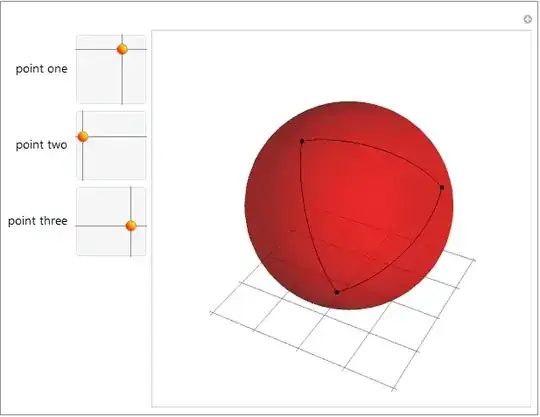


-
-
1
-
1
-
As it's a simple transform it's not really appropriate, but do you know
CoordinateTransform(further to the deprecated Vector Analysis package) exists as of 9? – Charlotte Hadley Apr 13 '13 at 23:19 -
@Martin, Wizard here is still on version seven, if memory serves... – J. M.'s missing motivation Apr 14 '13 at 17:58
-
6
I might as well... let me present here the spherical geometry version of this answer. I shall provide two flavors in this answer as well: one where all the arc lengths are given, and one where all the interior angles are given. The formulae used within those routines are nothing more than an application of the spherical law of cosines.
Now, on to the routines. But first, a few auxiliaries:
sphericalDistance[{u1_, v1_}, {u2_, v2_}] :=
                  InverseHaversine[Haversine[v1 - v2] + Sin[v1] Sin[v2] Haversine[u1 - u2]]

GreatCircleArc[p1_, p2_] := Module[{cc, sp1, sp2},
       cc = Cos[sphericalDistance[p1, p2]/2];
       {sp1, sp2} = Append[Sin[#2] Through[{Cos, Sin}[#1]], Cos[#2]] & @@@ {p1, p2};
       BSplineCurve[{sp1, Normalize[(sp1 + sp2)/2]/cc, sp2}, SplineDegree -> 2,
                    SplineKnots -> {0, 0, 0, 1, 1, 1}, SplineWeights -> {1, cc, 1}]]
Here, then, is the routine for drawing a spherical triangle on a unit sphere, given the (normalized) side lengths:
With[{a = π/5, b = π/4, c = π/3},
     Block[{β = N[ArcCos[(Cos[b] - Cos[a] Cos[c])/(Sin[a] Sin[c])]]},
      Graphics3D[{{Opacity[1/2], Sphere[]},
                  {Directive[Red, AbsolutePointSize[6]],
                   Point[{{0, 0, 1}, {Sin[c], 0, Cos[c]},
                          {Sin[a] Cos[β], -Sin[a] Sin[β], Cos[a]}}]},
                  {Directive[Blue, AbsoluteThickness[3]],
                   GreatCircleArc @@@ Partition[{{0, 0}, {0, c}, {-β, a}}, 2, 1, 1]}},
                 PlotRange -> ConstantArray[{-1, 1}, 3]]]]
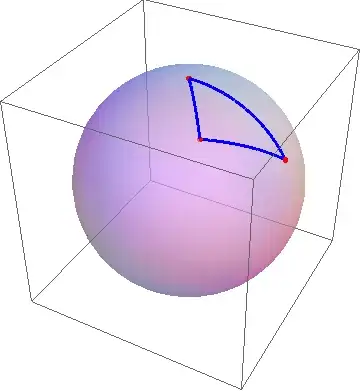
Here's the routine for drawing a spherical triangle on the unit sphere, given the interior angles:
With[{α = π/4, β = π/3, γ = π/2},
 Block[{a, c},
  {a, c} = N[ArcCos[{(Cos[α] + Cos[β] Cos[γ])/(Sin[β] Sin[γ]),
                      (Cos[γ] + Cos[α] Cos[β])/(Sin[α] Sin[β])}]];
  Graphics3D[{{Opacity[1/2], Sphere[]},
              {Directive[Red, AbsolutePointSize[6]],
               Point[{{0, 0, 1}, {Sin[c], 0, Cos[c]},
                      {Sin[a] Cos[β], -Sin[a] Sin[β], Cos[a]}}]},
              {Directive[Blue, AbsoluteThickness[3]],
               GreatCircleArc @@@ Partition[{{0, 0}, {0, c}, {-β, a}}, 2, 1, 1]}},
             PlotRange -> ConstantArray[{-1, 1}, 3]]]]

I made the normalization that one of the vertices is always $(\theta,\varphi)=(0,0)$; if you want your triangles to be positioned somewhere else, modifying the routines should not be too difficult.

J. M.'s missing motivation
- 124,525
- 11
- 401
- 574