10

I have to provide data exports from Mathematica to CSV format and it is very slow compared to other formats as can be seen in the following table:

  • JSON, 15 sec, 8.4 MB
  • TXT, 23 sec, 5.6 MB
  • XLSX, 37 sec, 3.0 MB
  • CSV, 704 sec, 4.4 MB

Can somebody give me a hint on how to speed this up? Or an explanation why it is so slow?

Sjoerd C. de Vries
  • 65,815
  • 14
  • 188
  • 323
Patrick Bernhard
  • 707
  • 5
  • 12

2 Answers2

12

Intermediate ExportString makes "CSV" exports much faster

I actually can reproduce this extraordinary slow CSV export on my two systems, on a "9.0 for Microsoft Windows (32-bit) (January 24, 2013)" even when I work locally (see below), and on a "9.0 for Mac OS X x86 (64-bit) (January 24, 2013)" when I work over a network share (not shown here):

t = RandomReal[{0, 1000}, {4000, 80}];

Export[FileNameJoin[{$TemporaryDirectory, "Matrix.CSV"}], t, "CSV"]

This may take eons. Let's see how long it takes:

{FileExtension@#, First@AbsoluteTiming[Export[#, t, FileExtension@#]],
     FileByteCount@#} & /@ {FileNameJoin[{$TemporaryDirectory, 
     "Matrix.CSV"}]} // Grid

CSV 159.78120 5815838

To me, this amazingly long time seems to be caused by laborious interactions with the file system, in particular I suspect every line of the CSV is being sent separately. That is why I propose a work around, where firstly all data is "CSV"ed using ExportString and secondly is exported using the simple "Table" formatting, which seems to work en bloc:

Export[FileNameJoin[{$TemporaryDirectory, "Matrix.CSV"}],  ExportString[t, "CSV"], "Table"]

This appears to work much faster, let's see how long it takes this time:

{FileExtension@#, 
    First@AbsoluteTiming[
      Export[#, ExportString[t, FileExtension@#], "Table"]], 
    FileByteCount@#} & /@ {FileNameJoin[{$TemporaryDirectory, 
     "Matrix.CSV"}]} // Grid

CSV 10.234375 5815838

About 16 times faster. Enjoy!

Edit

I made the same test on an ancient "7.0 for Mac OS X PowerPC (32-bit) (February 19, 2009)", interestingly here the direct "CSV" Export (to $TemporaryDirectory) is approx. 10% faster than my work around. Hmm. In contrary, on the abovementioned "9.0 for Mac OS X x86 (64-bit) (January 24, 2013)" system it is 30% faster. But for network shares my work around anyway is highly recommended for comma separated value exports!

UDB
  • 1,835
  • 21
  • 14
3

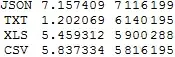
I can't reproduce this on my system (Win7-64, MMA v9):

t = RandomReal[{0, 1000}, {4000, 80}];

(
    fn = FileNameJoin[{$TemporaryDirectory, "Matrix." <> #}];
    {#, AbsoluteTiming[Export[fn, t];] // First, FileByteCount@fn}
) & /@ {"JSON", "TXT", "XLS", "CSV"} //Grid

enter image description here

(Note that I used "XLS" instead of "XLSX" as Export didn't seem to work for this matrix size)

Sjoerd C. de Vries
  • 65,815
  • 14
  • 188
  • 323
  • In[54]:= matrix = ToString[#] & /@ RandomReal[1, {1000, 100}];

    AbsoluteTiming[ Export["C:\Users\Patrick\Desktop\export.json", matrix]][[1]]

    Out[77]= 0.733201

    AbsoluteTiming[ Export["C:\Users\Patrick\Desktop\export.txt", matrix]][[1]]

    Out[78]= 0.124800

    AbsoluteTiming[ Export["C:\Users\Patrick\Desktop\export.xlsx", matrix]][[1]]

    Out[79]= 0.410001

    AbsoluteTiming[ Export["C:\Users\Patrick\Desktop\export.csv", matrix]][[1]]

    Out[81]= 0.124800

    – Patrick Bernhard Apr 11 '13 at 07:11
  • Thanks for your comment. With random data I cannot reproduce the results. The original data is from a company so I cannot post it. The datasets are 10000x30 matrixes with strings and dates and numbers. But then I understand that this is not a common problem for many people and this is already helpful. Thanks again and regards from Berlin! – Patrick Bernhard Apr 11 '13 at 07:19
  • @PatrickBernhard Perhaps if you provide the type of field per column we can mimic your data more accurate. Would 10 columns for each type (strings, dates and number) do? – Sjoerd C. de Vries Apr 11 '13 at 08:37
  • @PatrickBernhard The problem may lie in the representation of your date fields. What kind of format do you use? – Sjoerd C. de Vries Apr 11 '13 at 22:11
  • 1
    @Sjoerd C. de Vries: For large size "XLSX" Export you need to enlarge the JVM maximum memory, which is preset to 512M doing something like this: Needs["JLink"];ReinstallJava[CommandLine -> "java", JVMArguments -> "-Xmx1024m"];` – UDB Nov 01 '13 at 16:21