I know you can import sounds/images from the Mathematica library, but I was wondering if I could import sounds I have on my computer (i.e. .wav files)? I've tried using the Import functon and properly named the file, but it says it can't be found. Thank you for any assistance anyone can provide!
Asked
Active
Viewed 551 times
0

-
Did you provide the full path to your file? – J. M.'s missing motivation Apr 21 '13 at 06:57
-
1It is possible to import .wav files. Take a look at http://reference.wolfram.com/mathematica/ref/format/WAV.html – Rod Apr 21 '13 at 07:05
1 Answers
2
Make sure you're telling Mathematica to look the right place:
SetDirectory["/Users/me/Desktop/sound-files"]
/Users/me/Desktop/sound-files
List the files:
FileNames["*.wav"]
{"asteroidexplode.wav", "fire.wav", "rule30.wav", "shipexplode.wav", "thrust.wav"}
Then import a file:
fire = Import["fire.wav"]
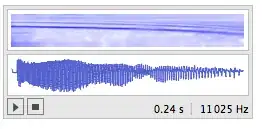
Now you can refer to the answers that @Yves pointed to in the comments.


cormullion
- 24,243
- 4
- 64
- 133