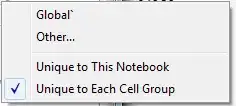
So in my search to fine tune Mathematica to what works for me, I found a nice setting that helps separate variable declaration between notebooks. Under Global Preferences, searching for CellContext and changing from "Global'*" to Notebook does this. Sweet, but now I am having trouble clearing all the variables. ClearAll["Global`*"] no longer works, and so I figured, since that's the setting I changed, maybe it would now be ClearAll[Notebook]. However, this doesn't work either and warns that Notebook is protected.
Maybe there is a better method of operation instead of the path I'm attempting to go down. I use Mathematica to do all of my Physics homework in; between each problem I usually do a ClearAll so I'm not contaminating possible variables between problems with wrong values.