2

I'm getting strange spikes in my surface S with the code below. PlotPoints seems to help, but it doesn't solve the problem. Any explanation and solution would be much appreciated.

a := {x, y, 1 - x}
b := {x, y, x}
S := Inner[Times, 
  Transpose[Inner[Times, {1 - x, x}, {{a /. {x -> 0, y -> 0}, b /. {x -> 0, y -> 1}},
     {a /. {x -> 1, y -> 0}, b /. {x -> 1, y -> 1}}}, Plus]], {1 - y, y}, Plus]
ParametricPlot3D[S, {x, 0, 1}, {y, 0, 1}]
ParametricPlot3D[S, {x, 0, 1}, {y, 0, 1}, PlotPoints -> 100]
Expand[S]
ParametricPlot3D[{x, y, 1 - x - y + 2 x y}, {x, 0, 1}, {y, 0, 1}]

EDIT: It seems that y -> is somehow responsible.
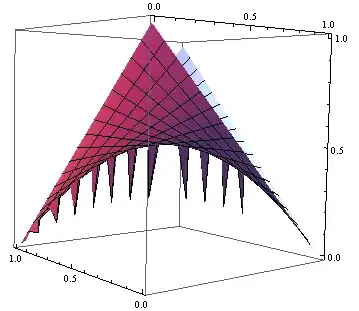
enter image description here enter image description here enter image description here

u17
  • 601
  • 3
  • 8
  • I can't see your spikes with Mma 9.0 WinXP – Dr. belisarius Apr 25 '13 at 18:24
  • 1
    I can see them (9.0.1 on Mac) – Michael E2 Apr 25 '13 at 18:26
  • Thanks for checking. I'm on Win8 with MMA 9.0.1. I briefely edited out the y -> 0 here because I thought it was redundant for my MWE. Now it's back in. It does matter in full code. Without y ->, I also don't get spikes. Strange. – u17 Apr 25 '13 at 18:32
  • I can see spikes on Vista (Mathematica 9.0). Conclusions: Expand helps ? A related problem where Expand had helped in version 8.0 : http://mathematica.stackexchange.com/questions/3568/bug-in-integrate-for-mathematica/3571#3571. However that bug has been fixed in ver. 9.0. – Artes Apr 25 '13 at 18:38
  • @Frank Same here – Dr. belisarius Apr 25 '13 at 18:41
  • I can see them on 9.0.1 win7. – Silvia Apr 25 '13 at 18:43

1 Answers1

5

The reason for the strange behavior is the "strange" definition of S. Compare:

Block[{x, y},
 x = 0.6; y = 0.4;
 S]
  (* {0.6, 0.4, 0.24} *)

S /. {x -> 0.6, y -> 0.4}
  (* {0.6, 0.4, 0.48} *)

Plot does something like the first one. What happens is that every x is replaced by 0.6 and every y is replaced by 0.4. So a = {x, 0, 1 - x} becomes {0.6, 0, 0.4}, and the rules {x -> 0, y -> 0} become {0.6 -> 0, 0.4 -> 0}. When applied to a, we get {0, 0, 0} instead of {0, 0 1}.

The following is a possible workaround:

ParametricPlot3D[Evaluate @ S, {x, 0, 1}, {y, 0, 1}]

[Edit: Forgot to put the Evaluate in.]

Michael E2
  • 235,386
  • 17
  • 334
  • 747