5

Running this code:

Histogram[{RandomVariate[NormalDistribution[1/4,0.12],100],
 RandomVariate[NormalDistribution[3/4, 0.12], 100]}, 
 Automatic, "Probability", PlotRange -> {{0, 1}, {0, 1}},
 Frame -> True, PlotRangeClipping -> True,
 FrameLabel -> {Style["x axis", 15], Style["probability", 15]}
]

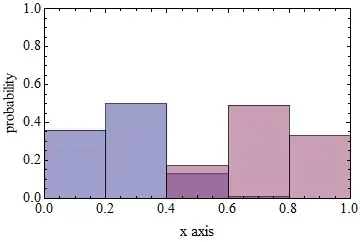
Gives me the following plot:

enter image description here

As you can see, the label on the right ("probability") is not printed correctly. The character "y" is missing. What's going on here?

I am using Mathematica 9.0.0.0. I ran this on two laptops, one with Windows 7 and the other with Windows 8.

Update: Judging by the comments, this seems to be a bug. So now the question becomes: Is there a workaround?

Update: This seems to be bug, so I'll tag as such. In the meantime, see the answers for workarounds.

a06e
  • 11,327
  • 4
  • 48
  • 108

4 Answers4

4

This seems to be related to, or a manifestation of:
Poor anti-aliasing in Rotated text with ClearType on

On my system Simon's workaround is successful.
Using Style["probability", 15, FontOpacity -> 0.999]:

enter image description here

Mr.Wizard
  • 271,378
  • 34
  • 587
  • 1,371
2

This issue happened for me in 9.0.1 and also some earlier versions.

My crude yet working workaround is adding some spaces after y to force it been displayed entirely, meanwhile also add corresponding spaces before p to keep the word being centrally aligned.

Hope this helps.

Silvia
  • 27,556
  • 3
  • 84
  • 164
0

When i ran your code on my system it was fine. Version No: 9.0.0.0 Platform: Linux x86(32-bit) So maybe its a windows problem. Try Exporting the image and see if that 'y' is still missing in the exported image.

Hubble07
  • 3,614
  • 13
  • 23
  • Interestingly, exporting to .pdf shows no issue. But .png and .jpg have the same problem. – a06e Apr 26 '13 at 16:13
0

I got the following reply from Technical Support @ Wolfram:

Hello -

Thank you for your email.

Our developers have created a report on this issue and are investigating the issue.

If you need a workaround for this issue, you have a number of possibilities beyond what is mentioned in the StackExchange thread. You could explicitly specify the FontFamily inside your Style statements:

FrameLabel -> {Style["x axis", 15],
  Style["probability", 15, FontFamily -> "Courier"]}

Or you could change the magnification of the notebook to something larger, which will often fix the problem.

Karl Isensee

Technical Support

Wolfram Research, Inc.

a06e
  • 11,327
  • 4
  • 48
  • 108