I feel certain there is a simple answere here.. how do I export image data to a tiff without any scaling?
I want to read back in the exact data.
g = Show[Graphics[{Black, Disk[#, 1]}] & /@ Table[RandomReal[{-10, 10}, 2], {50}]];
datain = ImageData[Rasterize[Style[g, Antialiasing -> False], "ColorSpace"-> "Grayscale"]];
as a more simple example just use:
datain = Table[0, {300}, {400}];

Export["test.tiff", Raster[datain], "BitDepth" -> 1, "ColorSpace" -> "Grayscale" ,
       ImageSize -> Reverse[Dimensions[datain]]];
dataout = Reverse[ImageData[Import["test.tiff"]]];
datain == dataout    ->> False
GraphicsGrid[{{
   Graphics[Raster[datain]],
   Graphics[Raster[dataout]],
   Graphics[Raster[(1 + datain - dataout)/2]]}}]
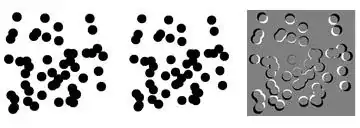
What you see is the image has been shrunk to accomodate an white margin of about 10 pixels. (Most annoying you wouldn't notice this if you didn't look carefull..)
example 2..

Edit
Bill S has the solution.. Either Image[datain] or Image[Raster[datain]] or this mess:
Graphics[Raster[datain],
      PlotRange -> {{0, Dimensions[datain][[2]]}, {0,Dimensions[datain][[1]]}}]
does the job. The last form I guess gives a clue, presumably Export calls Graphics which is padding by default. None of the documented options ImagePadding, ImageMargins, etc turn this off though.
Edit 2.. need BOTH of these options...go figure
Graphics[Raster[datain], ImagePadding -> None, PlotRangePadding -> None]


PlotRangePaddingmight be the one... – cormullion Apr 26 '13 at 19:29Rescalemight also be useful. – amr Apr 28 '13 at 04:30