Mathematica knows the xyz-file type: XYZ.
givenlist=Import["https://www.dropbox.com/s/mjewq4wnqlqczjb/AdvancedCase.xyz?dl=0"]
from this documentation page. There rest works as above. But this fails.
Loading this as ASCII shows this:
13.2577219009 -45.3633308411 136.8547973633
13.5088977814 -45.2704734802 136.8559722900
10.8333778381 -45.8802146912 136.6637573242
10.9468536377 -46.1600723267 136.5761871338
13.1572370529 -45.1396865845 136.6828918457
10.7912321091 -45.7505187988 136.6897125244
...
This is already a three-dimensional list. Rename the file type to txt and it is imported.
Import["./../AdvancedCase.txt", "Data"]
ListPlot3D[%20]

If the given surface would not have this much and heavy noise then ExtrudeMesh is the solution. This shows how to extrude a Rectangle into a mesh volume in two steps.
allows making a control check whether enough points are considered for the convex hull.
Perhaps this is what You like:
ListPlot3D[%20, Mesh -> None, InterpolationOrder -> 0,
 ColorFunction -> "SouthwestColors", Filling -> Bottom]
 This is interpolation-free and assumes nothing that may spike. Each value is displayed on a shared basis. The extrusion is now taken to a common base plain. This looks rather different from top and bottom than from the sides views:

There are several types of substructures in the various subregion.

This shows this concave:
ListPlot3D[140 - %20, Mesh -> None, InterpolationOrder -> 0,
 ColorFunction -> "SouthwestColors", Filling -> Bottom, Mesh -> None]

ListPlot3D[list, Method -> {"Extrusion" -> 0.5},
NormalsFunction -> ({0., 0., 1.} &)]
A nice solution too is
ListPlot3D[list/5, InterpolationOrder -> 0,
 Method -> {"Extrusion" -> 0.1}, NormalsFunction -> ({0., 0., 1.} &),
 ColorFunction -> "SouthwestColors"]

I added a scale down factor 0.2 and suppresssed interpolation. This is now a plain extrusion and has a structured downside.
I can not find this method option in my Mathematica documentation. So gratefull thanks to michael-e2!!!
OK! There is a lot of information now added by the comments.
This is a comparison for a methodology smoothing the supposed surface:
ListPointPlot3D[{data,
  BilateralFilter[data, 2, .5, MaxIterations -> 25]},
 PlotStyle -> {Thin, Red}]

This question offers the smoothing built-ins in Mathematica: remove noise from data
So some smoothing gives another impression of the given surfaces:
ListPointPlot3D[MeanShiftFilter[data, 5, .5, MaxIterations -> 25],
 PlotStyle -> {Thin, Red}]
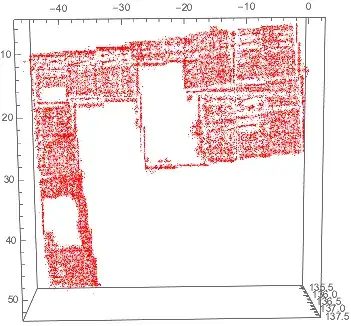
From straight line to steps. But some lines get more straight. Other lines appear and some inner points set appear.

It is time do ask again for more information about the intents of the question. The smoothed structures seem to fit to my first preconception of it.
The change is
ListPlot3D[MeanShiftFilter[data, 5, .5, MaxIterations -> 25],
 Mesh -> None, InterpolationOrder -> 0,
 ColorFunction -> "SouthwestColors", , Method -> {"Extrusion" -> 0.1},
  NormalsFunction -> ({0., 0., 1.} &)]
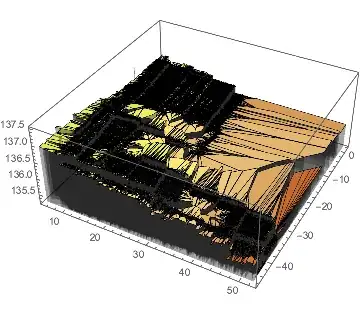
Nice to communicate whether this is the right direction.
ListPlot3D[MeanShiftFilter[data, 5, .5, MaxIterations -> 25],
 Mesh -> None, InterpolationOrder -> 0,
 ColorFunction -> "SouthwestColors", Method -> {"Extrusion" -> 0.1},
 NormalsFunction -> ({0., 0., 1.} &)]


(#+n)&/@ listwill add n to the z components. – Daniel Huber Apr 01 '21 at 19:12