1

Is there a setting to display the required arguments of a function when typing as Visual Studio, Matlab, etc. does?

Dr. belisarius
  • 115,881
  • 13
  • 203
  • 453
Matthew
  • 459
  • 3
  • 14
  • 2
    You may use the command completion ctrl-shift-K (at least until mathematica 8,I'm not sure it works on mathematica 9) – andre314 May 04 '13 at 14:24
  • @andre It works on 9.0.1, but was broken in 9.0.0. v9 also allows one to use multiple templates – rm -rf May 04 '13 at 14:37
  • Cmd-Shift-K if on the ole Macintosh. – kale May 04 '13 at 14:40
  • @andre That is useful, but is there a way to have the function arguments display? Say, once you type in the name of the function, a command that displays what arguments the function requires? – Matthew May 04 '13 at 14:56
  • @Matthew Did you even try what he suggested? – rm -rf May 04 '13 at 15:59
  • @rm-rf Yes. Sorry I was not clear. ctrl-shift-K does not display the arguments for user-defined functions/modules. – Matthew May 04 '13 at 16:09
  • 1
    @Matthew Well, that's because you haven't defined them :) See this answer, which is applicable to version 9. The method is the same for version 8, except that only 1 template is completed (the first one, IIRC) – rm -rf May 04 '13 at 16:15
  • After using Ctrl-Shift-K, you'll get a drop-down list of one or more template forms with very brief explanations (since a given built-in function may take varying numbers of arguments). Select the form you want and the corresponding template will be pasted into your input line. Then fill in the (named) fields, tabbing from each to the next. – murray May 04 '13 at 17:49
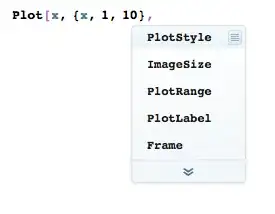
  • To chime in, with M9 you can get a list of possible (but not all) Options for a function by pressing Ctrl+K (or Cmd+K) after the minimum number of arguments are provided to the function: i.e. Plot[x,{x,1,10}, then Ctrl+K – Charlotte Hadley May 04 '13 at 21:02
  • @Martin John Hadley: I'm not getting anything with the Mac OS X Mathematica 9.0.1 I type Plot[x,{x,1,10}, and press Ctrl+K (nor if I add in Shift to the key combination). Ditto for Cmd+K. – murray May 04 '13 at 22:39
  • @murray that's strange, I use Cmd+K for Options frequently - have you changed any autocompletion preferences? It's interesting to note the Documentation doesn't mention this shortcut, Hyperlink["paclet:tutorial/UsingTheInputAssistant"], I found it by accident. – Charlotte Hadley May 04 '13 at 23:25
  • @Martin John Hadley: Now I am getting the drop-down list of options after I use Cmd+K (on Mac). Don't know why I wasn't earlier. – murray May 05 '13 at 15:11

1 Answers1

1

The closest thing to what you're describing are function templates, there is a tutorial on how to use them here.

You first have to write the name of the function, for example Plot, and then you hit cmd+shift+k on OS X and ctrl+shift+k on Windows, you'll get this:

arguments

Once you have typed the mandatory arguments, you can hit cmd+k on OS X or ctrl+k on Windows to get a list of any options you supply:
options

If you're having trouble making function templates work with user defined function, you should read this.

C. E.
  • 70,533
  • 6
  • 140
  • 264