2

How do you set the precision for a function where you substitute a number in a For loop? I mean I code something like this and I want Mathematica to set the precision for all the values

a = 3 x*Exp[x] - Cos[x];
aff = D[D[a, x],x];
For[i = 0, i <= 10, i++, s1 = Normal[Series[aff, {x, 1, i}]]; 
 b1 = s1 /. x -> 1.3; Print[b1]]

But Mathematica makes the values in 4 digit precision and 1 in non numerical form

9 E+Cos[1]
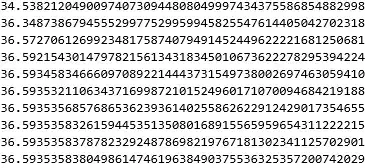
34.5382
36.3487
36.5727
.
.
.

How do I make it more precise and in numerical form obviously? I also tried with the N[] function but it doesn't work. I'm a newbie in programming. Please kindly help.

flinty
  • 25,147
  • 2
  • 20
  • 86
Aji Wibowo
  • 35
  • 3
  • The 1.3 is a "machine precision" number. Try b1=s1/.x->13/10;Print[N[b1,20]] and see if you get more digits. – Bill Oct 31 '21 at 11:50
  • @Bill Thank you sir, it works :) So in order to make it to numerical form you need to make it to std form first instead of machine precision number? – Aji Wibowo Oct 31 '21 at 12:30
  • 1
    Inside Mathematica there are symbols that may have no numeric value, there are integers and rationals that have exact values and then there are decimal approximations. 1.3 is an approximate number that uses the floating point hardware in your CPU. Mathematica won't let you see that with 20 digits, it only shows the number of digits or precision it has. You can turn an exact value, like an integer or 13/10 or E^2 or Pi/6 into an approximate value using N[]. But that won't increase the precision. "std form" and other "form" may make a pretty display but often get you into trouble. Understand? – Bill Oct 31 '21 at 13:20
  • 1
    What you see when machine precision numbers are printed is controlled by the option PrintPrecision. By default it's 6 and six digits is what you see. – Michael E2 Oct 31 '21 at 13:22

1 Answers1

5

Mathematica is a computer algebra system. Take advantage of this by using exact values. At the end you can always use N[result,precisionNeeded]. Do not use Mathematica like Matlab or Python or Fortran.

a = 3 x*Exp[x] - Cos[x];
aff = D[D[a, x], x];
data = Table[Normal[Series[aff, {x, 1, i}]] /. x -> 13/10, {i, 10}];

And now if you want 50 digits precision you can do

N[data, 50]

Mathematica graphics

You want 1000 digits precision? Just replace the 50 above by 1000 and so on. This way you get exact result, and convert to numerical at the very end reducing possible numerical approximation typical in other langauges.

Nasser
  • 143,286
  • 11
  • 154
  • 359
  • 1
    Thank you, I'm not used to Table functiton, but this give some insight to me, really helpful. But what do you mean by "Do not use Mathematica like Matlab or Phyton"? – Aji Wibowo Oct 31 '21 at 12:33
  • 1
    @AjiWibowo See https://mathematica.stackexchange.com/questions/134609/why-should-i-avoid-the-for-loop-in-mathematica for a partial answer. – Michael E2 Oct 31 '21 at 13:24
  • @MichaelE2 thank you :) – Aji Wibowo Oct 31 '21 at 13:42