If you want to edit the box expressions, there're already some similar questions on MSE, such as 47213, 13317.
Solution 1
However, the direct use of FrontEnd`UndocumentedTestFEParserPacket makes my kernel hang up (perhaps because the front-end can't handle the TeXAssistant box in such a way), so I use the following workaround:
FrontEndExecute[
  FrontEnd`UndocumentedTestFEParserPacket[
    "\!\(TemplateBox[<|\"boxes\" -> FormBox[\nRowBox[{\"sin\", \"(\", \nRowBox[{\"3\", \nStyleBox[\"x\", \"TI\"]}], \")\"}], TraditionalForm], \"errors\" -> {}, \"input\" -> \"\\\\sin(3x)\", \"state\" -> \"Boxes\"|>,\n\"TeXAssistantTemplate\"]\)"
  , True]
][[1]] //ToExpression
(* Output: TemplateBox[<|"boxes" ->     FormBox[RowBox[{"sin", "(", RowBox[{"3", StyleBox["x", "TI"]}],        ")"}], TraditionalForm], "errors" -> {}, "input" -> "\\sin(3x)",    "state" -> "Boxes"|>, "TeXAssistantTemplate"] *)
Note: two characters \* have been removed from the string!
Solution 2
Or simply use the kernel function:
ToExpression@"\!\(TemplateBox[<|\"boxes\" -> FormBox[\nRowBox[{\"sin\", \"(\", \nRowBox[{\"3\", \nStyleBox[\"x\", \"TI\"]}], \")\"}], TraditionalForm], \"errors\" -> {}, \"input\" -> \"\\\\sin(3x)\", \"state\" -> \"Boxes\"|>,\n\"TeXAssistantTemplate\"]\)"
(* Output: TemplateBox[<|boxes->FormBox[RowBox[{sin,(,RowBox[{3,StyleBox[x,TI]}],)}],TraditionalForm],errors->{},input->\sin(3x),state->Boxes|>,TeXAssistantTemplate] *)
Note: two characters \* have been removed from the string!
Solution 3
Or use this kernel function, which has the capacity to convert string box representations as a part of its functionality:
BoxForm`ConvertForm["\!\(\*TemplateBox[<|\"boxes\" -> FormBox[\nRowBox[{\"sin\", \"(\", \nRowBox[{\"3\", \nStyleBox[\"x\", \"TI\"]}], \")\"}], TraditionalForm], \"errors\" -> {}, \"input\" -> \"\\\\sin(3x)\", \"state\" -> \"Boxes\"|>,\n\"TeXAssistantTemplate\"]\)", StandardForm, StandardForm][[1, 1]]
(* Output: RowBox[{"Sin", "[", RowBox[{"3", " ", "x"}],      "]"}] *)
If you want a TeXAssistant box comes back in the notebook, you can use NotebookWrite to write it.
Solution 1: Button
Button["Click to replace selected string!",
  NotebookWrite[EvaluationNotebook[],
    ToExpression@StringReplace[StartOfString~~"\!\(\*"~~s__~~"\)"~~EndOfString:>s]@ToExpression@NotebookRead@EvaluationNotebook[]
  ]
]
Solution 2: Define the format of a wrapping symbol
Evaluate this line:
wrapper /: MakeBoxes[wrapper@str_?StringQ, _] := ToExpression@StringReplace[StartOfString~~"\!\(\*"~~s__~~"\)"~~EndOfString:>s]@str
then add a head to the box string, like this:
wrapper@"\!\(\*TemplateBox[<|\"boxes\" -> FormBox[\nRowBox[{\"sin\", \"(\", \nRowBox[{\"3\", \nStyleBox[\"x\", \"TI\"]}], \")\"}], TraditionalForm], \"errors\" -> {}, \"input\" -> \"\\\\sin(3x)\", \"state\" -> \"Boxes\"|>,\n\"TeXAssistantTemplate\"]\)"
then select these code, click the menu command Cell/Convert To/StandardForm (or simply press the hot key Shift+Ctrl+N)
Solultion 3: Add a menu command
Evaluate the following:
FrontEndUtilities`Action["BuildBoxFromString"] := NotebookWrite[EvaluationNotebook[],
  ToExpression@StringReplace[StartOfString~~"\!\(\*"~~s__~~"\)"~~EndOfString:>s]@ToExpression@NotebookRead@EvaluationNotebook[]
]
FrontEndExecute@FrontEnd`AddMenuCommands["AboutBoxDialog", {
  Delimiter,
  MenuItem["BuildBoxFromString",
    KernelExecute@FrontEndUtilities`Action["BuildBoxFromString"],
    MenuKey["F4", Modifiers -> {"Control"}]
, MenuEvaluator -> Automatic]
}]
Then you can use a menu command with a hotkey to replace selected string by the box represented by it. The menu option will be placed after the item Help/About Mathematica.
You can add the code above to init.m for automatic evaluation.
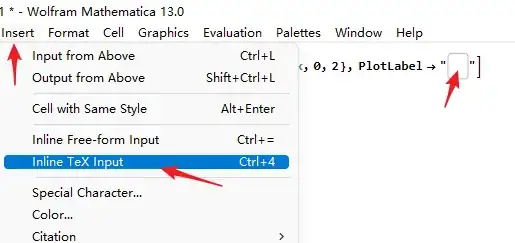


TemplateBoxthings but is a simple $sin(3x)$ like the arrow pointed – yode Jan 20 '22 at 16:59