5

I'm wondering if it is possible to link Excel and Mathematica in real time, so that Mathematica can be used as a computing and "storage" tool. Suppose I have an Excel spreadsheet with an active DDE link:
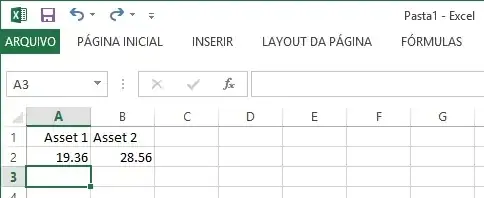
enter image description here

I would like to know if it is possible for Mathematica to communicate with Excel in real time and store every cell update in Excel. I know there is a package called ExcelLink, with several functions to link Mathematica and Excel. So, if I use, for instance ExcelRead["A2"] I get the correct value

19.36

However, it is not dynamic! I can get dynamic values by using

a=Dynamic[Refresh[ExcelRead["A2"], UpdateInterval -> 0]]
b=Dynamic[Refresh[ExcelRead["B2"], UpdateInterval -> 0]]

However, when I try to add a+b I get

19.36+28.56

And, worse, If I use

Dynamic[a+b, UpdateInterval -> 0]

I get

19.36+28.56

So, here arises my first problem: although Mathematica reads the values in real time from Excel, I'm not able to perform any calculation with them. Is there any way to do it?

My second problem is: how can I write dynamically the values I'm getting from the DDE Link inside Excel itself? I need to write every updated value in Excel in a sequence like shown below
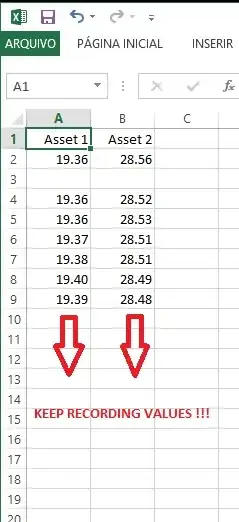
enter image description here

Rod
  • 3,318
  • 2
  • 24
  • 40
  • 1
    Umm... you can't add two Dynamic objects! – rm -rf Jun 10 '13 at 02:54
  • @rm-rf It's funny, because I can do it in Excel, but not in Mathematica? – Rod Jun 10 '13 at 02:55
  • 2
    I don't know what you mean by doing it in Excel (I don't have Excel), but the a and b you have in Mathematica have the head Dynamic, for which the operation + is not defined. What does Dynamic[Setting@a + Setting@b, ...] give? – rm -rf Jun 10 '13 at 02:57
  • @rm-rf wow.. it works! – Rod Jun 10 '13 at 02:58
  • @rm-rf What about the dynamic storage of updated values? Any idea how to do it? I don't mind to store them in Mathematica or Excel, by the way... – Rod Jun 10 '13 at 02:59
  • Again, I don't have Excel, so this is just a guess — could you perhaps use ExcelPosition to find the current position and increment it upon each refresh before writing to Excel (write to the incremented position)? You can use the second argument of Dynamic... – rm -rf Jun 10 '13 at 03:01
  • @rm-rf First: it's absolutely impressive that you don't have Excel... :-o You have convinced me that you're really a Mathematica fan! :-) Second: forget about Excel for a while... could you imagine any way to store these continuously updating values in Mathematica? – Rod Jun 10 '13 at 03:05
  • @rm-rf I've tried this: list = {} an then Dynamic[Refresh[AppendTo[list, Setting@a], UpdateInterval -> 0]], but my list grows in a crazy pace! – Rod Jun 10 '13 at 03:07
  • 2
    Well, I've just never needed Excel in my life and I use LaTeX for all my Word/Powerpoint needs, so I've not needed the entire Office suite either. Why do you use UpdateInterval -> 0? Can't you do it slower? What's the point in updating like crazy if you don't need to? You'll quickly run out of memory at this rate... – rm -rf Jun 10 '13 at 03:10
  • What is a DDE link? I presume it's some other external feed that updates your Excel sheet with fresh data? – rm -rf Jun 10 '13 at 03:11
  • @rm-rf I'm working with financial data in real time... sometimes the amount of data received in one second is crazy high! I need to capture all this data in real time... – Rod Jun 10 '13 at 03:11
  • @rm-rf That's true... DDE link is an external feed for Excel. – Rod Jun 10 '13 at 03:12
  • Ah, Ok. Hmm... Doesn't the Wolfram Financial Platform have something for this? (or is it a separate paid app?) – rm -rf Jun 10 '13 at 03:13
  • @rm-rf Actually the Wolfram Financial Platform is pretty weak for most of the needs of the financial industry... – Rod Jun 10 '13 at 03:14
  • In any case, I'm not sure it's a good idea to just refresh at a high rate, since you might end up re-reading the same cell repeatedly, leading to duplicate values (which then might be indistinguishable from non-sampling related duplicates). Perhaps you might be able to read the current position, store it in mma, then at the next update, check to see if the size of that column has changed, and if so, read the block from current position till new position (looks like ExcelRange might help) – rm -rf Jun 10 '13 at 03:19
  • Also, Append and friends create a copy each time so your performance will take a hit as the list grows... you might have to use linked lists (but needs more care in handling it) – rm -rf Jun 10 '13 at 03:20
  • @rm-rf That's why I wanted to store the data directly into Excel... I was wondering something like Dynamic[Refresh[Excel[counter]=Setting@a,UpdateInterval->.1]. This would put the storage load in Excel, instead of Mathematica... I'm still wondering how to create this "counter" so it dynamically refreshes itself to A7, A8, A9, etc... – Rod Jun 10 '13 at 03:23

1 Answers1

2

After some research I've found this partial solution:

Step 1: Open Excel (if you have it!)

Step 2: Open Excel Link

Needs["ExcelLink`"]

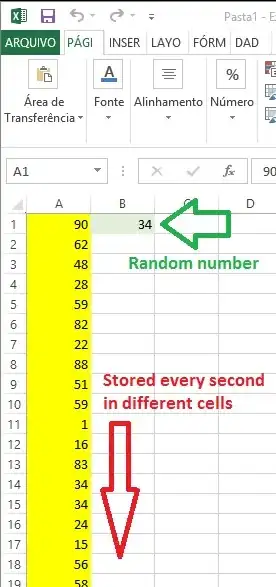
Step 3: If you don't have any DDE Link for Excel, simulate real time data using

Dynamic[Refresh[Excel["B1"] = RandomInteger[100], UpdateInterval -> 1]]

Step 4: Import back to Mathematica your simulated data

a = Dynamic[Refresh[ExcelRead["B1"], UpdateInterval -> 1]]

Step 5: Create a numberic list and set Dynamic[] to append sequential numbers to it every 1 second

numlist = {}; k = 1;
num = Dynamic[Refresh[AppendTo[numlist, k++];Last@numlist, UpdateInterval -> 1], TrackedSymbols -> {}]

Step 6: Create a string list (for cell values) and set Dynamic[] to append sequential values to it every 1 second

cellslist = {}; j = 1;
cell = Dynamic[Refresh[AppendTo[cellslist, "A" <> ToString[Last[numlist]]];Last@cellslist, UpdateInterval -> 1], TrackedSymbols -> {}]

Step 7: Store the values in Excel itself!!! (thanks to @rm-rf for the Setting tip!)

Dynamic[Refresh[Excel[Last@cellslist] = Setting@a, UpdateInterval -> 1]]

Result

enter image description here

IMPORTANT

This is a solution using UpdateInterval->1 . However, I would appreciate any solution with asynchronous reading and writing in real time.

Rod
  • 3,318
  • 2
  • 24
  • 40