10

How do I add individual context menus (shown upon secondary mouse click) to various components of a graphics object without needing to go into edit mode?

Consider the following example:

Graphics[{Style[Disk[{0, 0}], 
   ContextMenu -> {
      MenuItem["Color", KernelExecute[Print[Black]], MenuEvaluator -> Automatic], 
      MenuItem["Shape", KernelExecute[Print["Circle"]], MenuEvaluator -> Automatic]}],
    Red, Style[Disk[{1, 1}],
   ContextMenu -> {
      MenuItem["Number 1", KernelExecute[Print[1]], MenuEvaluator -> Automatic], 
      MenuItem["Number 2", KernelExecute[Print[2]], MenuEvaluator -> Automatic]}]}]

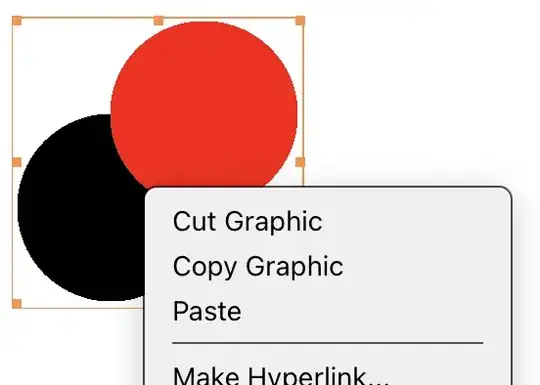
Right clicking on the output graphics object does not trigger the appropriate shape-dependent context menu. Instead I get the built-in context menu associated with the whole graphics object:
enter image description here

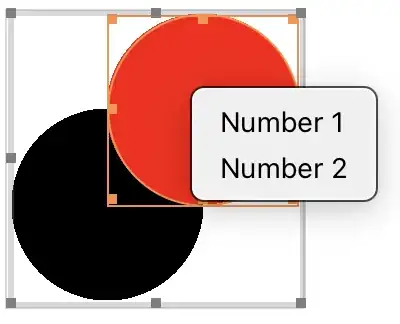
Instead, I have to go into graphics edit mode by double-clicking before right clicking correctly produces the appropriate context menu.
enter image description here

What do I need to do produce the correct context menu based on the mouse positioned over the appropriate shape without requiring me to go into edit mode? The solution should work when Deploy is applied to the whole Graphics. Further, I need it so that right-clicking outside either shape should not trigger the built-in context menu, and should not produce any menu at all. Undocumented solutions especially involving "EventHandler", FE`Evaluate, ... and friends are welcome.

QuantumDot
  • 19,601
  • 7
  • 45
  • 121
  • Addendum: In my head the ideal solution would look like the effect of EventHandler[..., {"MouseClicked", 2}:> (show context menu)], even if this exact approach is unavailable. – QuantumDot Aug 19 '22 at 17:46

3 Answers3

5

This is likely cheating. It simulates a context menu with a palette. But there are no menus shown outside the disks and it works in a Deployed cell. Note that the Which goes throught the graphics elements from last to first drawn so that when there is an overlap we get the menu for the top element. The result of clicking in the palette menu is given in a MessageDialog.

CellPrint[
 ExpressionCell[
  Graphics[{Yellow, d1 = Disk[{0, 0}], Red, d2 = Disk[{1, 1}]}],
  "Output",
  CellEventActions -> {{"MouseDown", 2} :>
     (Which[
       RegionMember[d2, MousePosition["Graphics"]], NotebookClose[p]; 
       p = CreatePalette[{
      Button[Style["Number 1", FontSize -> 20], 
       MessageDialog["1"]; NotebookClose[EvaluationNotebook[]], 
       Appearance -> "Frameless"],


      Button[Style["Number 2", FontSize -> 20], 
       MessageDialog["2"]; NotebookClose[EvaluationNotebook[]], 
       Appearance -> "Frameless"]
      }, WindowSize -> {150,All}, 
     WindowMargins -> {{MousePosition[][[1]], 
        Automatic}, {Automatic, MousePosition[][[2]]}}, 
     WindowTitle -> "The red disk", TextAlignment -> Center],

   RegionMember[d1, MousePosition["Graphics"]], NotebookClose[p]; 
   p = CreatePalette[{

      Button[Style["Color", FontSize -> 20], 
       MessageDialog[Yellow]; NotebookClose[EvaluationNotebook[]],
        Appearance -> "Frameless"],


      Button[Style["Shape", 20], MessageDialog["Circle"]; 
       NotebookClose[EvaluationNotebook[]], 
       Appearance -> "Frameless"]
      }, WindowSize -> {150,All}, 
     WindowMargins -> {{MousePosition[][[1]], 
        Automatic}, {Automatic, MousePosition[][[2]]}}, 
     WindowTitle -> "The yellow disk", TextAlignment -> Center]
   ]
  )}

] ]

Jean-Pierre
  • 5,187
  • 8
  • 15
5

It is not perfect but maybe it fits your needs:

withContextMenu[menu : {__RuleDelayed}] := Function[expr, withContextMenu[expr, menu]]
withContextMenu[expr_, menu : {__RuleDelayed}] := EventHandler[
   expr,
   {"MouseClicked", 2} :> (
     AttachCell[
      EvaluationNotebook[],
      Framed[Column[KeyValueMap[menuItem, <|menu|>], Spacings -> 0], 
       ContentPadding -> False, FrameMargins -> 0, 
       FrameStyle -> GrayLevel@.8, Alignment -> Left],
      {Left, Top}, 
      Offset[MousePosition["WindowAbsolute"]*{1, -1}, 0], {Left, 
       Top},
      RemovalConditions -> {"MouseClickOutside"}]
     ),
   PassEventsUp -> False
   ];

menuItem // Attributes = {HoldRest} menuItem[lbl_, action_] := Button[lbl, action; NotebookDelete@EvaluationCell[], Appearance -> "Frameless", Alignment -> Left, ImageSize -> {{80, 1000}, Automatic}, Background -> FEPrivateIf[FrontEndCurrentValue["MouseOver"], GrayLevel@.95, GrayLevel@.9], FrameMargins -> {{20, 2}, {2, 2}}]

Graphics[ Disk[] // withContextMenu[{1 :> Print[1], 2 :> Print[2]}] , Frame -> True , PlotRange -> 10 ] // withContextMenu[{3 :> Print[3], 4 :> Print[4]}]

enter image description here

Kuba
  • 136,707
  • 13
  • 279
  • 740
  • (+1) It probably would be better to attach the cell to the EvaluationCell[] instead of EvaluationNotebook[], or even better to BoxObject. – Alexey Popkov Aug 30 '22 at 13:21
  • @AlexeyPopkov maybe but it seems to ignore MouseClickOutside more often. – Kuba Aug 30 '22 at 13:40
  • Very interesting to me is Background -> FEPrivate`If[FrontEnd`CurrentValue["MouseOver"], color1, color2] because it does not use Dynamic. Would you provide me links to some reading material about when I can directly use FEPrivate` functions? Thanks! – QuantumDot Sep 01 '22 at 15:36
2

Inspired by what Dataset seems to do, we can use a Dynamic context menu for the entire Graphics expression, and update it based on which element we're over:

Attributes[customContextMenu] = {HoldFirst};
customContextMenu[cmVar_, prim_, cm_] :=
 DynamicWrapper[
  prim,
  If[CurrentValue["MouseOver"], cmVar = cm]
  ]

DynamicModule[ {cm = {}}, Style[ Graphics[{ {Transparent, customContextMenu[cm, Rectangle[ImageScaled@{0, 0}, ImageScaled@{1, 1}], {}]}, customContextMenu[cm, Disk[{0, 0}], {MenuItem["1", KernelExecute@1]}], Red, customContextMenu[cm, Disk[{1, 1}], {MenuItem["2", KernelExecute@2]}] }], ComponentwiseContextMenu -> {"GraphicsBox" -> Dynamic@cm} ] ]

enter image description here

As you can see, I use a Transparent Rectangle as the background which allows me to reset the context menu when the mouse is not over any of the disks.

Lukas Lang
  • 33,963
  • 1
  • 51
  • 97