Bug introduced in 7.0 or earlier, and persisting through 10.1 or later (OSX 10.10.2)
Consider the following code:
jet[u_?NumericQ] :=
  Blend[{{0, RGBColor[0, 0, 9/16]}, {1/9, Blue}, {23/63,
      Cyan}, {13/21, Yellow}, {47/63, Orange}, {55/63, Red}, {1,
      RGBColor[1/2, 0, 0]}}, u] /; 0 <= u <= 1;
(* jet function get from http://stackoverflow.com/a/9321152/1363677*)
caxis[x_, {min_, max_}] :=
  If[x < min, jet[0], If[x > max, jet[1], jet[(x - min)/(max - min)]]];

data1 = Table[
   Sinc[x*y] + RandomReal[{0., 0.2}], {x, -2 Pi, 2 Pi, 0.05}, {y, -2 Pi, 2 Pi, 0.05}];
data2 = Table[
   Sinc[x*y] + RandomReal[{0., 0.2}], {x, -2 Pi, 2 Pi, 0.02}, {y, -2 Pi, 2 Pi, 0.02}];

Row[{Graphics[Raster[data1, ColorFunction -> (caxis[#, {-0.5, 2}] &)],
    ImageSize -> 200],
  Graphics[Raster[data2, ColorFunction -> (caxis[#, {-0.5, 2}] &)],
   ImageSize -> 200],
  Graphics[Raster[data2, ColorFunction -> "BlueGreenYellow"],
   ImageSize -> 200]}]
It gives the output:

Why is the second plot blank?
If the dynamic updating is turned off, all of the three are blank.
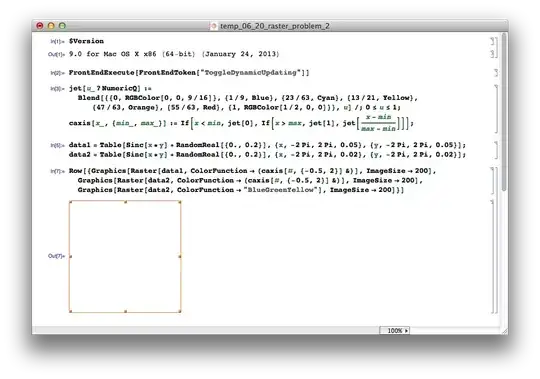
Why does Mathematica behave like this? I'm using OSX 10.8.4 on a Macbook Air with 1.7 GHz Intel Core i5 and 4GB memory.


ColorFunctionin the output Cell, which isColorFunction->($CellContext`caxis[#, {-0.5, 2}]& ), needs Dynamic Updating enabled to function. – Silvia Jun 20 '13 at 17:55