How do you export the result of a RevolutionPlot3D to STL (STereoLithography) file format for printing? I am a tyro when it comes to 3D rendering and printing.
Asked
Active
Viewed 2,454 times
6


1 Answers
17
Update
Please see Printout3D and related guides:
- http://reference.wolfram.com/language/workflow/MakeA3DPrintout.html
- http://reference.wolfram.com/language/ref/Printout3D.html
- http://reference.wolfram.com/language/guide/3DPrinting.html
Older
This is very easy. Design a model, for example:
model = RevolutionPlot3D[{Sin[t] + Sin[5 t]/10,
   Cos[t] + Cos[5 t]/10}, {t, 0, Pi},
  RegionFunction -> (Sin[5 (#4 + #5)] > 0 &), Mesh -> None,
  BoundaryStyle -> Black, PlotStyle -> Thickness[.1]]
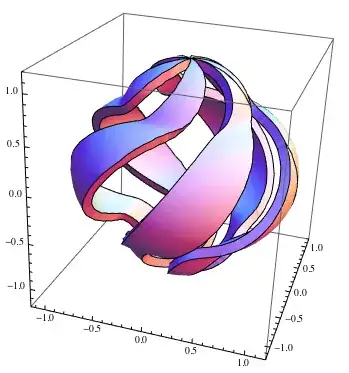
Note a special setting PlotStyle -> Thickness[.1] which gives thickness to the model walls - yo can set your own value of course. Now export to STL and then re-import to verify file was created and see how it looks
Export["model.stl", model];
Import[%]

The STL file can be just sent to 3D printer. The best part? - Wolfram has a whole course on 3D printing - tips how to make it work nicely:
Scan, Convert, and Print: Playing with 3D Objects in Mathematica Q&A
with the notebook. You may also want to take a look at

Vitaliy Kaurov
- 73,078
- 9
- 204
- 355
-
Good one, Vitaliy! Notice that STL files don't have dimensions or units, so at one point in the submission process for many 3D printer services you have to specify what that -1.0 to 1.0 size signifies - meters, inches, or millimeters, for example. If you know in advance what you can specify, you can scale the graphic suitably. – cormullion Jun 27 '13 at 07:07
Read the FAQs! 3) When you see good Q&A, vote them up byclicking the gray triangles, because the credibility of the system is based on the reputation gained by users sharing their knowledge. ALSO, remember to accept the answer, if any, that solves your problem,by clicking the checkmark sign` – Vitaliy Kaurov Jun 27 '13 at 03:10