Since You have updated question to be more general I'm going to show method which is good to take under consideration as a general approach :)
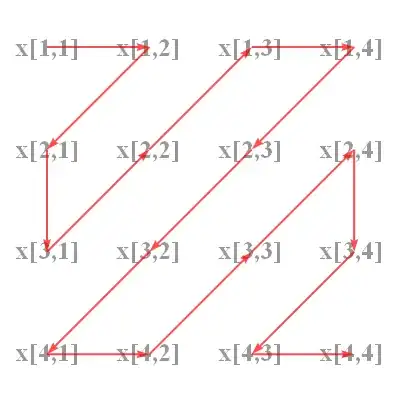
one of OP's examples
First, it is good to set vertices in proper order:
dia[1, k_] := Table[{1 + i, (k - i)}, {i, 0, k - 1}] // If[EvenQ@k, Reverse, # &]
mx = {#1, -#2} & @@@Select[
                           Join @@ Table[dia[1, i], {i, 1, 8}],
                           First@# <= 4 \[And] Last@# <= 4 &
                          ]
If You don't want to play with VertexShape then Graph can be a upper layer in Overlay with Your Grid:
graph = Graph[Table[i \[UndirectedEdge] i + 1, {i, 15}],
              VertexCoordinates -> mx, VertexSize -> 0,
              EdgeStyle -> Directive[{Thick, Red}],
              EdgeShapeFunction -> GraphElementData["FilledArrow"],
              ImageSize -> {400, 400}, ImagePadding -> 40];

grid = GraphicsGrid[Table[
         Style[StringForm["x[``,``]", a, b], GrayLevel@.6, Bold, 25]
         , {a, 4}, {b, 4}], ImageSize -> 400];

Overlay[{grid, graph}]
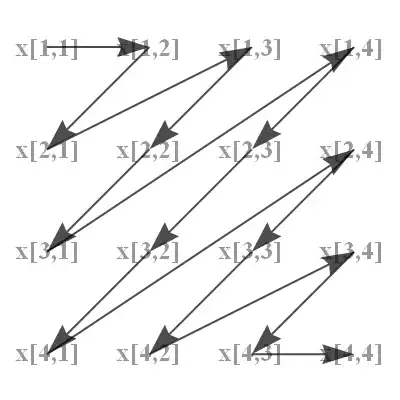
dia[1, k_] := Table[{1 + i, (k - i)}, {i, 0, k - 1}] // Reverse;
mx = {#1, -#2} & @@@ Select[
                            Join @@ Table[dia[1, i], {i, 1, 8}],
                            First@# <= 4 \[And] Last@# <= 4 &];
General case
It's about Graph and the trick is to set unwanted edges style Transparent.
mx[a_, b_] :=Table[{{b1, a + 1 - a1},Style[StringForm["x[``,``]", a1, b1], Bold]},
                   {a1, a}, {b1, b}] // Flatten[#, 1] &

Graph[Table[i \[UndirectedEdge] i + 1, {i, 24}],
      VertexCoordinates -> mx[5, 5][[ ;; , 1]],
      VertexLabels -> Table[i -> Placed[mx[5, 5][[ i, 2]], Center], {i, 25}],
      VertexSize -> 0.5, VertexShapeFunction -> "Square",
      EdgeStyle -> (Table[(i \[UndirectedEdge] i + 1) -> Blue, {i, 1, 23, 2}
                         ]~Join~
                    Table[(i \[UndirectedEdge] i + 1) -> Transparent, {i, 2, 24, 2}]),
      EdgeShapeFunction -> GraphElementData["FilledArrow", "ArrowSize" -> .1]]





ImageSizeto control the fitness of two objects, that's good and simple way. – HyperGroups Jul 08 '13 at 12:04