The function your looking for is Composition which does exactly what you would like it to do. For instance,
{rot1, rot2} = MapThread[RotationTransform, {{theta1,theta1},{point1,point2}}]
composed = Composition @@ %
Composition[
     RotationTransform[theta1, point1],
     RotationTransform[theta1, point2]
  ]
which can then be used like rot1 and rot2 would, e.g. composed[ {x, y, z} ]. From some experiments, it seems that Composition will combine multiple TransformationFunction into a single TransformationFunction, e.g.
Composition[ RotationTransform[ Pi/2 ], RotationTransform[ Pi/2] ] ]
simplifies to
RotationTransform[ Pi ]
Here is a specific example using the following rotations
RotationTransform[Pi/2, {1, 0}]
RotationTransform[Pi/2, {1, 1}]
composed = Composition @@ {%, %%}
which gives the output (it's in picture form as the output is displayed using boxes):
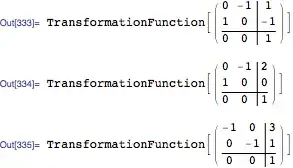
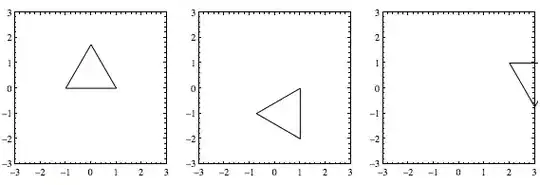
Now, applying them one at a time to a triangle, using the following code
FoldList[
  {EdgeForm[Black], White, #2[#1]} &,
   Polygon[{{1, 0}, {0, Sqrt[3]}, {-1, 0}}],
  {# &,
   GeometricTransformation[#, RotationTransform[Pi/2, {1, 0}]] &,
   GeometricTransformation[#, RotationTransform[Pi/2, {1, 1}]] &}
][[2 ;;]] //
GraphicsRow[
 Graphics[#, Frame -> True, PlotRange -> {{-3, 3}, {-3, 3}}] & /@ #
]&
gives
Using the composition directly via
Graphics[{
   EdgeForm[Black], White,
   GeometricTransformation[
       Polygon[{{1, 0}, {0, Sqrt[3]}, {-1, 0}}],
       composed]
  }, Frame -> True, PlotRange -> {{-3, 3}, {-3, 3}}]
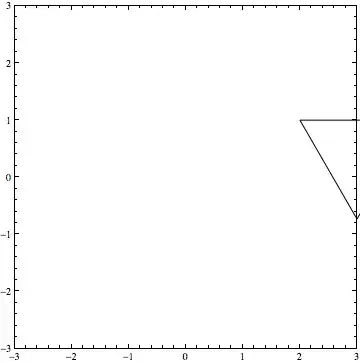
gives the identical end result
Two things to note here. First, the functions are entered into Composition in reverse order of application, i.e. the first function to be applied is last, and the last function is first. Second, I made use of GeometricTransformation to apply the rotations to a Graphics primitive.


