Update July 17, 2023
Which line to adapt so that no matrices during the row reduce steps
are displayed?
Here is a version which does that. here
The default is to display the matrices. If you do not want that, then call with False as second argument. Here is screen shot showing this:
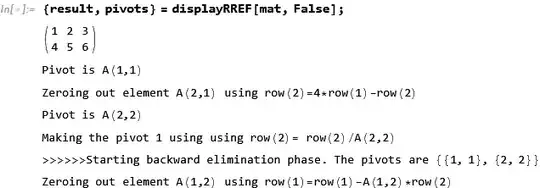
To show the matrices again, simply remove the False, like this
{result, pivots} = displayRREF[mat];
Original answer
This is below is modification of code from Find Elementary Matrices that produce RREF so now it can work with symbolic entries.
I tested it on few small symbolic matrices and it gives same result as Mathematica. This does forward elimination followed by backward elimination to obtain the Reduced Row Echelon Form which will be just a diagonal matrix for square matrix.
The square matrix is much easier to do. I also tested on your matrix and it also gave same result as Mathematica. But too large to post it here.
Here are some usage examples of smaller size.
Example 1
mat = {{3, a}, {2, b}}
displayRREF[mat]

Compare to

Example 2
mat = {{s, Sqrt[s], 3, 10, s^2}, {1, s, 2*s, 10, 1}, {0, 2, 3, 10,
    s^9}, {1/s, 5, 3, 8, 2 + s}};
MatrixForm[mat]

{result, pivots} = displayRREF[mat]
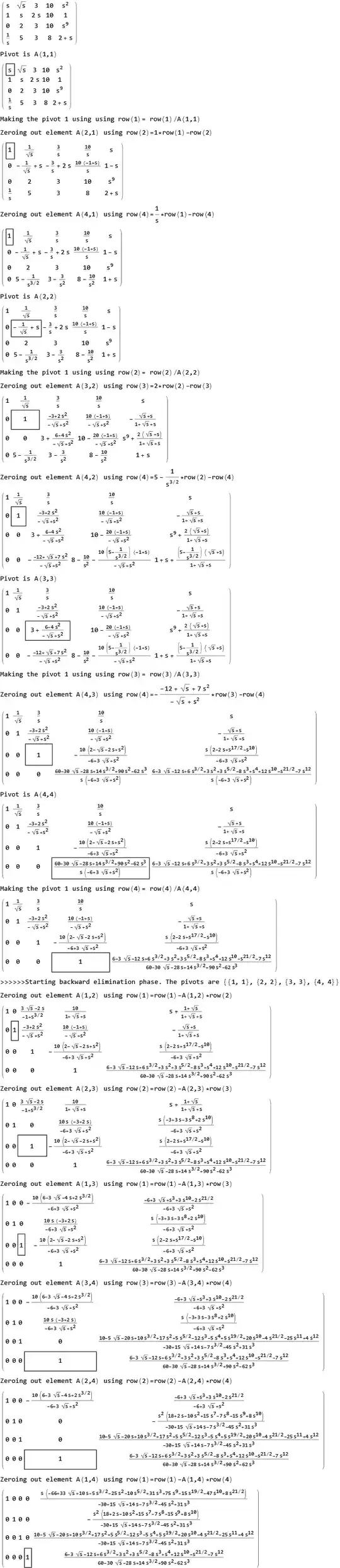
Compare to Mathematica's results
(mmaResult = RowReduce[mat]) // MatrixForm
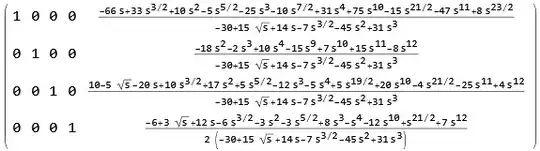
Verified same:
(result - mmaResult) // FullSimplify

Code is written in code cell. So it might get messed up when copying to input cell. So I also put the notebook here
(*Version April 29, 2023 of displayRREF*)
(*bug reports are welcome*)
 displayMatrix[A_?(MatrixQ[#]&),dashed_?BooleanQ]:= If[dashed,displayMatrix[A,Last@Dimensions[A]],Print[MatrixForm[A]]]
 displayMatrix[A_?(MatrixQ[#]&),nCols_Integer]:= Print[A[[All,1;;nCols]]//matWithDiv[nCols,Background->LightOrange]]
displayRREF[Ain_?(MatrixQ[#]&),dashed_:False]:=Module[
  {multiplier,j,i,pivotRow,pivotCol,nRows,nCols,p,tmp,startAgain,A=Ain,n,m,pivotsFound={},keepEliminating,nIter,entry},
    displayMatrix[A,dashed];
    {nRows,nCols} = Dimensions[A];
keepEliminating=True;

n=1; m=1;
nIter = 0;
While[keepEliminating,
    nIter++;
    If[nIter>100, (*safe guard*)
         Return["Internal error. Something went wrong. Or very large system?",Module]
    ];

    If[dashed && m==nCols,
         keepEliminating=False
    ,
         Print["Pivot is A(",n,",",m,")"];
         Print@makeNiceMatrix[A,{n,m},dashed];
         If[A[[n,m]] =!= 0,
              If[A[[n,m]] =!= 1,
                   A[[n,All]] = A[[n,All]]/A[[n,m]];
                   A=Simplify[A];
                   Print["Making the pivot 1 using using row(",n,")= row(",n,")/A(",n,",",m,")"]
                   (*Print@makeNiceMatrix[A,{n,m},dashed]*)
             ];
             If[n<nRows,
                   Do[
                        If[A[[j,m]] =!= 0,
                              multiplier = A[[j,m]]/A[[n,m]];
                              Print["Zeroing out element A(",j,",",m,") using row(",j,")=",multiplier,"*row(",n,")-row(",j,")"];
                              A[[j,m;;]] = A[[j,m;;]] - multiplier*A[[n,m;;]];
                              A=Simplify[A];
                              Print@makeNiceMatrix[A,{n,m},dashed];
                        ]
                   ,{j,n+1,nRows}
                   ];
              ];
              pivotsFound = AppendTo[pivotsFound,{n,m}];
              If[n==nRows,
                  keepEliminating=False
              ,
                  n++;
                  If[m<nCols,m++]
              ]
        ,
              (*pivot is zero*)
              Print["Pivot is zero"];
              (*Print@makeNiceMatrix[A,{n,m},dashed];*)
              If[n==nRows&&m==nCols, keepEliminating=False
              ,
                   (*pivot is zero. If we can find non-zero pivot row below, then exchange rows*)
                   If[n<nRows,
                         p = FirstPosition[A[[n+1;;,m]],_?(# =!=0)&];
                         If[ p===Missing["NotFound"]|| Length[p]==0,
                              If[m<nCols,
                                  m++
                              ,
                                  keepEliminating=False
                              ]
                         ,
                              (*found non zero pivot below. Exchange rows*)
                              tmp = A[[n,All]];
                              A[[n,All]] = A[[First[p]+n,All]];
                              A[[First[p]+n,All]] = tmp;
                              A=Simplify[A];
                              Print["Exchanging row(",n,") and row(",First[p]+n,")"];
                              Print@makeNiceMatrix[A,{n,m},dashed]
                        ]
                  ,
                        If[m<nCols,
                              m++
                        ,
                              keepEliminating=False
                        ]
                  ]
              ]
         ]
    ]
];


(*pivotsFound = DeleteDuplicates[pivotsFound];*)
Print@makeNiceMatrix[A,{n,m},dashed];
Print[">>>>>>Starting backward elimination phase. The pivots are ",pivotsFound];
Do[
    pivotRow=First@entry;
    pivotCol=Last@entry;

    If[pivotRow>1,
        Do[
             If[ A[[i,pivotCol]] =!= 0,
                  Print["Zeroing out element A(",i,",",pivotCol,") using row(",i,")=row(",i,")-A(",i,",",pivotCol,")*row(",pivotRow,")"];
                  A[[i,;;]] = A[[i,;;]] - A[[i,pivotCol]]*A[[pivotRow,;;]];
                  A=Simplify[A];
                  Print@makeNiceMatrix[A,{pivotRow,pivotCol},dashed]
             ]
        ,
        {i,pivotRow-1,1,-1}
       ]
    ]
    ,
    {entry,pivotsFound}

];
{A,pivotsFound[[All,2]]}
]
makeSolutionSpecialCase[A_?(MatrixQ[#]&),b_?(VectorQ[#]&),pivotCols_List]:=Module[
   {nRows,nCols,nLeadingVariables,nFreeVariables,n,m,k,variables={},eq,freeVariables,sol={}},
Print["Pivot columns are ",MatrixForm[pivotCols]];

ClearAll[x,t]; (*did not make them local, to prevent $ from showing in print*)
{nRows,nCols} = Dimensions[A];
nLeadingVariables = Length[pivotCols];
nFreeVariables =  nCols-nLeadingVariables;
Print["There are ",nLeadingVariables," leading variables and ",nFreeVariables," free variables. These are "];

Array[t, nFreeVariables];
Array[x, nCols];

m=0;k=0;
Do[
    If[Not[MemberQ[pivotCols,n]],
        m++;
        Print[x[n]," is a free variable. Let ",x[n],"=",t[m]];
        AppendTo[variables,t[m]];
        AppendTo[sol,0]
    ,
        Print[x[n]," is a leading variable"];
        AppendTo[variables,x[n]];
        AppendTo[sol,b[[++k]]]
    ]
,{n,1,nCols}
];

freeVariables=(t[#]&/@Range[nFreeVariables]);
Print["Hence the system after RREF is the following>>>>>>"];
Print[MatrixForm[A.variables],"=",MatrixForm[b]];
Print["There is different solution for different value of the free variables."];
Print["Setting free variable ", freeVariables," to zero gives"];
variables=variables/.((t[#]->0)&/@Range[nFreeVariables]);
Print[MatrixForm[A.variables],"=",MatrixForm[b]];
Print["Therefore the final solution is "];
Print[MatrixForm[x[#]&/@Range[nCols]],"=",MatrixForm[sol]]


]
(version 3/10/2017. Original version)
(version 5/7/2022. Make it handle all cases)
(version 5/12/2022. Added frame around pivot as it moves)
displayRREF[A_?(MatrixQ[#]&),b_?(VectorQ[#]&)]:=Module[
    {B,(augmented)nRows,nCols,nEquations,nVariables = Length@b,rref,pivotCols,matRank,augmentedRank},
{nRows, nCols} = Dimensions[A];
nEquations     = nRows;

If[nEquations != nVariables, Return["Size of b vector is not the same as number of rows in the matrix",Module]];

matRank   = MatrixRank[A];
B = Join[A,Transpose[{b}],2];

Print["Augmented matrix is "];
displayMatrix[B,True];

augmentedRank = MatrixRank[B];

If[matRank<augmentedRank, (*Case No solution*)
     Print["System is not consistent, no solution exist. Try using least squares."]
,
    (*we must have rank A == rank[A|b]  -- system is consistent. It can have*)
    (*infinite solutions or one unique solution*)
    If[matRank == nCols,
         If[nCols == nRows, (*square. case A*)
              Print["System is consistent. One unique solution"];
              {rref,pivotCols} = displayRREF[B,True];

              If[MatrixRank[A]!=Length[pivotCols], (*Verify*)
                  Print["Internal Error detected. Pivot columns not same as Rank. Please report bug"]
              ,
                  Print["Solution  vector is ", MatrixForm[rref[[All, nCols + 1]]]]
              ]
        ,
            Print["Internal Error detected. matRank != nCols but not square. "]
        ]
   ,
        (*-- rank A  < N. Case C *)
        Print["System is consistent but infinite solutions."];
        {rref,pivotCols} = displayRREF[B,True];
        makeSolutionSpecialCase[rref[[All,1;;nCols]],rref[[All,nCols+1]],pivotCols]
  ]

]
]
makeNiceMatrix[mat_?MatrixQ,pivot_List,dashed_?BooleanQ]:=Module[{g,nRow,nCol},
    {nRow,nCol} = Dimensions[mat];
   (g=Grid[mat,Dividers->{dashPosition->{Red,Dashed}},Background->{None,None,{pivot->Pink}}];)
   If[dashed,
       g = Grid[mat,Dividers->{nCol->{Red,Dashed}},Frame->{None,None,{pivot->True}},Background->LightOrange]
   ,
       g = Grid[mat,Frame->{None,None,{pivot->True}}]
   ];
   MatrixForm[{{g}}]
]
(thanks to http://mathematica.stackexchange.com/questions/60613/how-to-add-a-vertical-line-to-a-matrix)
(makes a dash line inside Matrix)
Format[matWithDiv[n_,opts:OptionsPattern[Grid]][m_?MatrixQ]]:=MatrixForm[{{Grid[m,opts,Dividers->{n->{Red,Dashed}}]}}];


