1

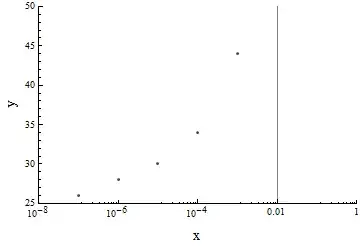
Hi I would simply like to fill in the region from a vertical gridline to the right boundry of the plot

Here is an example

z0vals = {1.*^-8, 1.*^-7, 1.*^-6, 0.00001, 0.0001, 0.001};
evvals = {25, 26, 28, 30, 34, 44};
ptsS = MapThread[List, {z0vals, evvals}]
ListLogLinearPlot[ptsS,
PlotRange -> {{10^-8, 1}, {25, 50}},
Frame -> {True, True, False, False},
FrameLabel -> {Style["x", FontSize -> 16], 
Style["y", FontSize -> 16]}, GridLines -> {{0.01}, None}]

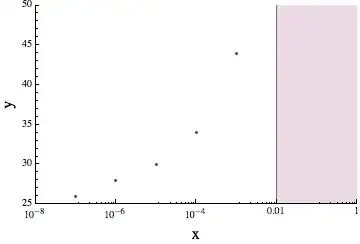
that looks like this

(i.e. shade the region from x = 0.01 to 1)

many thanks. enter image description here
LiaChica
  • 359
  • 3
  • 12
  • I'm not sure if it's possible using Filling specifications or similar, but you could just draw a rectangle over this part of the figure. – Oleksandr R. Jul 12 '13 at 14:22

1 Answers1

3

is this cheating?

z0vals = {1.*^-8, 1.*^-7, 1.*^-6, 0.00001, 0.0001, 0.001};
evvals = {25, 26, 28, 30, 34, 44};
ptsS = MapThread[List, {z0vals, evvals}];

ListLogLinearPlot[{ptsS, {{0.01, 100}, {1, 100}}}, 
    PlotRange -> {{10^-8, 1}, {25, 50}},
    Frame -> {True, True, False, False}, 
    FrameLabel -> {Style["x", FontSize -> 16], 
    Style["y", FontSize -> 16]},
    Joined -> {False, True},
    Filling -> {2 -> Bottom},
    GridLines -> {{0.01}, None}]

(all I did is adding a second list of points to plot and filled bottom up for that)

The resulting plot looks like:

enter image description here

Note that I hardcoded the "boundaries" (0.01, 1, and a "random" 100 for the points I added), you might want to adjust that for your plots

Pinguin Dirk
  • 6,519
  • 1
  • 26
  • 36