I spent some time reverse-engineering the ArrangeSummaryBox code and came up with the function AddCustomTypesetting. It's easy to use and automatically incorporates the delayed embedding button if the expression is larger than a certain limit (given by $NotebookInlineStorageLimit). Consider this example from the Neat Examples section:
myObj[assoc_?AssociationQ][key_String] := assoc[key];
myObj[assoc_?AssociationQ][fun_] := fun@assoc;
ResourceFunction["AddCustomTypesetting"][
 myObj[_?AssociationQ], Function[{obj},
  RawBoxes @ Cell[
     BoxData @ ToBoxes @ Row[{
        "myObj", "[", "[LeftAssociation]",
        Panel @ Grid[{
           {"Length:", obj[Length]},
           {"Keys:", Multicolumn[obj[Keys], 4]},
           {"ByteCount:", obj[ByteCount]}
           }, Alignment -> Left],
        "[RightAssociation]", "]"
        }],
    ShowStringCharacters -> False
    ]
  ]
 ]
myObj[<|"a" -> RandomReal[1, 10], "b" -> 2|>]
myObj[<|"a" -> RandomReal[1, 10^6], "b" -> 2|>]
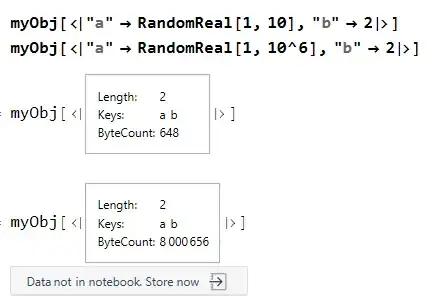
I tend to tinker a bit with functions like these. The latest version can always be found here on GH. The current version (that I will push to ResourceFunction["AddCustomTypesetting"] soon) will also allow you to remove the typesetting rule again with:
AddCustomTypesetting[myObj[_?AssociationQ], None]


