9

I have made this type mistake so many times:

Which[a=b,expr1,True,expr2]

as opposed to the intended but still correct syntax

Which[a==b,expr1,True,expr2]

And, the mistake doesn't jump out at me--especially when there are more than several lines of code. Syntax coloring would help me identify the mistake quickly.

Is it possible to make a custom syntax coloring for "=", "==", and "==="?

Craig Carter
  • 4,416
  • 16
  • 28
  • 1
    SyntaxInformation[Which] seems to indicate that equal signs of odd-index arguments should be colored. But they're not. The setting "ColorEqualSigns" -> OddQ is not documented and seems not to work. A bug? Ask WRI. – Michael E2 May 25 '23 at 16:13
  • 1
    Possible duplicate?: https://mathematica.stackexchange.com/questions/59755/what-is-colorequalsigns-and-how-does-one-use-it -- It certainly implies that you're out of luck. Unless there's a hack around the bug. – Michael E2 May 25 '23 at 16:22
  • 1
    According to this answer, "ColorEqualSigns" -> System`Odd should color = at odd-index arguments, but it colors only the first argument. (So it's a known bug since 2017.) – Michael E2 May 25 '23 at 16:26
  • Thanks @MichaelE2. Useful to know that this is potentially interesting enough that somebody wanted it in 2017. Fingers crossed for a future release. – Craig Carter May 25 '23 at 18:35
  • It doesn't seem that this should be a hard fix because == already gets redisplayed as a contracted symbol. – Craig Carter May 25 '23 at 18:38
  • 1
    If more people ask for it to be fixed, that will make it seem more valuable to WRI to fix it. – Michael E2 May 25 '23 at 18:38
  • You may find some other (ie. not by changing the colors) feasible solutions to your problem in Detecting operator Set in Assumptions. – Domen May 25 '23 at 21:26

1 Answers1

10

1. Syntax Coloring (partially working)

Under menu Edit > Preferences > Appearance > Syntax Coloring > Errors and Warnings, turn on Possible unwanted assignments. This will make = in Solve red.
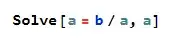
enter image description here

However, as explained by @Itai Seggev, this doesn't work for Which due to a bug. It can be fixed, but it will unfortunately work only for the first argument (which is apparently also a known but not yet fixed bug):

Unprotect[Which];
SyntaxInformation[Which] = SyntaxInformation[Which] /.
  ("ColorEqualSigns" -> _) -> ("ColorEqualSigns" -> System`Odd);
Protect[Which];

enter image description here

2. Operator Rendering

For versions 12.3.1+, you can use OperatorRenderings to set more distinct characters for Set, Equal and SameQ. There is a whole variety of interesting Unicode symbols that resemble =, such as = ﹦ ⩶ ≝ ⌯ ⩸. You can probably find your own combination of symbols which will help you in easier differentiation between them.

opR = AbsoluteCurrentValue[$FrontEndSession, {StyleHints, "OperatorRenderings"}];
opR["="] = "≜";
opR["=="] = "≡";
opR["==="] = "≣";
CurrentValue[$FrontEndSession, {StyleHints, "OperatorRenderings"}] = opR;

Animation of typing

Domen
  • 23,608
  • 1
  • 27
  • 45
  • 2
    Thanks. Not just solve, but also this: Which[a = b, a, True, b] The Solve example wasn't a good example of what I wanted--I'll edit Would you mind deleting your answer so the question gets attention? – Craig Carter May 25 '23 at 15:30
  • I have edited the answer so that it more clearly shows its flaws. However, I believe it still does partially answer your question. Obviously, you have every right to downvote it or/and not accept it :) (Or give a bounty to the question for more attention ...) – Domen May 25 '23 at 21:25
  • Excellent! Accepted as answered. Thanks. – Craig Carter May 26 '23 at 13:02