How does one install and use the new LLMFunction described in Wolfram blog ?
Asked
Active
Viewed 1,461 times
18
-
6who ever downvoted this question, it will help to explain why and what is wrong with it? I honestly do not care about these cloud virtual points (if there is way to set my overall score to be always zero at stackexchange, I will do it right now). But I would like to know why the downvote for? Is it because you do not like others to know how to use this Wolfram function? I find this very strange behavior as I see nothing wrong with this question. – Nasser May 27 '23 at 02:04
-
1Related question (now for 13.3): I need to change the openAI account. How does one get Mathematica to close the old connection so that I can log onto a different (and functional) openAI account? – John Bechhoefer Jun 29 '23 at 03:48
-
I did not have to do anything in V 13.3, it just worked as is. I did not have to login to openAI or anything. Here is screen shot !Mathematica graphics if you having problem using this in V 13.3, I would suggest posting separate question on this as the above question applies to the V 3.2.1 using paclet install which is no longer applies to V 13.3 I'll add a note to my answer on this. – Nasser Jun 29 '23 at 04:55
-
I think your openAI key expires automatically after some period of no use. But I am not sure. If you changed your openAI account, I assume you can just use the new account to get key? Or just use Wolfram cloud account. That does not requires you to login to openAI from what I found. – Nasser Jun 29 '23 at 06:16
-
No, of course it does not expire. Why would it? Password does not... – Валерий Заподовников Jun 29 '23 at 06:50
-
I should have specified that this was for a copy of Mathematica installed on my computer. Actually, the problem arose when I had an issue with my original account. When you open a new account using the same cell phone number, openai does not give you any free quota, so I would have to subscribe, even to explore the functionality. I now remember how to access the original account, and I would like to use that one when I sign in to Mathematica, as illustrated in a previous comment. However, I do not know how to sign out of the "bad" account. – John Bechhoefer Jun 29 '23 at 15:50
-
@Nasser could you please specify if you need to have a working openAI account for your 'update for V 13.3' answer to work? If so do you know how to clean up possible conflict with past expired account? Regards, Chris – chris Jul 01 '23 at 18:15
-
@chris In V 13.3, if you are already logged into Wolfram cloud account, then the LLMFUnction works as is. No need to login or I assume even have an account at openAI, since the connection is going via Wolfram cloud (I assume your Wolfram credit is used for this). If you not logged into Wolfram account, then you would need to have an openAI account in order to get a key. I only have one account at openAI (actually, it is a free one, I use it via google login). That the extent of what I know. If you need more details, you could ask separate question on this. (it complicated setup, I agree) – Nasser Jul 02 '23 at 03:25
3 Answers
16
Update for V 13.3
I found I had to do nothing in V 13.3 to use LLMFunction. It just connects to openAI directly and does not ask for any key. Here is movie showing that.

But, and this is important, I was logged into my Wolfram account when I did the above. i.e. I had signed in using this

When I signed out from Wolfram cloud, then it will not work any more and now it asks for key as before from openAI:

So if you do not want to deal with getting a key each time and having to login to openAI, you have to be logged into your Wolfram cloud account first. Once you are logged into Wolfram cloud account, you will remained logged, and when you restart Mathematica, it will automatically login again without you asking to login each time.
If anyone having problem using LLMFunction in V 13.3 may be separate question will be better.
Original answer
Currently LLMFunction is installed via paclet. In V 13.3 it will be build in.
Step 1
PacletInstall["Wolfram/LLMFunctions"]
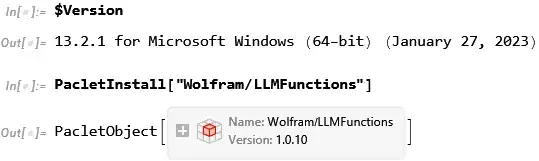
Step 2
The very first time, when you issue the first LLMFunction command, you will get this pop-up menu

If you do not see the above, then run PacletUninstall["Wolfram/LLMFunctions"], exit Mathematica, and open Mathematica again and try again to install it again. The pop-up menu will show up only first time after installation, and only after issuing the very first LLMFunction. It will not show up automatically after just installing the paclet. You must issue an LLMFunction command to see it.
Here is small movie showing the above

Step 3
Now login to your openAI account. (click on Go to OpenAI button above) I used my google login. i.e. I was logged into google before doing all the above.
Now under your settings at top right corner, you will see View API keys.

Step 4
Click on that and then click on Create new secret key

step 5
Now a pop-up menu will show up asking you to enter some text. Then click on create secret key

step 6
Copy the key generated (by clicking on the little icon on the right of the key, to copy it to buffer) which will show up after the above step and paste into the pop-up menu that Mathematica have opened above. Then click I agree on conditions,and click on Done button.
step 7
Now you can use LLMFunction

The above was done on Version 13.2.1 on windows 10.

Nasser
- 143,286
- 11
- 154
- 359
-
1Even though I am logged into my Wolfram account,
LLMFunctionwill not work for me usingv13.3. I get an "exceed quota" error, suggesting lack of API credentials? – gwr Jun 29 '23 at 14:03 -
1It now works, after I upgraded my API plan with OpenAI (my free trial period had elapsed). I guess that the credentials were copied from your earlier version? I believe that you need to have valid API credentials with OpenAI and it has nothing to do with your Wolfram account. – gwr Jun 29 '23 at 15:55
-
1@gwr But I have valid openAI account. At least last time I used it via google account. But when I am not logged into Wolfram cloud first, it asks for key as you see from the above movie. When I am logged into Wolfram account, it does not ask for key. Anyway, this is all confusing to me. I never like to use things that needs keys and login and so on. I am not going to spend time programming something based on me having an account or key or enough quota or be connected to the internet for my program to work. I want to know that my program works and runs anytime and anywhere. But that is just me. – Nasser Jun 29 '23 at 18:56
-
May be in a future version of Mathematica, they will have chatGPT buildtin Wolfram itself directly. i.e. as linked to library as part of Mathematica executable. But may be this is not possible, unless WRI buys out openAI. – Nasser Jun 29 '23 at 18:59
-
This answer does not work for me in Mathematica 14.0, logged into my Wolfram account but without OpenAI credit. I get the message "ServiceExecute::apierr: The service returned the following error message: The model
gpt-4does not exist or you do not have access to it." – divenex Jan 11 '24 at 19:01 -
@divenex I have not tried LLM on V 14. Please open new question if you have problem using LLM's on V 14 and I am sure someone who know will be able to help./ – Nasser Jan 12 '24 at 09:13
-
@Nasser Here is a link to my new question, as you suggested https://mathematica.stackexchange.com/q/296455/41148 – divenex Jan 15 '24 at 11:48
2
How to use the new LLMFunction?
The following Community post "Workflows with LLM functions" has a notebook with different use case examples worked out.

Anton Antonov
- 37,787
- 3
- 100
- 178
0
I can't uninstall the LLM paclet. I get the following error. I have the paid version of ChatGPT and I get the same annoying message that I have exceeded my current quota.


user23438
- 188
- 6
-
Generally, Paclets consist of code etc. stuffed into a directory/folder. You can manually move/rename the entire paclet without invoking any Mathematica code if need be. I'd recommend moving it to a new location (or simply rename it) and verify that you didn't break anything before deleting it completely, to be on the safe side. – Jun 30 '23 at 02:22
-
1if you using V 13.3 then no need to use paclet as LLMFunction is now builtin. If you using earlier version, then I am not sure as I have not seen this error before myself. Either follow advice by jdp or may be post separate question on this problem. – Nasser Jun 30 '23 at 06:05
-
2Note that a paid ChatGPT plan is different from a paid API plan. I had that issue (exceed quota) and only after establishing a means for payment for an API plan did it work out. – gwr Jun 30 '23 at 13:44
-
2Thank you all. I have resolved the issue. As @gwr explained without paying for direct access to the API you cannot use this function. I thought that having ChatGPT Plus gave me that access, but it a completely different service. – user23438 Jun 30 '23 at 15:25