3

I have found that the Defer function, among others such as HoldForm or Inactive, seems to be the key to something I want to do, but I have been unable to figure out. If I calculate the value of a variable and then print it using Defer, it correctly shows me the name of the variable. Doing so in a matrix however simply prints out the name of the matrix rather than the names of the variables within that matrix. I understand why this is the case, but I am unable to figure out how to apply this Defer to the elements of the matrix rather than to the matrix as a whole.

As an example:

a1 = 42;
mat = {{a1, a2}, {b1, b2}};
Print[Defer[MatrixForm[mat]]]
Print["***"]
Print[MatrixForm[mat]]

This currently prints:

mat
***
42  a2
b1  b2

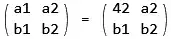
What I would like is:

a1  a2
b1  b2
***
42  a2
b1  b2

This is a minimal example. In my case, I have several matrices, which are not necessarily 2x2, for which I would like to show both the analytical and numerical versions.

sg1234
  • 289
  • 1
  • 7

2 Answers2

3

When you do

a1 = 42;
mat = {{a1, a2}, {b1, b2}};

Then mat has 42 already in there. So too late. I think you probably want

a1 = 42;
mat = HoldForm[MatrixForm@{{a1, a2}, {b1, b2}}];
Row[{mat, " = ", ReleaseHold@mat}]

Mathematica graphics

It is important to note that after ReleaseHold@mat the MatrixForm wrapper is still there. So if you want to actually use mat for computation you need to do

mat = Flatten[List @@ ReleaseHold[mat], 1]

Mathematica graphics

And now you can use mat in rest of code as it now has no wrapper and no Hold on it.

Update

Better ways than what I did (less typing) to remove MatrixForm and the Hold heads from mat is as suggested below by Somos. These are

mat = First@ReleaseHold[mat]

or

mat = Identity @@ ReleaseHold[mat]

Mathematica graphics

Nasser
  • 143,286
  • 11
  • 154
  • 359
  • Very nice, and I am grateful for your edits which make it much more condensed! I am not sure I understand the @ syntax, so if you are able to add an explanation as to how that works I would really appreaciate it. – sg1234 May 27 '23 at 22:36
  • 1
    @sg1234 the @ is just the same as [...] so instead of writing foo[4] you could, if you want, write f@4 it saves one key stroke, that is all. If you are lazy, you'll find yourself using @ more. – Nasser May 27 '23 at 22:40
  • thanks, I've reverted to brackets since I find that easier to read :) but I will keep that in mind and will no doubt move to @ once I am more comfortable with this language... – sg1234 May 27 '23 at 22:42
  • 1
    I suggest Identity@@ReleaseHold[mat] instead. – Somos May 30 '23 at 00:10
  • @Somos that is nice. I did not know this trick. Thanks., – Nasser May 30 '23 at 00:25
  • 1
    You can use First@ReleaseHold[mat] also. – Somos May 30 '23 at 02:28
  • @Somos Yes, this is even simpler. Less typing. no op have many choices to pick from ! – Nasser May 30 '23 at 02:44
3

Mathematica is a very rich symbolic language, and there are many ways to achieve the same result. However, given your description of the problem and my feeling that you are a novice in Mathematica, I would not immediately go to Defer or HoldForm, which are somehow more sophisticated and advanced functions, but would use a more common/idiomiatic approach with rules and ReplaceAll. This keeps the symbolic form of your matrix and its numerical values completely separated, combining them only when you explicitly want to do so.

mat = {{a1, a2}, {b1, b2}};

(* The following can come from some other function that calculates values, e.g. vals = solveProblem[...]; *) vals = {a1 -> 42, a2 -> 43, b2 -> -5};

Print[MatrixForm[mat]] Print["***"] Print[MatrixForm[mat /. vals]]

enter image description here

Domen
  • 23,608
  • 1
  • 27
  • 45
  • You are correct in your assessment of my Mathematica knowledge, and I like this answer a lot as well. I might end up using this version instead... But even if I don't (after all, my code now works and I am happy to move on...), I will definitely keep this way of doing things in mind for other cases, so thank you for taking the time to add this asnwer despite the other one having already been accepted! – sg1234 May 28 '23 at 16:20
  • PS: actually, I really much prefer this way of doing things, the code is much more readable... My minimal example was perhaps too minimal, but using the matrix after via the "Flatten[List @@ ReleaseHold[mat], 1]" command obscures things a bit... Not too sure what (n)etiquette says regarding changing the accepted answer? I feel both are really good and the one to choose could depend on one's use case, but in my case I will be using this one for my situation. – sg1234 May 28 '23 at 16:33
