This shows the step that rejects the root (note that Rationalize is applied to g[x] internally):
tr = Trace[
   NSolve[g[x] == 0 && -2 < x < -1, {x}],
   _Select,
   TraceInternal -> True] // Flatten // Last

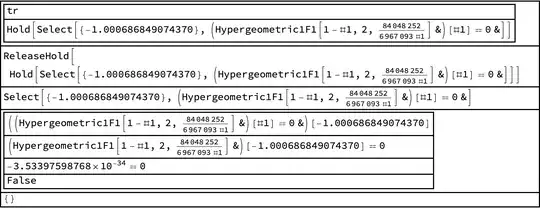
This shows that Hypergeometric1F1 has some round-off error that prevents it from equaling 0. (I change the invisible HoldForm to the visible Hold; it should make the first steps clearer.)
tr = tr /. HoldForm -> Hold;
Trace[tr // ReleaseHold,
  TraceDepth -> 3] /. {h_HoldForm :> h,
  List -> (Column[#, Dividers -> All] &)@*List}
Addendum: Hackathon
Well, just because I get curious how these things work. It won't matter that much when WRI fixes the problem. The code below addresses two bugs.
First, numerics. I said above that round-off error caused the root candidate to test as not-a-root. I now think it's more likely that the hypergeometric function is computed with too much accuracy. That shouldn't be viewed as a problem, but NSolve seems to rely on round-off error being greater than the function value at a root. If so, then too little round-off error is a problem when you compare the function to zero. I don't have a way of knowing if this is true. (One can review arbitrary-precision numbers in the middle sections here; recall that 0``17. represents a result that differs from zero by less than 10^-17. and is equal to zero, that is. 0``17. == 0 evaluates to True).
Second, plot-based root finding (see for example, findAllRoots[] in Find all roots of an interpolating function (solution to a differential equation)) can be subject to the limitations of Plot, in particular the Automatic choices for PlotPoints and PlotRange. In the OP's equation with the bounds -2 < x < -1, NSolve[] finds an approximation to the root by plotting and refines it with FindRoot[]. (Then rejects it due to the numerics issue explained above.) NSolve[] uses the Automatic settings for these two options. For the OP's original problem with the bounds -100 < x < 0, the automatic PlotRange chosen is entirely negative and does not capture the root.
We address both problems below. For the numerics problem, we look for a zero-crossing in an epsilon neighborhood of the proposed root. The WorkingPrecision will be the Precision of the argument Slot[1]. Since arbitrary-precision numbers have extra digits beyond the Precision, we can make a slightly smaller neighborhood than the epsilon corresponding to Precision[Slot[1]] to implement a more rigorous test of roots as befits NSolve[]. We evaluate the function at the root candidate $r_0$ and $r_0\pm\varepsilon/2$. If the absolute value of the sum of the signs of the function values is less than $3$, then either one of the values is zero or two have have opposite. In either case, we accept $r_0$ (even if the zero value occurs at one of $r_0\pm\varepsilon/2$).
For the plotting problem, we set the option PlotRange -> All. It turns out that NSolve does not call Plot[], but the internal version Visualization`Core`Plot[], so we set the option for that function. (One can also set PlotPoints if that seems necessary; one could add that option to findAllRoots[], too.)
Hacking caveat: By adding a definition to Select[], we create the potential of interfering with something unknown and messing up NSolve[]. I checked that the form of Select[] defined below is called only once in the OP's NSolve[] call. Select[] is used a lot internally, so danger exists that a slightly different problem might have slightly different uses of Select[]. I consider that the code is presented for display purposes, for those who might share my curiosity about internals. In the meantime, I'd suggest that findAllRoot[] is a better alternative.
Internal`InheritedBlock[{Select},
 (* Numerics fix *)
 Unprotect@Select;
 ClearAttributes[Select, ReadProtected];
 DownValues[Select] = Prepend[
   DownValues@Select,
   HoldPattern[Select[e_, Function[Equal[f_, 0]]] /; ! TrueQ[$in]] :>
    Block[{$in = True},
     Select[e,
      With[{fvals =
          Function[
            f] /@ (Slot[
              1] (1 + SetPrecision[10^-Precision[Slot[1]],
                  Infinity]/(2) {-1, 0, 1}))},
        dbPrint[fvals];
        Abs@Total[Sign[fvals]] < 3 (* zero-crossing *)
        ] &
      ]
     ]
   ];
 Protect@Select;
(* Plotting fix *)
 WithCleanup[
  opts = Options@VisualizationCorePlot;
  SetOptions[VisualizationCorePlot, {PlotRange -> All}];
(* OP's problem *)
  NSolve[g[x] == 0 && -100 < x < -1, x],
(* clean up *)
  SetOptions[VisualizationCorePlot, opts]
  ]
 ]
(* {{x -> -1.00069}} *)


NSolvereturns unevaluated if you don't include conditions on $x$, which is arguably better than returning an incorrect result. I'd report this to Support. – MarcoB Jun 23 '23 at 01:26PrintPrecisionones). Do you have exact values, or 16-digit approximations? – Michael E2 Jun 23 '23 at 15:29NSolve[Hypergeometric1F1[1 - x, 2, c/x] == 0 && ?? < x < -1, {x}]for3.6705 < c < 7.0045, adjusting the lower bound??to suit. (Forc = 3.6705the root is around-391; forc = 4, it's-2.– Michael E2 Jun 23 '23 at 16:33