11

In working on a custom stock screener, I often need to run mathematica code like this:

{#, FinancialData[#, "DividendYield"]} & /@ Take[FinancialData["NYSE:*"], 30]

In this example, I've limited the result set to 30, but ideally I'd like to get the dividend yield for a much larger set.

This is a specific example of a more general problem I have with mathematica, which is that sometimes I need to run a large number of distinct network IO calls and this blocks further computations.

Is there some workaround for writing calls like this that won't block further computations? I am a fairly competent programmer and therefore can implement a system in my Mathematica code to compute results one at a time, but I am trying to avoid reinventing the wheel. I feel this must be a very common problem for Mathematica users who use the built in data sources/Wolfram|Alpha integration.

F'x
  • 10,817
  • 3
  • 52
  • 92
achristi
  • 113
  • 5
  • 2
    You can start two distinct kernels (or better: two instances of Mathematica front end too, if you're not on a Mac). But then they won't share variables. Alternatively you can evaluate in a subkernel. The relevant functions are ParallelSubmit and Parallel`Developer`QueueRun. – Szabolcs Mar 13 '12 at 13:53
  • Thank you. I will look into the documentation for those calls and do some experimentation. – achristi Mar 13 '12 at 13:56
  • I'll post a full answer tomorrow if I have time, or hopefully someone else will do it before that. – Szabolcs Mar 13 '12 at 13:56
  • @Szabolcs one can start multiple mma frontends on a mac too (by directly exectuing the relevant file inside the Mathematica.app bundle) – acl Mar 13 '12 at 14:30
  • @acl I never used a Mac, I've just been told that it's not easy to do it, and I wanted to avoid another comment about that. Two kernels should suffice anyway, I just prefer two front ends for these things in case I crash or (more likely) freeze one of them. – Szabolcs Mar 13 '12 at 14:55

2 Answers2

11

As Szabolcs mentions, the simplest way to do this is to start a new kernel and push this bulk of data acquisition to that kernel and let it run in the background. There are good examples in the documentation in tutorial/ConcurrencyManagingParallelProcesses.

For your specific case, here's an example following the above:

LaunchKernels[1];
j = ParallelSubmit[{#, FinancialData[#, "DividendYield"]} & /@ 
   Take[FinancialData["NYSE:*"], 30]];

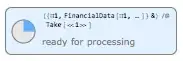
enter image description here

Parallel`Developer`QueueRun[]
Out[3]= True

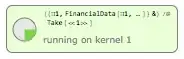
enter image description here

You can continue working as usual in your main kernel.

rm -rf
  • 88,781
  • 21
  • 293
  • 472
4

Parallel Kernels for separate Notebooks

Perhaps you simply want to run two kernels in parallel. You can do this by:

  1. Open Evaluation > Kernel Configuration Options... and set up more than one kernel.

  2. Assign a different kernel to each of two Notebooks using Evaluation > Notebook's Kernel

From there you can run your slow code in one Notebook and do your interactive programming in the other.

Mathematica graphics


"Dialogs" on a single Kernel

I guess the main point of my question is, if I'm launching an external command, even if I am waiting for feedback from it, it shouldn't take up a kernel's resources ... also not to mention that I'm being a complete jerk launching two kernels when we only have 2 on our network seat.

Perhaps your best option in that case is to run calculations in a kernel dialog while the background task is momentarily paused. On my system the shortcut key for Evaluation > Evaluate in Subsession is F7.

As an example try:

Do[Pause[1], {i, 50}];

And while it is running put the cursor in a separate cell containing:

Print[i]

And press F7.

Every time you select that cell and press F7 you should get the current value of i from the evaluating Do loop.

Mathematica graphics

Mr.Wizard
  • 271,378
  • 34
  • 587
  • 1,371