3

What I want to do is to recognize keys in the image and create a list of keys around every key that fall within a pentagonal (or similar) region. These are the ones that can be accidentally pressed instead of the intended key. For the following case, the keys around 'y' will be y->{6,7,t,u g h}. For keys at the edges there would be fewer adjacent keys. Any convenient output format will do.

enter image description here

I have seen 27045, but could not get it to work with this keyboard image. To get a fresh image:

img=Import["https://i.stack.imgur.com/le9Jz.png"];

Your help is appreciated. Thanks.

Syed
  • 52,495
  • 4
  • 30
  • 85
  • Just in case someone has the knowledge to take it further... The functions ImageContents and ImageCases seemed promising to me, but we'd need an entity concept for "letter" or "alphabetic character" or something like that. Both functions (without the qualifier as a second argument) find the keyboard and nothing else. I don't know if that means it can't possibly find anything else, or if it would use a different search strategy if we could tell it to look for "letter". Anyway, if we could find the letters this way, then you can find their location and use a distance function etc etc. – lericr Nov 03 '23 at 17:06
  • Will the image always be a QWERTY keyboard? In which case it might not be necessary to recognize characters. – MelaGo Nov 03 '23 at 19:52
  • @Melago, It is easy enough to create a list by hand, but the general task is about recognizing characters that may not be static. – Syed Nov 04 '23 at 01:25
  • Speaking of which here is a post on the Puzzling SE. – Syed Nov 04 '23 at 02:38
  • Mathematica is poor in text recognition so creating list by hand would be indeed faster than creating code that still would work only in a particular case. – azerbajdzan Nov 04 '23 at 10:25
  • This should be the simplest case. These letters are not misaligned, blurred, rotated, overlapping or otherwise obscured. I tried for a good two hours with TextRecognize before giving up. I will wait; perhaps someone has a method they want to share. @azerbajdzan – Syed Nov 04 '23 at 10:51
  • What font is used on the image of keyboard? – azerbajdzan Nov 04 '23 at 11:38
  • "BookAntiqua" or "BookManOldStyle"? but I could be wrong. – Syed Nov 04 '23 at 11:47
  • No, letter "g" is for example different. – azerbajdzan Nov 04 '23 at 11:54
  • 2
    maybe we can start with something like ds = Dataset[ TextRecognize[Binarize@ImageResize[img, 3000], "Character", {"Text", "BoundingBox", "Image"}, RecognitionPrior -> "Column"], MaxItems -> All]? – kglr Nov 04 '23 at 13:41

2 Answers2

3

Since I consider image recognizing code as a waste of time and typing keys of keyboard in sequence as pretty easy I produced the following code.

keyboard = 
  Characters@
   StringSplit[
    "Q W E R T Y U I O P\n A S D F G H J K L\n  Z X C V B N M", 
    "\n"];(*keys of keyboard separated and aligned with spaces*)
Grid[keyboard]
keys = DeleteCases[Flatten[keyboard], " " | "\n"];
coo = ({1, -2}*Reverse@First@Position[keyboard, #] & /@ keys);
gr = NearestNeighborGraph[coo, {All, 3}, 
   VertexLabels -> Thread[coo -> (Placed[#, Above] & /@ keys)]];
gr = VertexReplace[gr, Thread[coo -> keys]]
# -> AdjacencyList[gr, #] &@"Y"
# -> AdjacencyList[gr, #] &@"A"
# -> AdjacencyList[gr, #] &@"D"

enter image description here

(* "Y" -> {"T", "U", "G", "H"} *)

(* "A" -> {"Q", "W", "S", "Z"} *)

(* "D" -> {"E", "R", "S", "F", "X", "C"} *)

With

keyboard = 
  Characters@
   StringSplit[
    "1 2 3 4 5 6 7 8 9 0\n Q W E R T Y U I O P\n  A S D F G H J K L\n \
  Z X C V B N M", "\n"];

enter image description here

"Y" -> {"6", "7", "T", "U", "G", "H"}

"A" -> {"Q", "W", "S", "Z"}

"D" -> {"E", "R", "S", "F", "X", "C"}

azerbajdzan
  • 15,863
  • 1
  • 16
  • 48
2
kb = Reverse @ 
  TakeList[Characters["1234567890qwertyuiopasdfghjklzxcvbnm"], {10, 10, 9, 7}]; 

 vLabels = Join @@ 
  MapIndexed[{1, Sqrt[3]/2} Reverse@#2 - {(#2[[1]] - 1)/2, 0} -> # &, kb, {2}];


qwertyGraph = 
 VertexReplace[#, vLabels] & @ 
  NearestNeighborGraph[Keys @ vLabels, 
  VertexLabels -> Placed["Name", Center], 
  VertexSize -> Large, 
  VertexLabelStyle -> 14]
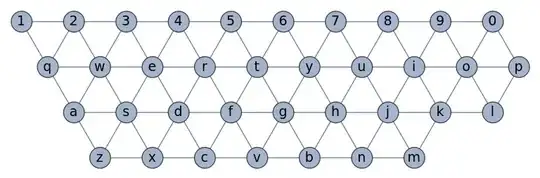
enter image description here

VertexComponent[qwertyGraph, "t", 1]
{"t", "f", "g", "r", "y", "5", "6"}
VertexComponent[qwertyGraph, "b", 1]
{"b", "v", "n", "g", "h"}
Select[DictionaryWordQ] @
 MapApply[StringJoin] @
  Tuples @  
   Map[VertexComponent[qwertyGraph, #, 1] &] @ 
     Characters["hello"]
{"hello", "brook", "jello"}

EDIT by OP

With the dictionary available and the task enunciated in the post mentioned in the comments:

Clear[adjChecker];
adjChecker[k_String] := 
 And @@ (MemberQ[VertexComponent[qwertyGraph, #2, 1], #1] & @@@ 
    Partition[Characters@k, 2, 1])

Select[DictionaryLookup[], adjChecker] // SortBy[StringLength]

{"a", "I", "as", "dc", "er", "es", "lo", "oi", "re", "uh", "we",
"ass", "awe", "dew", "ere", "err", "ewe", "huh", "loo", "lop", "oik", \ "poi", "pol", "pop", "red", "saw", "see", "sew", "was", "wed", "wee", \ "WWW", "awed", "awes", "deed", "deer", "dews", "drew", "ewer", \ "ewes", "free", "kook", "loll", "look", "loop", "plop", "poll", \ "polo", "pool", "poop", "reds", "reed", "sass", "saws", "seed", \ "seer", "sees", "sere", "serf", "sews", "tree", "weds", "weed", \ "weer", "wees", "were", "asses", "deeds", "deres", "dress", "erred", \ "freed", "freer", "frees", "reeds", "resew", "rewed", "sawed", \ "seeds", "sered", "serer", "seres", "sewed", "sewer", "swede", \ "treed", "trees", "tress", "trews", "wases", "weeds", "assert", \ "assess", "deeded", "desert", "lollop", "qwerty", "redder", "redrew", \ "reseed", "resews", "reweds", "sassed", "sasses", "seeded", "seeder", \ "seesaw", "swedes", "wedded", "wedder", "weeded", "weeder", \ "dessert", "dressed", "dresser", "dresses", "redress", "reseeds", \ "resewed", "seesaws", "tresses", "assessed", "assesses", "reseeded", \ "rewedded", "seesawed", "redressed", "redresses"}

Syed
  • 52,495
  • 4
  • 30
  • 85
kglr
  • 394,356
  • 18
  • 477
  • 896
  • Thanks @kglr. The graph show upside down on v12.2.0 on Win7-x64. – Syed Nov 04 '23 at 16:14
  • @Syed, I am using "13.3.1 for Linux x86 (64-bit) (July 24, 2023)". Does removing Reverse from definition of kb fix the issue? – kglr Nov 04 '23 at 16:16
  • No, but it flips it L-R while being upside down. – Syed Nov 04 '23 at 16:18
  • 1
    how about adding the option VertexCoordinates -> Keys[vLabels] in NearestNeighborGraph? – kglr Nov 04 '23 at 16:26
  • @kglr: Those words have nothing to do with the adjacent keys on keyboard, if that was the goal. – azerbajdzan Nov 04 '23 at 16:29
  • thank you @azerbajdzan. No idea how the list (now fixed) was concocted:) – kglr Nov 04 '23 at 16:34
  • 1
    It is fixed now. The DictionaryWordQ application is concise and amazing. – Syed Nov 04 '23 at 16:38
  • @kglr: The words should be words that can be written using adjacent keys. What hello and the outputted words have to do with it? Such word would be for example dress. – azerbajdzan Nov 04 '23 at 16:48
  • @azerbajdzan, "words should be words that can be written using adjacent keys" is an interesting requirement but I don't see that in OP. The list in the example is simply the list of dictionary words that might be typed by someone intending to type "hello" but accidentally hits adjacent keys for each letter (the outputed words have nothing to do with the requirement as you stated). – kglr Nov 04 '23 at 17:05
  • 1
    @kglr: Ahhh... I see. There is a link in one comment of OP under OP question. - There is that requirement. – azerbajdzan Nov 04 '23 at 17:07
  • @kglr: Also... on the other hand if someone accidently hits adjacent keys then such words do not have to be in dictionary. It well could be helkp instead of hello. – azerbajdzan Nov 04 '23 at 17:11
  • I agree. In a not-too-farfetched use case for auto-correction, someone accidentaly typing "helkp" is assumed to have meant to type one of {"hello", "broil", "jello"} – kglr Nov 04 '23 at 17:28