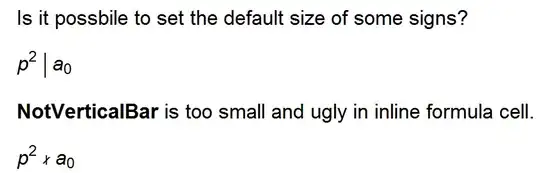
Alt++ could adjust the size, but how to store the satisfactory size?
For example: Each time I type |, its size is (I assume) 12.
How to make its effect like adding StyleBox["|", FontSize->18]?
Alt++ could adjust the size, but how to store the satisfactory size?
For example: Each time I type |, its size is (I assume) 12.
How to make its effect like adding StyleBox["|", FontSize->18]?


SetOptions[InputNotebook[],
 InputAutoReplacements -> {"!!" -> StyleBox["\[NotVerticalBar]", 25]}]
Then just type !!
or use
SetOptions[InputNotebook[],InputAliases -> {"!!" -> StyleBox["\[NotVerticalBar]", 25]}]
to type Esc!!Esc

!! and then add xx!! yy,xx,yy will inherit the FontSize->25.
– HyperGroups
Jul 29 '13 at 08:36
This could be a comment but it is wrong habbit to put the answers there, if it is not what you like I will delete it:
newNV[x__] := Row[{x}, Style["\[NotVerticalBar]", 25]]

newNV[1, 2, 3, 4]


Ctrl+9 this way. But this is also useful, so just leave it as one answer.
– HyperGroups
Jul 29 '13 at 08:40
NotVerticalBar[] for example.
– Kuba
Jul 29 '13 at 08:48
By forcing the character to have a certain font size you run into the problem that its relative size will be incorrect if the entire expression is subsequently styled to have a different font size.
Therefore, it would be better to scale the character with a Magnification factor instead of an absolute font size. If you're interested in typesetting, I would assume that the relevant formatting is really only needed for TraditionalForm output, so I would use the following:
Format[
  NotVerticalBar[x___], TraditionalForm] :=
 DisplayForm[
  RowBox[Riffle[ToBoxes /@ Flatten[{x}],
    StyleBox["\[NotVerticalBar]", Magnification -> 2.5]]]]

TraditionalForm[Style[a^2 \[NotVerticalBar] b, FontSize -> 18]]

TraditionalForm[Style[a^2 \[NotVerticalBar] b, FontSize -> 24]]

If you want this to be in StandardForm, you'd have to replace TraditionalForm by StandardForm everywhere above, and the result would look like this:
Style[a^2 \[NotVerticalBar] b, FontSize -> 24]


UnicodeFontMapping.tras discussed here to use your new glyph automatically. – Mr.Wizard Jul 29 '13 at 08:52