7

I have 3 implicit equations in 5 variables: $f_1(S, y_h, y_d, x_h, J)=0$, $f_2(S, y_h, y_d, x_h, J)=0$, and $f_3(S, y_h, y_d, x_h, J)=0$. These equations determine a 3D surface in $S-y_h-y_d$ coordinate system. The equations are given below.

M = 1;
roo = 0.01;
xd = 3;

f1[S_, yh_, yd_, xh_, J_]:= 2 M (xh^2 - (yh + 1)^2)/(xh^2 + (yh + 1)^2)^2 + 2 S ((xh - xd)^2 - (yh + yd)^2)/((xh - xd)^2 + (yh + yd)^2)^2 + J/(2 yh) == 0,

f2[S_, yh_, yd_, xh_, J_]:= M*xh (yh + 1)/(xh^2 + (yh + 1)^2)^2 + S (xh - xd) (yh + yd)/((xh - xd)^2 + (yh + yd)^2)^2 == 0,

f3[S_, yh_, yd_, xh_, J_]:= JLog[2 yhJ/roo] + 2 M (yh + 1)/(xh^2 + (yh + 1)^2) + 2 S (yh + yd)/((xh - xd)^2 + (yh + yd)^2) - (Log[2/roo] + 1) == 0,

where $S, y_h, y_d, x_h, J$ are Reals, $yh>0$, and $yd>0$.

I am trying to obtain the surface in the $S-yh-yd$ coordinate system like the following image. How to plot it? enter image description here

What I have tried: For 1 equation in 3 variables: $f(S, y_h, y_d) = 0$, I can use ContourPlot3D to get the surface; For equations expressed in an explicit form: $S = S(x_h, J)$, $y_h = y_h(x_h, J)$, $y_d = y_d(x_h, J)$, I can use ParametricPlot3D. But I failed when I faced this issue introduced above. Please help me. Thanks a lot for your support!

Background Information

This problem is from the paper Prominence eruptions and coronal mass ejections triggered by newly emerging flux by J. Lin, T. G. Forbes, P. A. Isenberg.

xzczd
  • 65,995
  • 9
  • 163
  • 468
yuhao chen
  • 73
  • 4

3 Answers3

6

The problem is more involved than I thought.

This post involves several code blocks, you can copy them easily with the help of importCode.

Based on Ulrich Neumann's idea i.e. transforming the $(x_h, y_h, y_d)$ coordinates to $(S,y_h,y_d)$ coordinates, we transform the contour surface directly as follows:

M = 1;
roo = 0.01;
xd = 3;
sys = {(2 M (xh^2 - (yh + 1)^2))/(xh^2 + (yh + 1)^2)^2 + (
        2 S ((xh - xd)^2 - (yh + yd)^2))/((xh - xd)^2 + (yh + yd)^2)^2 + J/(2 yh) == 0, 
       (M xh (yh + 1))/(xh^2 + (yh + 1)^2)^2 + (
        S (xh - xd) (yh + yd))/((xh - xd)^2 + (yh + yd)^2)^2 == 0, 
       J Log[(2 yh J)/roo] + (2 M (yh + 1))/(xh^2 + (yh + 1)^2) + (
        2 S (yh + yd))/((xh - xd)^2 + (yh + yd)^2) == Log[2/roo] + 1};

ruleJS = Solve[sys // Most, {J, S}] // Flatten;

eqmid = sys[[3]] /. ruleJS;

Sfunc[xh_, yh_, yd_] = S /. ruleJS;

plot = ContourPlot3D[ 0 == Subtract @@ eqmid // Evaluate, {xh, -5/2, 7/2}, {yh, 0, 4}, {yd, 0, 6}, PlotPoints -> 20]; // AbsoluteTiming (* {208.254, …} *)

Show[plot /. GraphicsComplex[lst_, rest__] :> GraphicsComplex[ Function[{xh, yh, yd}, {Sfunc[xh, yh, yd], yh, yd}] @@ Transpose@lst // Transpose, rest], AxesLabel -> {S, Subscript[y, h], Subscript[y, d]}, ViewPoint -> {1.2, 0.7, -3.}, ViewVertical -> {-1, 1, 1}, BoxRatios -> Automatic, PlotRange -> {{-1, 3/2}, {0, 4}, {0, 6}}]

enter image description here

Remark

The equation has been defined in a strange manner i.e. 0 == Subtract @@ eqmid to circumvent the following bug:

ContourPlot3D wrong plotting result with extra surfaces

Do notice this work-around is not robust. Personally I recommend turning back to a earlier version like v8 or v9 to circumvent the bug. The following is the output in v8:
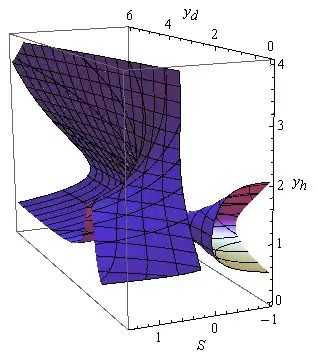
enter image description here

As we can see, the surface is plotted better.

If you just want to know how to plot the surface, you can stop here.


Further Analysis

If you carefully compare the plot in the paper to ours, you may notice that, the surface in the region yd < 3 && yh < 2 && s > 0.5 seems to be slightly inconsistent (even if we ignore the roughness of the result in paper). I suspect the surface in the paper hasn't been plotted in a correct way.

The following is a way to produce a contour surface that's closer to that in paper. The idea itself is simple: we directly eliminate the redundant J and xh, and plot the remaining equation. J is easy to eliminate, because the first equation is a linear equation of J, so it can be Solved easily:

rule1 = Solve[sys[[1]], J] // Flatten

The troublesome part is xh. We can obtain a 5th order polynomial equation of xh by taking numerator of sys[[2]], but as mentioned in the question, xh∈Reals, so only one of the real root is needed. Which real root should be chosen? Additionally, how can this be done in an efficient way?

To speed up the code, I'll turn to the function roots in this post:

roots[c_List] := Block[{a}, a = DiagonalMatrix[ConstantArray[1., Length@c - 2], -1];
   a[[1]] = -Rest@c/First@c;
   Eigenvalues[a]];

I haven't used the more efficient method based on librarylink mentioned therein because I'm too lazy I don't want to make this answer too advanced.

With roots, we build the following function for solving xh:

takenume = (Subtract@@#//Together//Numerator)&;
(xhfunc[S_, yh_, yd_?NumericQ] := First@Sort@Cases[Chop@roots[#], _Real]) &@
 Reverse@CoefficientList[takenume@sys[[2]], xh]

Here I've simply chosen the smallest Real root of the equation. This is merely a guess. But later we'll see this guess indeed reproduces the picture in paper.

By substituting J and xh to last equation, we obtain an equation that can be plotted by ContourPlot3D. To improve the efficiency, we Compile the obtained equation:

lhs3compiled = 
  Compile[{S, yh, yd, xh}, 
   sys[[3]] /. rule1 // Subtract@@#& // Evaluate, 
   RuntimeOptions -> EvaluateSymbolically -> False];

And we write the following code for visualization:

(* The minus sign is for circumventing the aforementioned bug. *)
ContourPlot3D[
  -lhs3compiled[S, yh, yd, xhfunc[S, yh, yd]], 
  {S, -1, 3/2}, {yh, 0, 4}, {yd, 0, 6}, Contours -> {0}, 
  AxesLabel -> Automatic, BoxRatios -> Automatic,
  ViewPoint -> {1.2, 0.7, -3.}, ViewVertical -> {-1, 1, 1}] // AbsoluteTiming

enter image description here

As we can see, the surface in the region yd < 3 && yh < 2 && s > 0.5 is closer to the one in the paper, but this is probably the result of numeric error. Let's take a slice and observe at S = 3/2:

With[{S = 3/2}, Plot3D[
      lhs3compiled[S, yh, yd, xhfunc[S, yh, yd]], {yd, 0, 6}, {yh, 0, 4}, 
  AxesLabel -> Automatic, PlotRange -> All, 
  ScalingFunctions -> {"Reverse", Automatic}, Mesh -> {{0}}, MeshFunctions -> {#3 &},
   PlotPoints -> 50]]

enter image description here

As shown above, there's a sudden jump at the region yd < 3 && yh < 2, and the zero contour actually lies on the cliff wall. Further check suggests the cliff is generated by xhfunc, which involves the artificial "take the smallest real root" operation that's likely to generate jump in solution:

With[{S = 3/2}, Plot3D[
      xhfunc[S, yh, yd], {yd, 0, 6}, {yh, 0, 4}, AxesLabel -> Automatic, 
  PlotRange -> All, ScalingFunctions -> {"Reverse", Automatic}, Mesh -> {{1}}, 
  MeshFunctions -> {#3 &}, PlotPoints -> 50]]

enter image description here

With[{S = 3/2}, ContourPlot[
    {0 == lhs3compiled[S, yh, yd, xhfunc[S, yh, yd]], 
   xhfunc[S, yh, yd] == 1}, {yd, 0, 6}, {yh, 0, 4}, FrameLabel -> Automatic, 
  PlotPoints -> 50, ScalingFunctions -> {"Reverse", Automatic}]]
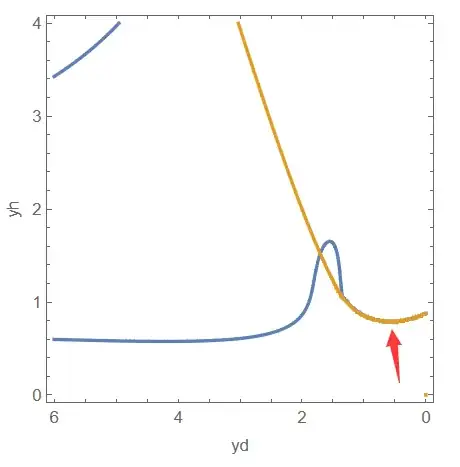
enter image description here

Of course, the illustration above is inadequate to prove the new surface is fake, but I think it's at least plausible.

xzczd
  • 65,995
  • 9
  • 163
  • 468
  • 1
    Nice! It's unfortunate that this (fairly general) bug persists through 5 versions of mathematica! Not to mention the time it takes to get the wrong answer. – chris Dec 27 '23 at 07:49
  • I truly appreciate your response! This surface was plotted in a paper published in 2001, but the author forgot the details about the Mathematica code. Your code brilliantly addresses this issue. I am currently trying to grasp more details of your code. Additionally, I am curious about the outcomes if we choose different real roots (not just the smallest one). Would the parametric surface exhibit significant changes? Once again, thank you sincerely for your time and invaluable contribution. – yuhao chen Dec 27 '23 at 09:16
  • @xzczd Thank your for your updates. I guess there might be additional constraints that exclude the other real roots. As you mentioned, I need a better understanding of this model. If I use your method for plotting in my paper, should I include a citation, acknowledge your contribution in the text, or list you as a co-author? – yuhao chen Dec 27 '23 at 14:19
  • @yuhaochen Directly citing the web page is a possible choice. (BTW this has been discussing in meta but there's no conclusion so far 囧: https://mathematica.meta.stackexchange.com/q/968/1871 ) – xzczd Dec 27 '23 at 14:34
  • @yuhaochen After a more careful analyse, I believe the surface generated by coordinate transformation is the only valid surface. See my revised answer. – xzczd Dec 31 '23 at 08:35
4

Sorry, I'm a little bit late, perhaps I found an easier solution

M = 1;
roo = 0.01;
xd = 3;

f1[S_, yh_, yd_, xh_, J_] := 2 M (xh^2 - (yh + 1)^2)/(xh^2 + (yh + 1)^2)^2 + 2 S ((xh - xd)^2 - (yh + yd)^2)/((xh - xd)^2 + (yh + yd)^2)^2 + J/(2 yh) ; f2[S_, yh_, yd_, xh_, J_] := Mxh (yh + 1)/(xh^2 + (yh + 1)^2)^2 + S (xh - xd) (yh + yd)/((xh - xd)^2 + (yh + yd)^2)^2 ; f3[S_, yh_, yd_, xh_, J_] := JLog[2 yh*J/roo] + 2 M (yh + 1)/(xh^2 + (yh + 1)^2) + 2 S (yh + yd)/((xh - xd)^2 + (yh + yd)^2) - (Log[2/roo] + 1)

First eliminate J,S

solJS = Solve[{f1[S, yh, yd, xh, J], f2[S, yh, yd, xh, J]}==0, {J,S}][[1]] 

From

Map[FunctionDomain[#, {yh, yd, xh}] &, solJS[[All, 2]]]
(*{xh != 3 && yd + yh != 0 && xh^2 + 2 yh + yh^2 != -1, 
xh != 3 && yd + yh != 0 && xh^2 + 2 yh + yh^2 != -1}*)

we conclude xh<3!

One equation eq[ yh, yd, xh] remains

Now we plot ContourPlot3D this equation and memorize S in the colorfunction

    eq =0== f3[S, yh, yd, xh, J] /. solJS 
 pic4D = ContourPlot3D[
  Evaluate[eq], {yh, 0, 5}, {yd, 0, 5}, {xh, -5, 3-.001}, 
  ColorFunction -> Function[{yh, yd, xh}, Evaluate[S /. solJS]], 
  ColorFunctionScaling -> False]

enter image description here

From this plot we take the point and color values

pts = pic4D[[1, 1]][[1]];
cols = pic4D[[1, 1]][[3, 2]];

and collect the 4D solution points S,yh,yd,xh

Syhydxh  = MapThread[Join[{#2},#1 ] &, {pts, cols}];

Plot subspace S,yh,yd

Graphics3D[{Map[{Hue[#[[-1]]], Point[ # [[{ 1, 2, 3}]]]} &, 
Syhydxh ] }, PlotRange -> {{-1, 3/2}, {0, 5}, {0, 5}}, 
AxesLabel -> {S, yh , yd}, Axes -> True]

enter image description here

Unfortunately I couldn't compare my result with xzcdz`s result because Mathematica v12.2 doesn't evaluate his answer.

Hope it helps!

addendum

Complete solution

SyhydxhJ = Map[Join[#,{J /. solJS /. {yh -> #[[2]], yd -> #[[3]], xh-> #[[4]]}} ] &, Syhydxh ];

fullfills the three equations quite well

null = Map[ {Apply[f1, #]  , Apply[f2, #]  , Apply[f3, #]  } &,SyhydxhJ] 

enter image description here

2. addendum

Comparing with xzczd's answer we see a very good match(without "oh no" part)

enter image description here

Ulrich Neumann
  • 53,729
  • 2
  • 23
  • 55
  • Sadly that bug has influenced this solution, too. In v8 the pic4D looks like this: https://i.stack.imgur.com/Cqlgm.png ContourPlot3D simply cannot be used in any step if we want to resolve the problem in higher versions, I'm afraid. – xzczd Dec 27 '23 at 14:48
  • @xzxzd Thanks for your comment. I added pic4D in my answer. Meanwhile I could evaluate your answer and got good agreement – Ulrich Neumann Dec 27 '23 at 14:55
  • @xzxzd The branch you signed with "oh no" doesn't occur in my solution – Ulrich Neumann Dec 27 '23 at 15:08
  • Yeah but a redundant "triangle" appears instead... – xzczd Dec 27 '23 at 15:13
  • 1
    BTW, you don't need to extract the points, just transform the coordinates in the first argument of GraphicsComplex, then you'll obtain the transformed surface. – xzczd Dec 27 '23 at 15:43
  • @Ulrich Neumann Really appreciate your answer, which provides a new perspective on solving this problem. – yuhao chen Dec 27 '23 at 17:28
  • @xzczd I am not familiar with GraphicsComplex. I am wondering how to transform these points into a surface? – yuhao chen Dec 27 '23 at 17:31
  • I just realize something really funny: with lhs=f3[S, yh, yd, xh, J] /. solJS, compare ContourPlot3D[ lhs == 0, {yh, 0, 5}, {yd, 0, 5}, {xh, -5, 5}] and ContourPlot3D[ 0 == lhs, {yh, 0, 5}, {yd, 0, 5}, {xh, -5, 5}] – xzczd Dec 28 '23 at 01:52
  • @xzczd Astonishing! Though the correct use of ContourPlot3D should be ContourPlot3D[lhs , {yh, 0, 5}, {yd, 0, 5}, {xh, -5, 5}, Contours -> {0}] ??? – Ulrich Neumann Dec 28 '23 at 14:30
  • lhs == 0 and 0==lhs are valid nowadays, of course. But in version 5 or earlier, when ContourPlot3D is still inside a official package, ContourPlot3D[lhs , ……, Contours -> {0}] is indeed the only valid syntax. – xzczd Dec 29 '23 at 02:49
2

Here I present an alternative solution which uses NSolve to get all real solution points S,yh,yd,xh of the underlying problem.

M = 1;
roo = 1/100;
xd = 3;

f1[S_, yh_, yd_, xh_, J_] := 2 M (xh^2 - (yh + 1)^2)/(xh^2 + (yh + 1)^2)^2 + 2 S ((xh - xd)^2 - (yh + yd)^2)/((xh - xd)^2 + (yh + yd)^2)^2 + J/(2 yh); f2[S_, yh_, yd_, xh_, J_] := Mxh (yh + 1)/(xh^2 + (yh + 1)^2)^2 + S (xh - xd) (yh + yd)/((xh - xd)^2 + (yh + yd)^2)^2; f3[S_, yh_, yd_, xh_, J_] := JLog[2 yh*J/roo] + 2 M (yh + 1)/(xh^2 + (yh + 1)^2) + 2 S (yh + yd)/((xh - xd)^2 + (yh + yd)^2) - (Log[2/roo] + 1)

solJS = Solve[{f1[S, yh, yd, xh, J], f2[S, yh, yd, xh, J]} == 0, {J,S}][[1]]

Find all real solutions of f3==0

solxh[yh_, yd_] :=Values@NSolve[{0 == f3[S, yh, yd, xh, J] /. solJS, -5 < xh < 3}, xh,Reals] // Flatten

zwsol = Table[zw = solxh[yh, yd];Map[ {S /. solJS, yh, yd, xh} /. xh -> # &, zw], {yh, Subdivide[1/100, 5, 50]}, {yd,Subdivide[1/100, 5, 50]}];// AbsoluteTiming (271seconds)

All solution quadrupels S,yh,yd,xh

SyhydxhN = zwsol /. {} -> Nothing // Flatten[#, 2] &;   
Graphics3D[{ Map[{Hue[#[[3]]], Point[Most[#]]} &, SyhydxhN ]}, 
PlotRange -> {{-1, 3/2}, {0, 5}, {0, 5}}, AxesLabel -> {S, yh, yd},Axes -> True]

enter image description here

comparing with xzczd's solution (sorry,in v12.2 I couldn't exclude the "oh no"-surfaces)

enter image description here

conclusion:

If NSolve-result is correct,

  • the solution covers a smaller surface than that found by xzczd
  • a slightly different solution found with ContourPlot3D in my first answer
Ulrich Neumann
  • 53,729
  • 2
  • 23
  • 55
  • @xzxzd I checked my code, it runs fine in a fresh kernel on Mathematica v12.2 – Ulrich Neumann Dec 30 '23 at 13:05
  • Ah, I see the issue. I've tested the solxh outside of Table, so the yh and yd are not successfully passed into solJS. (I'd suggest define the function as e.g. mid[yh_, yd_] = 0 == f3[S, yh, yd, xh, J] /. solJS; solxh[yh_, yd_] := Values@NSolve[{mid[yh, yd], -5 < xh < 3}, xh, Reals] // Flatten to make it more robust. ) – xzczd Dec 30 '23 at 13:46
  • @xzczd I am curious what could be the reason for the different solution-surfaces – Ulrich Neumann Dec 30 '23 at 16:49
  • Your solution is more plausible, I should say, because replacing NSolve with Solve results in the same solution, and Solve is usually quite robust. But I can't think out a way to analyze deeper at the moment... – xzczd Dec 31 '23 at 03:37
  • @xzczd Perhaps you could take all the points from your plot "extra surfaces" and check wether they fullfill the three equations? – Ulrich Neumann Dec 31 '23 at 07:57
  • @xzczd Thanks for your reply. I would like to plot the surface of the solution point cloud S,yh,yd, but didn't succeed. I tried ListContourPlot3D and ListSurfacePlot3D. Any idea? Thanks – Ulrich Neumann Dec 31 '23 at 08:09
  • Join the point to a surface is just not easy. The performance issue of ListSurfacePlot3D is a long standing problem. (Just search in this site. ) The performance of ListContourPlot3D is also not great AFAIK. I've just finished revising my answer, have a look. – xzczd Dec 31 '23 at 08:34