4

Trying to solve this pde (inspired by this question NeumannValue when differential equation does not use Laplacian )

pde = Derivative[2, 0][f][x, y] ==y^2*f[x, y] + NeumannValue[1, x == 1 ]
bc = DirichletCondition[f[x, y] == 1, x == 1]  ;
F = NDSolveValue[{pde, bc}, f, {x, 0, 1}, {y, 0, 1}] ;
Plot[{Derivative[1, 0][F][1, y] }, {y, 0, 1},GridLines -> {None, {1}}, PlotRange -> {0, 1},PlotLabel ->"NeumannValue[1,x\[Equal]1] isn't fullfilled!" ]

enter image description here

In contrast to that solution my "handmade Galerkin method" gives a smooth result, which fullfills the Neumann condition quite well

enter image description here

(If of interest here my code handmade Galerkin method )

I'm aware that NeumanValue in the first example is ignored because of DirichletCondition at the same boundary.

My question :

Is it possible to make FEM solution work for the case that Neumann and Dirichlet bcs are defined at the same place?

Thanks!

Ulrich Neumann
  • 53,729
  • 2
  • 23
  • 55
  • 2
    Neumann and Dirichlet bcs are defined at the same place? from Neumann condition and Dirichlet condition at the same point one of the answers says applying Dirichlet boundary conditions will override your Neumann boundary conditions in the case of the finite element method – Nasser Mar 01 '24 at 12:28
  • @Nasser Thanks for your reply. Galerkin method gets by without this restriction I think. First partial integration "processes" the Neumann condition, then the unknowns of Dirichlet condition are inserted. This leads to the final set of equations. – Ulrich Neumann Mar 01 '24 at 13:09
  • 1
    I would like to see the code. Also, note that Dirichlet conditions apply at points while NeumannValues apply at edges (in 1D these are also points) – user21 Mar 01 '24 at 16:51
  • @user21 Thanks, I try to share the file but am unsure how to do it... – Ulrich Neumann Mar 01 '24 at 16:54
  • What do you mean with 'file' in your post you mentioned code. Could you not share that? – user21 Mar 01 '24 at 16:55
  • It is long code. Perhaps I can save the notebook in the Mathematica cloud? – Ulrich Neumann Mar 01 '24 at 16:58
  • As a side note, there is a note about this not being possible currently, but who knows maybe you can - I just can not imagine how it's done right now. – user21 Mar 01 '24 at 16:58
  • @user21 Now my notebook is available, see link in my answer. Hope it's selfexplaining – Ulrich Neumann Mar 01 '24 at 17:13
  • @UlrichNeumann Thank you very much for your code (+1). It looks like your code is not optimized yet. It takes about 3 min on the mesh of 158 triangle elements only. – Alex Trounev Mar 01 '24 at 19:48
  • 1
    @AlexTrounev Thank you for your reply. I only introduced Gaussian quadratur to make code faster. But it seems to work. Meanwhile I try(actual without success ;-) ) to use Mathametica DiscretizePDE functionality to make code run faster... – Ulrich Neumann Mar 01 '24 at 20:05
  • @UlrichNeumann What boundary conditions you used at $y=0, 1$? – Alex Trounev Mar 01 '24 at 20:28
  • @AlexTrounev Only boundary conditions at x==1 , see constraints RB1 = Map[fi[[#]] == 1 &, indexR1]; in NMinimize – Ulrich Neumann Mar 01 '24 at 20:37
  • @UlrichNeumann It is not right. Probably we can use pde at the border y==0 and y==1. – Alex Trounev Mar 01 '24 at 22:12
  • @AlexTrounev I don't undersatnd "it is not right". Look at NDSolveValue[{Derivative[2, 0][f][x, y] == y^2*f[x, y], {f[1, y] == 1, Derivative[1, 0][f][1, y] == 1}}, f, {x, 0, 1}, {y, 0, 1}] which gives the correct solution without additional bc using a not-FEM solver. – Ulrich Neumann Mar 02 '24 at 07:42
  • @UlrichNeumann In a case of NDSolve with Automatic option we use pde at y==0 and y==1. These conditions equal to ``NeumanValue[0,y==0||y==1] in a case of FEM. See my answer. Your solution has high error since you are not used boundary conditions at $y=0,1$ . – Alex Trounev Mar 02 '24 at 12:35
  • @AlexTrounev Which solution, from my last comment or from my answer, has large error ? – Ulrich Neumann Mar 02 '24 at 12:37
  • @UlrichNeumann Please compare your solution obtained with Galerkin method with f[x,y] from NDSolve and with my solution u1[x,y]. – Alex Trounev Mar 02 '24 at 15:26

3 Answers3

4

To verifier solution computed with Galerkin method we can use the Euler wavelets collocation method from my answer here. We add boundary conditions at y==0 and y==1 in a form of homogenous Neumann condition or in a form of pde. First version

UE[m_, t_] := EulerE[m, t];
psi[k_, n_, m_, t_] := 
  Piecewise[{{2^(k/2) UE[m, 2^k t - 2 n + 1], (n - 1)/2^(k - 1) <= t <
       n/2^(k - 1)}, {0, True}}];
PsiE[k_, M_, t_] := 
 Flatten[Table[psi[k, n, m, t], {n, 1, 2^(k - 1)}, {m, 0, M - 1}]]
k0 = 3; M0 = 4; With[{k = k0, M = M0}, 
 nn = Length[Flatten[Table[1, {n, 1, 2^(k - 1)}, {m, 0, M - 1}]]]];
dx = 1/(nn); xl = Table[l*dx, {l, 0, nn}]; zcol = 
 xcol = Table[(xl[[l - 1]] + xl[[l]])/2, {l, 2, nn + 1}]; Psijk = 
 With[{k = k0, M = M0}, PsiE[k, M, t1]]; Int1 = 
 With[{k = k0, M = M0}, Integrate[PsiE[k, M, t1], t1]];
Int2 = Integrate[Int1, t1];
Psi[y_] := Psijk /. t1 -> y; int1[y_] := Int1 /. t1 -> y;
int2[y_] := Int2 /. t1 -> y;
M = nn;

U1 = Array[a, {M, M}]; U2 = Array[b, {M, M}]; G1 = Array[g1, {M}]; G2 = Array[g2, {M}]; G3 = Array[g3, {M}]; G4 = Array[g4, {M}];

u1[x_, z_] := int2[x] . U1 . Psi[z] + x G1 . Psi[z] + G4 . Psi[z]; u2[x_, z_] := Psi[x] . U2 . int2[z] + z G2 . Psi[x] + G3 . Psi[x]; uz[x_, z_] := Psi[x] . U2 . int1[z] + G2 . Psi[x]; ux[x_, z_] := int1[x] . U1 . Psi[z] + G1 . Psi[z]; uxx[x_, z_] := Psi[x] . U1 . Psi[z]; uzz[x_, z_] := Psi[x] . U2 . Psi[z]; (Equations and solution)

eqn = Join[ Flatten[Table[(uxx[xcol[[i]], zcol[[j]]] - zcol[[j]]^2 u1[xcol[[i]], zcol[[j]]]), {i, M}, {j, M}]], Flatten[Table[ u1[xcol[[i]], zcol[[j]]] - u2[xcol[[i]], zcol[[j]]], {i, M}, {j, M}]]]; bc = Join[Flatten[Table[ux[1, zcol[[j]]] - 1 == 0, {j, M}]], Flatten[Table[u1[1, zcol[[j]]] - 1 == 0, {j, 1, M}]], Flatten[Table[uz[xcol[[j]], 0] == 0, {j, M}]], Flatten[Table[uz[xcol[[j]], 1] == 0, {j, M}]]]; var = Join[Flatten[U1], Flatten[U2], G1, G2, G3, G4];

eq = Join[Table[eqn[[i]] == 0, {i, Length[eqn]}], bc];

{v, m} = CoefficientArrays[eq, var];

sol1 = LinearSolve[m // N, -v];

(Visualization) rul = Table[var[[i]] -> sol1[[i]], {i, Length[var]}];

Plot3D[Evaluate[u1[x, y] /. rul], {x, 0, 1}, {y, 0, 1}, PlotLegends -> Automatic, ColorFunction -> "SunsetColors", PlotRange -> All, Exclusions -> None]

Plot3D[Evaluate[u2[x, y] /. rul], {x, 0, 1}, {y, 0, 1}, PlotLegends -> Automatic, ColorFunction -> "SunsetColors", PlotRange -> All, Exclusions -> None, PlotTheme -> "Marketing", MeshStyle -> White]
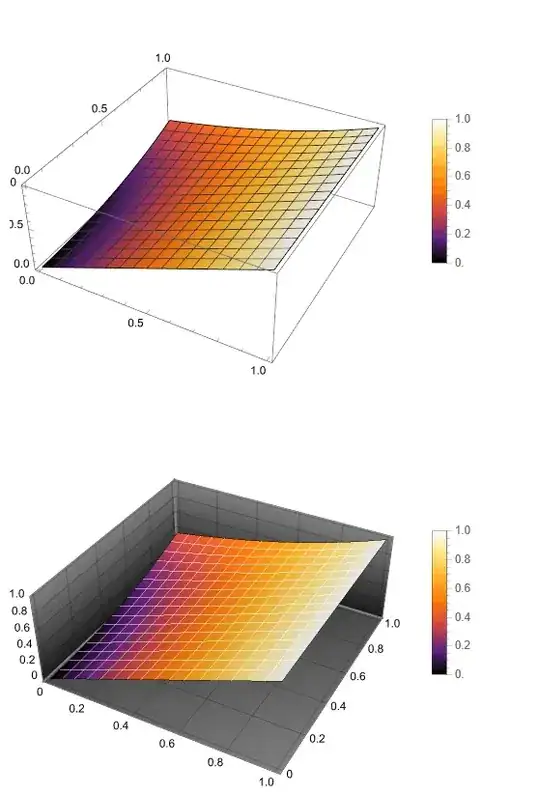
Figure1

In second version we use pde as follows

eq0 = Join[Table[uxx[xcol[[i]], 0] == 0, {i, M}], 
   Table[uxx[xcol[[i]], 1] - u1[xcol[[i]], 1] == 0, {i, M}]];

eq1 = eq = Join[Table[eqn[[i]] == 0, {i, Length[eqn]}], Take[bc, 2 M], eq0]; sol2 = CoefficientArrays[eq1, var]

sol = LeastSquares[sol2[[2]] // N, -sol2[[1]]]

Solution sol is not differ from shown above sol1, which is already obvious.

Update 1. We can compare solution u1[x,y]/.rul and u1[x,y]/.rul1 with

sol3 = NDSolveValue[{Derivative[2, 0][f][x, y] == 
    y^2*f[x, y], {f[1, y] == 1, Derivative[1, 0][f][1, y] == 1}}, 
  f, {x, 0, 1}, {y, 0, 1}]

We have

{Plot[Table[Abs[sol3[x, y] - u1[x, y] /. rul1], {x, 0, 1, .1}] // 
   Evaluate, {y, 0, 1}, FrameLabel -> {"y", "\[Delta]f"}, 
  PlotLegends -> Automatic, Frame -> True, 
  PlotLabel -> "Absolute error for `pde` at y=0,1"], 
 Plot[Table[Abs[sol3[x, y] - u1[x, y] /. rul], {x, 0, 1, .1}] // 
   Evaluate, {y, 0, 1}, FrameLabel -> {"y", "\[Delta]f"}, 
  PlotLegends -> Automatic, Frame -> True, 
  PlotLabel -> "Absolute error for NeumannValue[0,y==0||y==1]"]}

Figure 2

Alex Trounev
  • 44,369
  • 3
  • 48
  • 106
  • 1
    This solution mifght be obtained with FEM-solver eqnsFEM = {Derivative[2, 0][f][x, y] == y^2*f[x, y] + NeumannValue[1, x == xMax(*&&0\[LessEqual]y\[LessEqual]1*)] + (1/2 E^-y (1 - E^(2 y) (-1 + y) + y)) NeumannValue[1, x == 0 ] , DirichletCondition[f[x, y] == 1, x == xMax] }; solFEM = NDSolveValue[eqnsFEM, f, {x, xMin, xMax}, {y, yMin, yMax}] ; too. As you can see there is no Neumanncondition at y==0||y==1 included. – Ulrich Neumann Mar 03 '24 at 17:01
  • Interestingly the solution exactly fullfills NeumannValue and DirichletCondition. If we try to decrease the last NeumannCondition .1 (1/2 E^-y (1 - E^(2 y) (-1 + y) + y)) NeumannValue[1, x == 0 ] this property is lost. Don't know why – Ulrich Neumann Mar 03 '24 at 17:08
  • @UlrichNeumann Yes, you are right, FEM solution also computable, but homogeneous NeumannValue[0, y==0] is Automatic option in this case, since this is Automatic for any PDE without given boundary conditions. – Alex Trounev Mar 03 '24 at 18:04
  • I'm not so sure about that because for this special pde only the derivative Derivative[1,0][f][x,y] at boundary x=const can be specified as NeumannValue. – Ulrich Neumann Mar 03 '24 at 21:24
  • @UlrichNeumann You can check that Derivative[0,1][solFEM][x,0]=0. – Alex Trounev Mar 03 '24 at 22:03
  • Thanks I checked it. But Derivative[0, 1][solFEM][x, 1]!=0 ! – Ulrich Neumann Mar 03 '24 at 22:09
  • @UlrichNeumann Yes, from one side implemented NeumannValue[0, y==0], and from other side pde. It looks like this is optimal solution in L2 norm. – Alex Trounev Mar 04 '24 at 00:47
  • 1
    The solution also agrees with the analytical one F = Values@DSolve[{Derivative[2, 0][f][x, y] == y^2*f[x, y], f[1, y] == 1,Derivative[1, 0][f][1, y] == 1}, f, {x, 0, 1 }, {y, 0, 1}] [[1,1]], which only prescribes two boundary conditions. – Ulrich Neumann Mar 04 '24 at 08:20
  • @UlrichNeumann Thank you very much for these comments. Nevertheless, for numerical solution we need some boundary conditions at $y=0, 1$ in a form of Dirichlet, Neumann or PDE. – Alex Trounev Mar 04 '24 at 12:30
  • Many thanks for the helpful discussion from me too. For numerical solution with Galerkin method I cannot agree. Have a look at my extended comment in the discussion with user21 – Ulrich Neumann Mar 04 '24 at 13:45
4

This is not an answer but an extended comment. I think it would be good to simplify and speed up your code and make sure the FEM computations are correct. Following the FEM Programming tutorial we get this:

Needs["NDSolve`FEM`"]

pde = Derivative[2, 0][f][x, y] == y^2*f[x, y] + NeumannValue[1, x == 1]; bc = DirichletCondition[f[x, y] == 1, x == 1]; F = data[{pde, bc}, f, {x, 0, 1}, {y, 0, 1}];

Using

NDSolveValue @@ F

gives what you had. This makes sure that we use the same input for NDSolveValus and for the system matrix extraction. Next we extract the system matrices:

{dPDE, dBC, vd, sd, md} = NDSolve`FEM`ProcessPDEEquations @@ F;
sm = dPDE["StiffnessMatrix"];
lv = dPDE["LoadVector"];

Next, we deploy the boundary conditions:

DeployBoundaryConditions[{lv, sm}, dBC];

Solve the linear equations:

result = LinearSolve[sm, lv];

And post process the solution:

NDSolve`SetSolutionDataComponent[sd, "DependentVariables", 
  Flatten[result]];
ProcessPDESolutions[md, sd]

Now, this solve the equation in exactly the same way like NDSolve would solve the PDE. What we can do next, is ignore the DirichletCondition. This will give a warning but we want to extract the load vector as if the DirichletCondition did not overwrite it:

F = data[{pde(*,bc*)}, f, {x, 0, 1}, {y, 0, 1}];
{dPDE, dBC, vd, sd, md} = NDSolve`FEM`ProcessPDEEquations @@ F;
smDummy = dPDE["StiffnessMatrix"];
lv = dPDE["LoadVector"];
DeployBoundaryConditions[{lv, smDummy}, dBC];
lv

Now, you have the load vector with the NeumannValue deployed. In your notebook you transform the PDE into an optimization problem and I have some difficulty to understand what you are doing there. If you could show this minimization approach based on the stiffness matrix and the NeumannValue, that would be useful, for me to understand how you want to solve this.

Now, let's do another experiment. Now we ignore the DirichletBoundary condition altogether:

pde = Inactive[Div][{{-1, 0}, {0, 0}} . 
      Inactive[Grad][f[x, y], {x, y}], {x, y}] - y^2*f[x, y] == 
   NeumannValue[1, x == 1];
(*bc=DirichletCondition[f[x,y]==1,x==1];*)
F = data[{pde(*,bc*)}, f, {x, y} \[Element] mesh];

Proceed as before, now we get an expected message:

{dPDE, dBC, vd, sd, md} = NDSolve`FEM`ProcessPDEEquations @@ F;
sm = dPDE["StiffnessMatrix"];
lv = dPDE["LoadVector"];

enter image description here

DeployBoundaryConditions[{lv, sm}, dBC];
result = LinearSolve[sm, lv];
NDSolve`SetSolutionDataComponent[sd, "DependentVariables", 
  Take[Flatten[result], md["DegreesOfFreedom"]]];
{ifun} = ProcessPDESolutions[md, sd];

Now, we look at the result in the same way the OP has done:

Plot[Evaluate[{Derivative[1, 0][ifun][1, y], 
   Derivative[1, 0][ifun][0, y]}], {y, 0, 1}]

enter image description here

user21
  • 39,710
  • 8
  • 110
  • 167
1

modified

Extended comment to answer @user21.

Meanwhile I could DiscretizePDE too. Here my code

{xMin, xMax, yMin, yMax} = {0, 1, 0, 1};
Needs["NDSolve`FEM`"]

meshing

mesh = ToElementMesh[Rectangle[{xMin, yMin}, {xMax, yMax}], 
"MaxCellMeasure" -> 0.0001 , 
"MeshElementType" -> "TriangleElement", "MeshOrder" -> 1] ;
index = MeshCells[MeshRegion[mesh], 0][[All, 1]];

rand = mesh["BoundaryElements"][[All, 1]] // Flatten[#, 1] &; indexR = Flatten[rand ] // DeleteDuplicates; pi = mesh["Coordinates"]; (* alle Punkte ) fi = Table[f[i], {i, 1, Length[pi]}]; ( Unbekannte DOFs *)

reg1 = ImplicitRegion[0 <= y <= yMax && x == xMax, {x, y}]; (* Randx[Equal]xMax) rand1 = Select[rand ,RegionMember[reg1, pi[[ #[[1]]]]] &&RegionMember[reg1, pi[[ #[[2]]]]] &];( an diesem Rand gilt f[xMax,y][Equal]1*) indexR1 = Flatten[rand1] // DeleteDuplicates;

discretization

vd = NDSolve`VariableData[{"DependentVariables","Space"} -> {{f}, {x, y}}];
sd = NDSolve`SolutionData[{"Space"} -> {mesh}];
cdata = InitializePDECoefficients[vd, sd, 
"DiffusionCoefficients" -> {{  {{-1, 0}, {0, 0}}}}, 
"ReactionCoefficients" -> {{-y^2} }];
bcdata = InitializeBoundaryConditions[vd,sd, {{NeumannValue[1, x == 1]}}   ] 
mdata = InitializePDEMethodData[vd, sd];

(Discretization) dpde = DiscretizePDE[cdata, mdata, sd] ; {load, stiffness, damping, mass} = dpde["All"];

dbc = DiscretizeBoundaryConditions[bcdata, mdata, sd]; DeployBoundaryConditions[{load, stiffness}, dbc];

solution

RB1 = Map[fi[[#]] == 1 &, indexR1];
mini = NMinimize[{(stiffness.fi - Flatten[load]) . (stiffness.fi-Flatten[load]), RB1}, fi];
solfun = ElementMeshInterpolation[{mesh}, fi /. mini[[2]]];

Plot3D[ solfun[x, y] , {x, y} [Element] mesh, AxesLabel -> {x, y} , PlotRange -> {{0, 1}, All}[[-1]], MeshFunctions -> (#3 &)]

enter image description here

Plot [ {Derivative[1, 0][solfun][1, y],Derivative[1, 0][solfun][0, y]} , {y, 0, 1}]

enter image description here

The result shows , the two Neumann-conditions and the DirichletCondition are fullfilled quite well.

It seems to be possible to get plausible results with Galerkin method, even if we take NeumannValue and Dirichletcondition at the same place of the boundary!

addendum

With the last example (@user21 's extended comment) the minimization problem with matrices smdummy and lv follows after introducing the dirichletcondition

RB1 = Map[fi[[#]] == 1 &, indexR1];(* all meshpoints `x==1`*)
mini = NMinimize[{(smdummy.fi + Flatten[lv]) . (smdummy.fi+    Flatten[lv]), RB1}, fi];
user21
  • 39,710
  • 8
  • 110
  • 167
Ulrich Neumann
  • 53,729
  • 2
  • 23
  • 55
  • @user21 But it gives the same result found in galerkinUN.nb. – Ulrich Neumann Mar 04 '24 at 09:46
  • I'd say, because what you ask for can not be fulfilled. – user21 Mar 04 '24 at 10:13
  • @user21 But the last plot shows the Neumannconditions are "roughly" fullfiled!? – Ulrich Neumann Mar 04 '24 at 10:14
  • @user21 I am not yet convinced from your last comment, see my modified answer(extended comment) with refined mesh – Ulrich Neumann Mar 04 '24 at 12:15
  • You can use this: bcdata2 = InitializeBoundaryConditions[vd, sd, {{DirichletCondition[f[x, y] == 1, x == 1]}}]; indexR1 = bcdata2["Stationary"][[1, 1, 3, 2, 1]] to compute the indexR1 – user21 Mar 05 '24 at 09:22
  • @user21 Thanks, that makes it easier! Just one question: In my addendum (extended comment) I wondered about the sign of lv, are there any changes made compared to load before? – Ulrich Neumann Mar 05 '24 at 09:34
  • I don't understand the question. Have a look at the update. I have to stop here. I would want to work on other things. – user21 Mar 05 '24 at 09:50