4

First-time user of Mathematica. I have three equations, and I'm trying to solve for one of the variables. I'm hoping this is just a syntax problem.

eq1 = a^3*c + c^3*a == (a + (1 - f)*d)^3*b + b^3*(a + (1 - f)*d);
eq2 = g == c - b; 
eq3 = (e - d)/(a + d) == g/b;
Solve[{eq1, eq2, eq3}, d]

But it results in just empty output:

the result is just an empty squiggly-braces

codebpr
  • 2,233
  • 1
  • 7
  • 26

2 Answers2

6
$Version

(* "14.0.0 for Mac OS X ARM (64-bit) (December 13, 2023)" *)

Clear["Global`*"]

eqns = {
   eq1 = a^3*c + c^3*a == (a + (1 - f)*d)^3*b + b^3*(a + (1 - f)*d),
   eq2 = g == c - b,
   eq3 = (e - d)/(a + d) == g/b};

vars = Variables[Level[eqns, {-1}]]

(* {a, b, c, d, e, f, g} *)

Option 1: Solve for three variables (including d) and disregard unwanted solutions. For example,

sol1a = d -> # & /@ (d /. Solve[eqns, {d, a, b}]);

There are multiple lengthy solutions.

#[sol1a] & /@ {Length, LeafCount}

(* {3, 17664} *)

or,

sol1b = d -> # & /@ (d /. Solve[eqns, {d, b, c}]);

#[sol1b] & /@ {Length, LeafCount}

{6, 2215}

Option 2: Solve for d and eliminate two other variables. For example,

sol2a = Solve[eqns, d, {a, b}];

#[sol2a] & /@ {Length, LeafCount}

(* {3, 17667} *)

or,

sol2b = Solve[eqns, d, {b, c}];

#[sol2b] & /@ {Length, LeafCount}

(* {6, 2221} *)

Option 3: Solve for d and use the option MaxExtraConditions

(sol3 = SolveValues[eqns, d, MaxExtraConditions -> All])
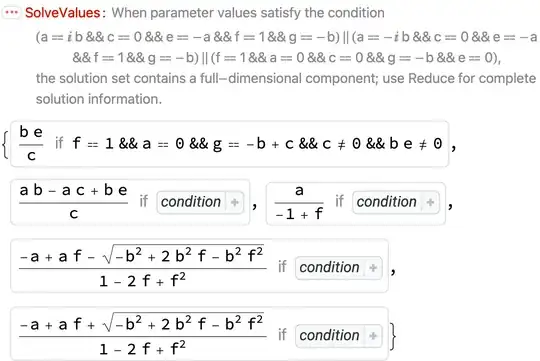
enter image description here

Bob Hanlon
  • 157,611
  • 7
  • 77
  • 198
  • Thanks, that's great. Could I narrow down the resulting solutions by assuming all the vars would be real numbers greater than zero? Also I'm trying to result in an equation which I can eventually type into python, so when the solution has several || and Root and #, then I don't even know where to begin with that. It seems that option 3 is closer to what I'm looking for, right? – DansAltamira Mar 06 '24 at 21:22
  • Just include the constraints in the Solve, e.g., sol1c = d -> # & /@ (d /. Solve[Join[eqns, {vars \[Element] PositiveReals}], {d, a, b}]) // ToRadicals; – Bob Hanlon Mar 06 '24 at 21:54
4

It's not a simple system of equations. There might be elegant methods. I present a more brute-force one:

eq4 = eq3 /. g -> (-b + c) // Simplify

c = c /. Solve[eq4, c][[1]]

Solve[eq1, d] // Simplify

Or using Eliminate to make it a one-liner:

Solve[Eliminate[{eq1, eq2, eq3}, {g, c}], d]

Or, as suggested by @Artes, using Reduce can even give some rational answers too instead of Root objects:

Reduce[Eliminate[{eq1, eq2, eq3}, {g, b}], d]

To convert Root objects to usual form just use ToRadicals. As an illustration:

sol = Reduce[Eliminate[{eq1, eq2, eq3}, {g, b}], d];

so[[3, 2, 1]] // ToRadicals

codebpr
  • 2,233
  • 1
  • 7
  • 26
  • Did you mean Reduce[Eliminate[{eq1, eq2, eq3}, {g, b}], d]? Also can I reduce the number of solutions by telling it all my vars are >0? – DansAltamira Mar 06 '24 at 16:04
  • And, I was hoping to just get a normal equation for d in terms of the other variables, however I get this long equation with boolean operators, so how do I even work with that? – DansAltamira Mar 06 '24 at 16:30
  • @DansAltamira ah my mistake I forgot to add Reduce. The long equation actually contains root objects which you can easily convert to normal form using ToRadicals. And yes it is a better practice to define all the assumptions for your variables. If they are global variables used throughout the notebook you can use something like $Assumptions = {{a, b, c, d} \[Element] Reals, {a, b, c, d} > 0} or if they are local you just use Assuming within Solve. Let me edit my answer to highlight that. – codebpr Mar 07 '24 at 02:06