5

I'm trying to create a function that returns a partly filled Disk, based on a percentage. So inputting 1 would give a fully filled disk, while inputting 0.5 would return a Disk with half of if it filled (from 12 'o clock to 6 'o clock). Etc.

So far I've written this:

Graphics[{{EdgeForm[Thick], White, Disk[{0, 0}, 1]}, 
          {Blue, Disk[{0, 0}, 1, {4 Pi/3, Pi/2}]}}]

enter image description here

The function part is not difficult but I can't get the coordinates to work properly. How do I transform a percentage like 0.1 to the correct segment of the Disk? (The {4 Pi/3, Pi/2} of the function).

Kuba
  • 136,707
  • 13
  • 279
  • 740
jlmr
  • 155
  • 4
  • @Öskå Yes technically a math issue. 2 Pi * percen. Honestly I would just use degree in this case. – William Aug 21 '13 at 08:17
  • You need Disk[{0, 0}, 1, {Pi/2, Pi/2 +/- n 2 Pi}] but I agree with @Öskå. – Kuba Aug 21 '13 at 08:18
  • ah, I just found it too :) And removed my comment about it.., meh, no awake yet. But this answer is probably helpful. – Öskå Aug 21 '13 at 08:22

5 Answers5

9

In my opinion using Rescale is not really necessary here. If you want to change both, the percentage p and the starting point s of the cake the formula for the angle argument of Disk is simply

2Pi*({0, p} + s)

This gives

enter image description here

and the code is simply

percentGauge[p_, start_] := 
 Graphics[{{EdgeForm[Thick], White, Disk[{0, 0}, 1]}, {Blue, 
    Disk[{0, 0}, 1, 2 Pi ({0, p} + start)]}}]
halirutan
  • 112,764
  • 7
  • 263
  • 474
  • I'm shocked that {0, p} + start appeared in 5th answer... Finally something without redundant parts :) – Kuba Aug 21 '13 at 11:32
8

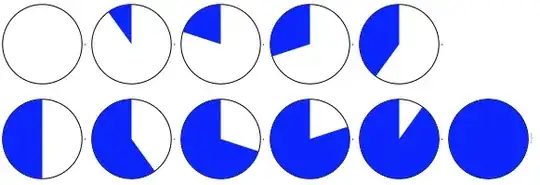
Rescale is useful:

percentFill[
   n_] := {90 Degree, (90 +  Rescale[n, {0, 1},  {0, 360}]) Degree};
Table[Graphics[{{
    EdgeForm[Thick], White, Disk[{0, 0}, 1]},
   {Blue, Disk[{0, 0}, 1, percentFill[p]]}}], {p, 0, 1, .1}]

disks

cormullion
  • 24,243
  • 4
  • 64
  • 133
7

"Partly filled disks based on percentage" == PieChart gives True so

f[s_] := PieChart[{1 - s, s}, SectorOrigin -> π/2]

is what you are looking for.

Usage:

f[.2]

pie

---EDIT---

SectorOrigin set to $ \pi/2 $ to match your requirement for .5 splitting the disk top-bottom rather than left-right (and also to get @Kuba's +1!)

gpap
  • 9,707
  • 3
  • 24
  • 66
3

Assuming you are on v9, here's another approach (it's different from what you ask, but maybe somebody else will like that):

myGauge[x_] := 
   AngularGauge[100 x, {0, 100}, 
      ScaleOrigin -> Reverse@{5 \[Pi]/2, \[Pi]/2}, 
      ScaleOrigin -> Top, 
      ScaleDivisions -> 10, 
      GaugeMarkers -> Placed[Automatic, "ScaleRange"], 
      GaugeLabels -> Placed["Value", Center]]

As you can see, I use AngularGauge to solve the issue. I specified some formatting - see the Documentation Center for more options / features (e.g. remove the Reverse to get other orientation).

Interactively:

Manipulate[myGauge[x], {{x, 0.42, "Fraction"}, 0, 1}]

yields:

enter image description here

Pinguin Dirk
  • 6,519
  • 1
  • 26
  • 36
2

You can use Degree to have the circle go around part of the whole.

filledDisk[frac_] := Graphics[{{EdgeForm[Thick], White, Disk[{0, 0}, 1]}, 
  {Blue, Disk[{0, 0}, 1, {90 Degree, (90 + frac 360) Degree}]}}]

And if you need percentage you can calculate it like so.

.1 * 360
William
  • 7,595
  • 2
  • 22
  • 70
  • Look at the example. It fills from the top... zero degrees is to the right. – C. E. Aug 21 '13 at 08:16
  • @Anon Well then 90 Degree then – William Aug 21 '13 at 08:18
  • For a full answer I was looking for something like this: filledDisk[frac_] := Graphics[{{EdgeForm[Thick], White, Disk[{0, 0}, 1]}, {Blue, Disk[{0, 0}, 1, {90 Degree, (90 + frac 360) Degree}]}}] and the corresponding function with radians. – C. E. Aug 21 '13 at 08:34
  • @Anon I amended my answer assuming you don't mind that I use your code. – William Aug 21 '13 at 08:36
  • @Liam I've never seen a clock turning in that way ;-) – Öskå Aug 21 '13 at 08:37
  • @Öskå He's using clock coordinates to explain, he's not trying to create a clock. In his example, the coordinates are given to turn in that direction. – C. E. Aug 21 '13 at 08:45