It seems there are a lot of related topics but I haven't found an answer.
I want to automatically quit Mathematica after some procedures are done but dialog window appears:
1 + 1;
NotebookSave[EvaluationNotebook[]];
FrontEndExecute[FrontEndToken["FrontEndQuit"]]
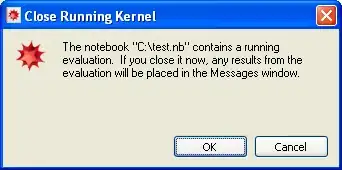
One can put this inside Button
Button["close",
        1 + 1; NotebookSave[EvaluationNotebook[]];
        FrontEndExecute[FrontEndToken["FrontEndQuit"]]
      ]
what will work but I need it works as a part of procedure because the notebook is called automatically and no one is going to click OK.
This Q&A is almost a duplicate of undisputed FrontEndTokenExecute but there was the work around.
I appreciate a work around but also the general question, how to stop or automatically agree with Dialogs is what I'm interested in.
Maybe it's relevant: Win XP/Win 7 Mathematica V9.0.0.1


WindowsTaskManagerbut I can switch to cmd if you show me how to catch some mark from MMA that will tell cdm to close it. – Kuba Aug 23 '13 at 11:21ListPlot3D[bigdata]and try to rotate the view :D :D – rm -rf Aug 23 '13 at 14:44