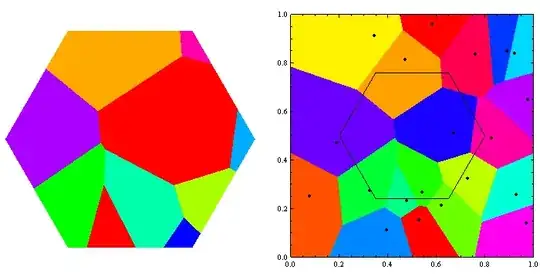
Someone know how can I get the correct crop of this Voronoi image using RegionFunction?

As you can see, there is a lot of undesired white regions inside the left polygon.
Some clue on how to correct it? Here is the code using PointInPoly and RegionFunction:
PointInPoly[{x_, y_}, poly_List] :=
 Module[{i, j, c = False, npol = Length[poly]},
  For[i = 1; j = npol, i <= npol, j = i++,
   If[((((poly[[i, 2]] <= y) && (y <
             poly[[j, 2]])) || ((poly[[j, 2]] <= y) && (y <
             poly[[i, 2]]))) && (x < (poly[[j, 1]] -
             poly[[i, 1]])*(y - poly[[i, 2]])/(poly[[j, 2]] -
              poly[[i, 2]]) + poly[[i, 1]])), c = ¬ c];];
  c]

pts=MapIndexed[Flatten[{##}]&,RandomReal[{0,1},{20,2}]];

poli={0.5,0.5}+#&/@Table[0.3{Cos[2π k/6],Sin[2π k/6]},{k,0,6}];
opt={ColorFunction->Hue
    ,InterpolationOrder->0
    ,ImageSize->500
    ,PlotRange->{{0,1},{0,1}}
    ,Epilog->{PointSize[.01],Point[Most/@pts],Line[poli]}
    };

g1=ListDensityPlot[pts
    ,Sequence@@opt
    ,RegionFunction->Function[{x,y,z},PointInPoly[{x, y}, poli]]
    ];

g2=ListDensityPlot[pts
    ,Sequence@@opt
    ];

GraphicsRow@{g1, g2}
Important point, I can't use image manipulate functions.
What I really need is the list of polygons inside the cropped area. I get it using g1[[1]]