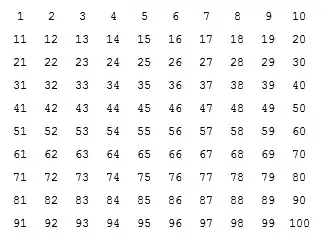
I can only implement a very simple one, I want to make my code look like that. Any better ideas?
Manipulate[
  Partition[ Table[ If[ PrimeQ @ i, Framed @ i, Style[i, Gray]], {i, 1, j, 1}], 10],
  {{j, 10}, 1, 100, 1}]
I can only implement a very simple one, I want to make my code look like that. Any better ideas?
Manipulate[
Partition[ Table[ If[ PrimeQ @ i, Framed @ i, Style[i, Gray]], {i, 1, j, 1}], 10],
{{j, 10}, 1, 100, 1}]


I prefer Bold and Larger in Style:
Animate[ Grid[
           Partition[ Table[ Style[i, Bold, Larger,
                                   If[i > j, Black, If[ PrimeQ @ i, Blue, Gray]]],
                            {i, 100}],
                      10],
           Spacings -> {1, 1}], {j, 0, 100}, Paneled -> False]

but if you like delete from the code Bold, Larger, to get exactly the same output as in the question.
Artes's answer is just fine. This variation works as follows. When you click on a number, the background of that number turns yellow and that of each of its divisors turns light blue.
DynamicModule[{s = 101},
Grid[Partition[Dynamic@Button[Style[#, 16], (s = #),
Background -> Which[ # == s, Yellow, Divisible[s, #],
LightBlue, True, White],
Appearance -> "Frameless", ImageSize -> Medium] & /@ Range[100],10]]]


What I really wanted to post was an alternative way of generating the grid. In my humble opinion, it's better to do it with Table without Partition as it looks better in code. But since Animate has already been dealt with, three times over, let me also use an alternative method for that:
color[n_] := Style[n, Which[100 Clock[1, 10] < n, Black, PrimeQ@n, Blue, True, Gray]]
Dynamic@Grid[Table[color[10 (i - 1) + j], {i, 10}, {j, 10}]]
The above has been updated as suggested by Artes, and here's the even shorter version of the second line using Array, that he proposed:
Dynamic@Grid@Array[color[10 (#1 - 1) + #2] &, {10, 10}]

1's form Table, e.g. Table[color[10 (i - 1) + j], {i, 10}, {j, 10}] or even nicer - use Array[ color[10 (#1 - 1) + #2] &, {10, 10}]
– Artes
Sep 03 '13 at 11:33
Starting with a styling funtion:
st = Style[#, If[PrimeQ@#, {Bold, Blue}, Gray]] &;
For fast operations and small tables you can use MapAt:
Animate[
 MapAt[st, Range@100, List /@ Range@i] ~Partition~ 10 // Grid,
 {i, 0, 100, 1}
]
In version 9 you can use Span for better performance:
Animate[
 MapAt[st, Range@100, ;; i] ~Partition~ 10 // Grid,
 {i, 0, 100, 1}
]
For slow functions you can generate before and after lists and select between them:
before = Range @ 100;
after  = st /@ before;

Animate[
 Join[Take[after, i], Drop[before, i]] ~Partition~ 10 // Grid,
 {i, 0, 100, 1}
]
The next level of optimization would be to create Box form directly, bypassing that display step:
base   = Range @ 100;
before = ToBoxes /@ base;
after  = ToBoxes /@ st /@ base;

Animate[
 Join[Take[after, i], Drop[before, i]] ~Partition~ 10 // GridBox // DisplayForm,
 {i, 0, 100, 1}
]
Well, this is not really an answer to your question, just something that came to mind when reading it & I thought I'd share. Note that I am sure that there are better ways to implement it (there must be some nice code to create the spiral... but I wanted to implement what I had in mind). depending on what the aim is (large number, animation, formatting...)
Anyway, reading your question, it sounds to me like it is used in education, to visualize something. And what immediately comes to mind is Ulam's spiral, see here.
My not-so-cool implementation is as follows (not made for speed):
ulam[n_ /; OddQ[n]] := Module[{spiral, orient, currentCoord, step},
  (*note: we create a too large container, ie. (n+1)x(n+1)*)
  spiral = ConstantArray[0, {n + 2, n + 2}];
  orient[coord_] := UnitStep[Part[spiral, Sequence @@ (coord + #)] - 1] & /@
    {{-1, 0}, {1, 0}, {0, 1}, {0, -1}};
  step[coord_] :=
    Switch[orient@currentCoord,
       {0, _, 0, 1}, {-1, 0},
       {0, 1, _, 0}, {0, -1},
       {_, 0, 1, 0}, {1, 0},
       {1, 0, 0, _}, {0, 1},
       _, "oops"];
  (*init*)
  spiral[[Ceiling[n/2] + 1, Ceiling[n/2] + 1]] = 1;
  spiral[[Ceiling[n/2] + 1, Ceiling[n/2] + 2]] = 2;
  currentCoord = {Ceiling[n/2] + 1, Ceiling[n/2] + 2};

  (*work*)

  Do[currentCoord = step@currentCoord + currentCoord;
      spiral[[Sequence @@ currentCoord]] = i + 2, {i, n^2 - 2}];
  Rest /@ Most /@ Rest@Most@spiral
]
Note that I implemented the spiral in the way Ulam did, i.e. I start from the center, and work my way out. Any other implementations are welcome (as we are all ready off-topic).
Now the Animate:
animateUlam[number_Integer /; number < 49] :=
  Module[{format, maxFact, spiral},
    spiral = MatrixForm[ulam[number]];
    maxFact = Max[Plus @@ Last /@ FactorInteger[#] & /@ Range[number^2]];
    format[n_] :=
    If[PrimeQ[n],
       Style[n, Red, Bold],
       Style[n, ColorData["BeachColors"]
         [Rescale[Plus @@ Last /@ FactorInteger[n], {3, maxFact}]]]];
    Animate[spiral /. (Rule[#, format[#]] & /@ Range[i]), {i, 0, number^2, 1}]]
Run it:
animateUlam[9]

Note that I chose to implement the style function differently (as I am off-topic anyway). The less prime factors there are in a number, the more into red the color. Obviously, choosing a large number (big spiral), things will get veeery slow, the way I implemented it; actually, the larger the spiral, the more Ulam's spiral makes sense. Thus, maybe you'd also like:
staticUlam[number_Integer /; number < 50] :=
   Module[{format, maxFact, spiral},
     spiral = MatrixForm[ulam[number]];
     maxFact = Max[Plus @@ Last /@ FactorInteger[#] & /@ Range[number^2]];
     format[n_] :=
       If[PrimeQ[n],
          Graphics[{Red, Disk[{0, 0}]}, ImageSize -> 10],
          Graphics[{ColorData["BeachColors"]
             [Rescale[Plus @@ Last /@ FactorInteger[n], {3, maxFact}]],
             Disk[{0, 0}]},ImageSize -> 5]];
      spiral /. (Rule[#, format[#]] & /@ Range[number^2])]
Obviously, this is not a smart way to implement it (e.g. you'd better format it when creating the spiral), but I just wanted to stay with above framework etc.)
And how does that look?
staticUlam[49]


Whichfor that:Animate[Grid@Partition[ Table[ Style[i, Which[ i > j, Black, PrimeQ@i, Blue, True, Gray]] , {i, 100}], 10], {j, 0, 100}]– ssch Sep 02 '13 at 17:01