Is it possible to Manipulate Graphs (e.g. a CompleteGraph[100, GraphLayout -> {"SpringElectricalEmbedding"}] in Mathematica 9 such that I can e.g. rotate it as 3D object and zoom in and out? If not, how else can one inspect large graphs without extra programming?
Asked
Active
Viewed 459 times
2

István Zachar
- 47,032
- 20
- 143
- 291

Drux
- 285
- 1
- 6
-
1Graphs are zoomable in PDFs: http://mathematica.stackexchange.com/questions/11673/how-to-play-with-facebook-data-inside-mathematica – C. E. Sep 07 '13 at 21:34
-
If one right-clicks on the image, then a pop-up menu comes up. One option is convert to graphics. I am just not able to find what Mathematica command actually is used to do this so that one can program it in. Strange. Any one knows the actual command used by that menu to convert it to Graphics object? (I never used CompleteGraph before) – Nasser Sep 07 '13 at 22:10
-
Related in 2D: Generating graphs interactively (GUI) – István Zachar Sep 08 '13 at 06:43
2 Answers
4
GraphPlot3D does what you want.
For instance, for a 10 node complete graph, you do this
GraphPlot3D@CompleteGraph[10, GraphLayout -> {"SpringElectricalEmbedding"}]
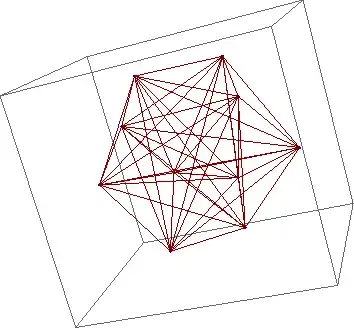
which will give a 3D plot of the graph that you can manipulate in the usual way.

Sektor
- 3,320
- 7
- 27
- 36

Stephen Luttrell
- 5,044
- 1
- 19
- 18
-
It's good enough for my current purposes, but does not seem to scale to
GraphPlot3D@CompleteGraph[100, GraphLayout -> {"SpringElectricalEmbedding"}]in terms of zooming :) ... Or does it? – Drux Sep 08 '13 at 17:40 -
I wouldn't expect it to scale, because an $n$-node complete graph has $O(n^2)$ edges. A 100-node complete graph has such a high "density" of edges that any visualisation of the whole graph will be a featureless blob. – Stephen Luttrell Sep 09 '13 at 09:10
-
If one had the ability to zoom in (as mentioned in the original question) it would not be a matter of visualizing a whole graph, but only the portion that fits on the screen ... – Drux Sep 09 '13 at 10:37
-
1But you do have the ability to zoom in - it's Ctrl (or Cmd) / left-click / drag (up/down). You can also pan with Shift / left-click / drag (up/down/left/right). For the 100-node complete graph this works OK, but it's not very informative! – Stephen Luttrell Sep 09 '13 at 13:40
-
Now that actually answers my question, for I did not know about this key-combination. In my actual problem, I'm not dealing with a 100-node complete graph, just with graphs that would not fit on-screen entirely. So thx for the answer and clarification. – Drux Sep 10 '13 at 07:27

