5

Given a large (very) sparse matrix, A, how can I efficiently "operate" on only the nonzeros in a given row? For example: For each row in A, generate a list of column indices that have a magnitude (absolute value) greater than a threshold, r.

My current approach is similar in spirit to a previous answer by Leonid (Efficient way to combine SparseArray objects?). I shamelessly steal his implementation of spart.

My current approach

First, let's build a random SparseArray for testing purposes.

randomSparseArray[n_Integer, r_Integer] := SparseArray[
  Table[{Random[Integer, {1, n}], Random[Integer, {1, n}]} ->RandomReal[],{r}]
,{n, n}];

A = randomSparseArray[10, 20]; (*10x10 matrix with 20 nonzeros*)

When Part is used to grab a row of A, a SparseArray representation is returned. Okay so let's rip this representation apart into its raw form using spart. For example the 3rd row of A

HoldPattern[spart[SparseArray[s___], p_]] := {s}[[p]];    
raw = spart[A[[3]], 4];
(*{1, {{0, 2}, {{10}, {5}}}, {0.534313, 0.981372}}*)

And then use a combination of Part and Position to extract the column indices from raw . (here I use a threshold of 0.5)

ind = Flatten@Position[Flatten@raw[[3]],x_/;Abs[x]>0.5];
Flatten[raw[[2, 2]]][[ind]]

Wrapping this all up into a function:

thresholdIndex[A_SparseArray, r_] := Module[{raw, ind},
raw = spart[A, 4];
ind = Flatten@Position[Flatten@raw[[3]], x_ /; Abs[x] > r];
Flatten[raw[[2, 2]]][[ind]]
]

We can now use Map to hit each row of A and search for column indices for elements with magnitudes greater than say, 0.5

Map[thresholdIndex[#, .5] &, A]

This whole process feels a little roundabout. First Mathematica has to extract a new SparseArray representation of a row (is this expensive?), we then chop it into pieces in order to work on it. Is there an easier way to do this while still maintaining performance?

My other idea is to apply spart to the original matrix and work with the CSR (compressed-sparse-row) representation. But this seems to defeat the purpose of even using a SparseArray from the get go.

Sidebar

I've been starting to implement an efficient algebraic multigrid (AMG) package in Mathematica. AMG is a fast iterative method traditionally used to solve large sparse matrix equations produced from the discretization of elliptic PDEs. One of the steps in the algorithm is very similar in flavor to thresholdIndex. As a sidebar, does anyone know if a nice AMG has been implemented in Mathematica? I would like to build a tool similar to PyAMG (http://code.google.com/p/pyamg/).

leibs
  • 758
  • 3
  • 11

3 Answers3

10

When working with SparseArray objects you should generally try to use functions that operate on SparseArray objects without converting to normal form.

You can use UnitStep for threshold operations:

row = Range[-5, 5];
r = 2;
1 - UnitStep[r - Abs@row]
{1, 1, 1, 0, 0, 0, 0, 0, 1, 1, 1}

For position you can use reconversion with SparseArray and sparse array Properties:

SparseArray[{1, 1, 1, 0, 0, 0, 0, 0, 1, 1, 1}]["AdjacencyLists"]
{1, 2, 3, 9, 10, 11}

Though not necessary in this case (as I will show) you can Map functions directly onto a SparseArray and the rows will be converted to individual SparseArray objects for the function.

Our function:

threshPos[t_] := SparseArray[1 - UnitStep[t - Abs@#]]["AdjacencyLists"] &;

A sample array:

SeedRandom[1]
sa = RandomInteger[12, {10, 10}] /. x_ /; x > 5 -> 0 // SparseArray;

sa // MatrixForm

enter image description here

Map our function:

threshPos[2] /@ sa
{{2,10}, {4,8}, {7,9,10}, {1,4,5,6,8}, {1,4,6,9}, {3,4,6}, {9}, {3}, {6}, {3,4,8,9}}

In this case however we can operate on the entire array at once for increased performance, as "AdjacencyLists" conveniently returns exactly what you want:

threshPos[2] @ sa
{{2,10}, {4,8}, {7,9,10}, {1,4,5,6,8}, {1,4,6,9}, {3,4,6}, {9}, {3}, {6}, {3,4,8,9}}

Timings on a larger array:

SetAttributes[timeAvg, HoldFirst]
timeAvg[func_] := Do[If[# > 0.3, Return[#/5^i]] & @@ Timing@Do[func, {5^i}], {i, 0, 15}]

sa = RandomInteger[25, {500, 500}] /. x_ /; x > 5 -> 0 // SparseArray;

threshPos[2] /@ sa // timeAvg
threshPos[2] @ sa  // timeAvg

0.010112

0.0009232

Mr.Wizard
  • 271,378
  • 34
  • 587
  • 1,371
  • Big +1. I wanted to write up something like this but did not have the time. Folks, not enough love for this answer! – Leonid Shifrin Sep 09 '13 at 15:44
  • @Leonid Thanks a lot; I'll treasure that. :-) – Mr.Wizard Sep 09 '13 at 15:50
  • @Mr.Wizard Great! This is a very slick answer. "AdjacencyList" is a nice hidden gem. I'll be using that trick quite a lot more. – leibs Sep 09 '13 at 19:29
  • @leibs I'm glad you like it. I had forgotten Abs in the function definition but that's corrected. Speaking of which don't forget the second "s" in "AdjacencyLists". – Mr.Wizard Sep 09 '13 at 20:10
  • @leibs a number of of the opaque objects in mma have properties. Another good one: InterpolatingFunction. – rcollyer Sep 09 '13 at 20:42
  • 1
    I think Clip[Abs@data, {r+1, r}, {0, 1}] provides a noticeable speed up compared to 1 - UnitStep[r - Abs@data] – Carl Woll Jun 10 '17 at 14:43
  • @CarlWoll I don't find those operations to be equivalent? I'm doing e.g. r = 2; data = {-2.28, -2.88, -1.77, 3.6, 1.38, -3.57, 2.07, 2.85, 0.54, -2.43}; then Clip[Abs@data, {r + 1, r}, {0, 1}] and 1 - UnitStep[r - Abs@data] and getting different results. Am I doing it wrong? By the way for performance I would in practice be using Subtract rather than - due to (40927). – Mr.Wizard Jun 10 '17 at 15:03
  • 1
    I was assuming integer data. For real data, you could use Clip[Abs@data, {r+$MachineEpsilon, r}, {0, 1}]. – Carl Woll Jun 10 '17 at 15:09
  • @CarlWoll Ah, I see. Thanks for the pro tip! :-) – Mr.Wizard Jun 10 '17 at 15:12
4

I think that you on the right way, but you can do some improvements.

First of all, this matrix generation is much more efficient:

randomSparseArray[n_Integer, m_Integer] := 
 SparseArray[RandomInteger[{1, n}, {m, 2}] -> RandomReal[{0, 1}, m]];

A = randomSparseArray[10, 20];

You can extract nonzero values and their positions by

A["NonzeroValues"]
A["NonzeroPositions"]

{0.169243, 0.397281, 0.907845, 0.572137, 0.0948881, 0.603708, 0.6843, 0.375677, 0.548642, 0.896008, 0.654598, 0.59134, 0.991824, 0.37921, 0.944823, 0.431562, 0.0285837, 0.330543, 0.82086}

{{1, 1}, {1, 9}, {1, 5}, {1, 10}, {2, 1}, {2, 5}, {5, 10}, {5, 2}, {6, 10}, {6, 6}, {6, 5}, {6, 2}, {7, 10}, {7, 6}, {7, 7}, {8, 4}, {9, 5}, {9, 4}, {10, 9}}

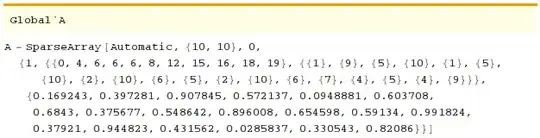
Or you can see how Mathematica stores SparseArray

?A

enter image description here

and use Leonid Shifrin's spart to extract this information

HoldPattern[spart[SparseArray[s___], p_]] := {s}[[p]];  
spart[A, 4]

{1, {{0, 4, 6, 6, 6, 8, 12, 15, 16, 18, 19}, {{1}, {9}, {5}, {10}, {1}, {5}, {10}, {2}, {10}, {6}, {5}, \ {2}, {10}, {6}, {7}, {4}, {5}, {4}, {9}}}, {0.169243, 0.397281, 0.907845, 0.572137, 0.0948881, 0.603708, 0.6843, 0.375677, 0.548642, 0.896008, 0.654598, 0.59134, 0.991824, 0.37921, 0.944823, 0.431562, 0.0285837, 0.330543, 0.82086}}

If you want just to pick elements with large magnitudes you can simply run

B = Chop[A, 0.5];

Extracting of row can be done as follows

pos = spart[A, 4][[2, 1]];
val = spart[A, 4][[3]];
col = spart[A, 4][[2, 2, All, 1]];

rowval = val[[1 + pos[[#]] ;; pos[[# + 1]]]] &[100]; (* nonzero values in row 100 *)
rowpos = col[[1 + pos[[#]] ;; pos[[# + 1]]]] &[100]; (* nonzero positions in row 100 *)

Note, that it is much faster, then A[[100]]['NonzeroPosition'] and spart[A[[100]],4] because computation of A[[100]] takes a lot of time.

ybeltukov
  • 43,673
  • 5
  • 108
  • 212
  • Thanks for the insight. I didn't know about the short hand for "NonzeroValues". Where is this documented? I've been looking for that feature for a while in a different application. – leibs Sep 08 '13 at 22:06
  • @leibs I don't know where this is documented but you can run PropertyList[A] and see these options. First time I found these options here on StackEchange. – ybeltukov Sep 08 '13 at 22:26
1

Perhaps defeating the point of SparseArray:

threshold[A_,u_]:=Position[Normal@A,_?(#>u&)]

will return position from SparseArray A of entries > u.

ubpdqn
  • 60,617
  • 3
  • 59
  • 148