3

What I am trying to do is modify the standard ClickPane example where a list of points (pts) is added to with each click, in the following way: when a click occurs, some sort of choice window appears, and the user then clicks on one of the options. This is added as a third element in each point, so that pts becomes a list of {x,y,text} triples (and incidentally gets displayed on the graphic using Text[]).

Here's the starting point that includes the triples

pts = {{0, 0, "No ID"}};

DynamicModule[{},
  ClickPane[
    Dynamic@Framed@Graphics[
      Map[Text[#[[3]], #[[{1, 2}]]] &, pts],
      PlotRange -> 1,
      Axes -> True],
    AppendTo[pts, Append[#, "No ID"]] &]]

The simplest thing I tried is to replace the "No ID" with a Choice Dialog

speciesList = {"No ID", "Oak", "Sycamore", "Plane", "Birch",
               "Ginko", "Ash", "Beech", "Cherry", "Maple"};

pts = {{0, 0, "No ID"}};

DynamicModule[{},
  ClickPane[
    Dynamic@Framed@Graphics[
      {Point[pts[[All, {1, 2}]]]},
      PlotRange -> 1,
      Axes -> True],
    AppendTo[pts, Append[#, ChoiceDialog["Pick one", speciesList]]] &]]

This does cause a choice dialog to pop up, but the dynamic evaluation seems to go into a spin and I have to abort. Any thoughts on what is going wrong would be appreciated.

What I would really like to do is have a PopupMenu appear right there at the click point (because input dialogs appear floating in the middle of the screen, which can be a long way away), but that seems harder...

ssch
  • 16,590
  • 2
  • 53
  • 88
Gareth
  • 216
  • 2
  • 3
  • Here's a smaller example to reproduce the problem, be aware that MMA will freeze for a while before you can abort: DynamicModule[{}, ClickPane[Graphics[], ChoiceDialog["?", {1 -> "a", 2 -> "b"}] &]] – C. E. Sep 25 '13 at 12:46

1 Answers1

1

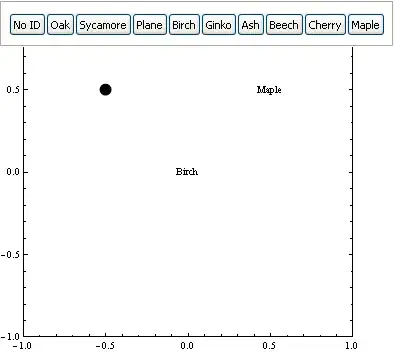
Don't have time to do this better now but here is an example how you can create your own dialog without dialog:

 DynamicModule[{x = {0, 0}, y = {0.5, 0.5}, z = {-.5, 0.5}, panel, 
                l = 1, point, choice, labels},
  Overlay[{
           Dynamic@ Graphics[{AbsolutePointSize@12, point@x, point@y, point@z}, 
                        Frame -> True, PlotRange -> 1],
           Dynamic@ panel
          },
          Dynamic@If[l == 1, {1}, {1, 2}],
          Dynamic@l
         ]
  ,
  Initialization :> (
      labels = {"No ID", "Oak", "Sycamore", "Plane", "Birch", "Ginko", "Ash", 
                "Beech", "Cherry", "Maple"};

      SetAttributes[{point, choice}, HoldFirst];

      choice[var_] := Panel@Row@Table[With[{i = i}, Button[i, AppendTo[var, i]; l = 1;]],
                                      {i, labels}];

      point[x_] := If[Length@x == 3,
                      Text[#3, {#1, #2}] & @@ x,
                      EventHandler[Point[x[[{1, 2}]]], 
                                   "MouseClicked" :> (l = 2; panel := choice[x];)]]

                     )
             ]

enter image description here

You can set details as you want. Alignment/Size/Repetable choice etc.

Kuba
  • 136,707
  • 13
  • 279
  • 740
  • Ok, thanks @Kuba! I'll see if I can adapt it to the case where the list of points is not predefined, and grows with each click. (Your point[x_] function passes an existing point definition on to be updated.) – Gareth Sep 25 '13 at 13:58
  • @Gareth you can have points coordinates as an array x[i] and pass to the graphics Table[With[{i=i}, point[x[i]]... with dynamic domain. Just shooting, have to check this latter. – Kuba Sep 25 '13 at 14:00