26

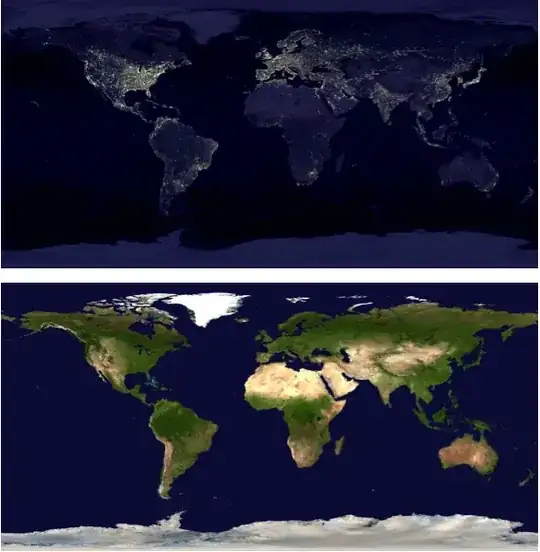
Given the following world images:

night = Import["http://eoimages.gsfc.nasa.gov/images/imagerecords/55000/55167/earth_lights_lrg.jpg"]
day = Import["http://eoimages.gsfc.nasa.gov/images/imagerecords/57000/57752/land_shallow_topo_2048.tif"]

day and night maps

how would you use Mathematica to create an accurate “day and night map” (examples here and there) of the Earth for a given date and time?

J. M.'s missing motivation
  • 124,525
  • 11
  • 401
  • 574
F'x
  • 10,817
  • 3
  • 52
  • 92

4 Answers4

35

Let me first name your maps correctly (you switched night and day maps):

night= Import["http://eoimages.gsfc.nasa.gov/images/imagerecords/55000/55167/earth_lights_lrg.jpg"];
day= Import["http://eoimages.gsfc.nasa.gov/images/imagerecords/57000/57752/land_shallow_topo_2048.tif"];

The images have different sizes:

ImageDimensions[day]

(*
==> {2048, 1024}
*)

ImageDimensions[night]

(*
==> {2400, 1200}
*)

so, I rescale the night image. Artefacts (if any) will probably be less visible there.

night = ImageResize[night, ImageDimensions[day]];

Now, for the calculation of the mask we don't need to use external sources. AstronomicalData will do:

mask =
 Rasterize[
  RegionPlot[
   AstronomicalData["Sun", {"Altitude", {2012, 6, 21}, {lat, long}}] <
     0, {long, -180, 180}, {lat, -90, 90}, Frame -> None, 
   PlotRange -> Full, PlotStyle -> Black, PlotRangePadding -> 0, 
   AspectRatio -> (#2/#1 & @@ ImageDimensions[day])],
  ImageSize -> ImageDimensions[day]
  ]

Mathematica graphics

Then, stealing the ImageCompose idea from Yu-Sung:

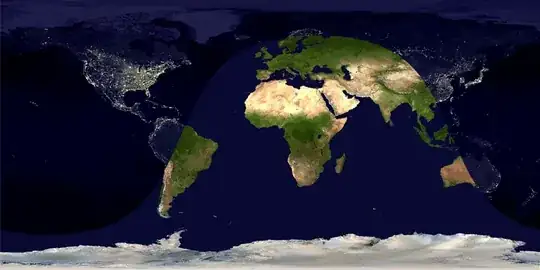
pl=ImageCompose[night, SetAlphaChannel[day, mask]]

Mathematica graphics

Borrowing and adapting some code from the Texture doc page:

Show[
 Graphics3D[{White, Tube[{{0, 0, -1.4}, {0, 0, 1.4}}, .04]}],
 SphericalPlot3D[1 , {u, 0, Pi}, {v, 0, 2 Pi}, Mesh -> None, 
  TextureCoordinateFunction -> ({#5, 1 - #4} &), 
  PlotStyle -> Texture[Show[pl, ImageSize -> 1000]], 
  Lighting -> "Neutral", Axes -> False, RotationAction -> "Clip"], 
 Lighting -> "Neutral", Boxed -> False, 
 Method -> {"ShrinkWrap" -> True}
]

Mathematica graphics

Sjoerd C. de Vries
  • 65,815
  • 14
  • 188
  • 323
  • 1
    For day/night Earth textures with matching dimensions, this is one place to get them; you then no longer need to resize. – J. M.'s missing motivation Oct 03 '12 at 16:12
  • Actually the last plot does not work for me: I get !http://i.stack.imgur.com/peG10.png – chris Dec 15 '12 at 14:54
  • @chris Do all the examples on the Texture doc page work for you? – Sjoerd C. de Vries Dec 26 '12 at 09:18
  • @SjoerdC.deVries in fact they do. – chris Dec 26 '12 at 09:27
  • @chris the final plot is not much different from what's in there. Could you try without Show and the Tube? For now, I suppose this is an issue of your graphics card. – Sjoerd C. de Vries Dec 26 '12 at 09:34
  • I tried SphericalPlot3D[1, {u, 0, Pi}, {v, 0, 2 Pi}, Mesh -> None, TextureCoordinateFunction -> ({#5, 1 - #4} &), PlotStyle -> Texture[Show[pl, ImageSize -> 1000]], Lighting -> "Neutral", Axes -> False, RotationAction -> "Clip"] it's all white! :-) – chris Dec 26 '12 at 09:53
  • @chris The last part is almost identical to the "Earth" example in the docs. Could you try pasting the above texture in th example itself to see if that works? If it doesn't I'm out of options. – Sjoerd C. de Vries Dec 26 '12 at 20:01
  • @SjoerdC.deVries this works: SphericalPlot3D[1 , {u, 0, Pi}, {v, 0, 2 Pi}, Mesh -> None, TextureCoordinateFunction -> ({#5, 1 - #4} &), PlotStyle -> Directive[Specularity[White, 10], Texture[pl]], Lighting -> "Neutral", Axes -> False, RotationAction -> "Clip"] – chris Dec 26 '12 at 22:01
  • @SjoerdC.deVries its very odd; From a new session your code produces a while globe; if I then evaluate the doc earth example and your code again it works... – chris Dec 26 '12 at 22:06
  • @chris I appear to have the same. Resizing the window seems to help quite often. I also notice that v8 and v9 react differently here. – Sjoerd C. de Vries Dec 26 '12 at 22:16
  • sweet you could put a toothpick texture on that white thing sticking through the earth. – amr May 22 '13 at 18:47
19

Yes, the basic idea is here: Demonstration: Day and Night World Clock

Now, to use the images, create an alpha channel using the computed the day-night curve--called "terminator" curve (rasterize it in grayscale), and compose two images using ImageCompose with the generated alpha channels (SetAlphaChannel to the second image).

Try the following code:

a = Image[ConstantArray[{255, 0, 0}, {200, 300}]];
b = Image[ConstantArray[{0, 255, 0}, {200, 300}]];

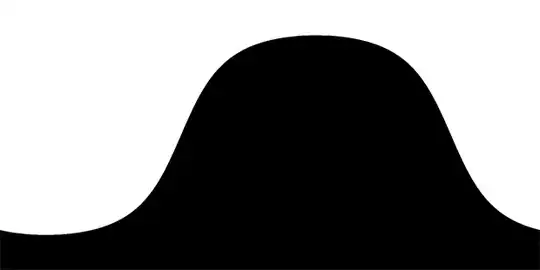
(* This is just a made-up mask. Don't mind the Plot[] part *)
mask = Rasterize[
  Plot[Sin[x], {x, -Pi/2, 3 Pi/2}, PlotRangePadding->0,
    Filling->-1, FillingStyle->Black, Frame->False, 
    Axes->False, ImageSize->{300, 200}, AspectRatio->2/3],
  "Image", ColorSpace->"GrayScale"];

ImageCompose[a, SetAlphaChannel[b, mask]]

You should get an image with green and red mixed as below. Now you can replace a and b with your day and night textures.

mask

I have to tell you that although the code there computes pretty close approximation of the actual terminator curve, it is not exact. To compute it accurately (or based on actual data), see: NOAA: Day Night Terminator

The following code and output is for the actual images (again the mask is fake):

day = ImageResize[day, {2048, 1024}]; (* Match the dimensions *)

mask = Rasterize[
   Plot[Sin[x], {x, -Pi/2, 3 Pi/2}, PlotRangePadding -> 0, 
    Filling -> -1, FillingStyle -> Black, Frame -> False, 
    Axes -> False, ImageSize -> {2048, 1024}, 
    AspectRatio -> 1024/2048], "Image", ColorSpace -> "GrayScale"];

ImageCompose[night, SetAlphaChannel[day, mask]]

output

J. M.'s missing motivation
  • 124,525
  • 11
  • 401
  • 574
Yu-Sung Chang
  • 7,061
  • 1
  • 39
  • 31
8

Since version 10.0, the functions DayHemisphere[], NightHemisphere[], and DayNightTerminator[] are now built-in, and can be used with GeoGraphics[]. These three can either take a specified date, and will otherwise default to Now. One can now do things like this:

GeoGraphics[{GeoStyling[GrayLevel[0, 2/3]], NightHemisphere[]}, 
            GeoBackground -> GeoStyling["Satellite"], GeoProjection -> "Equirectangular",
            GeoRange -> "World"]

day-night map

which can then be used as a suitable Texture[] if wanted.

J. M.'s missing motivation
  • 124,525
  • 11
  • 401
  • 574
6

As Sjoerd shows, AstronomicalData[] can be used to determine the altitude of the sun. However, if you do not need too much accuracy, such as in this application, you can use a low-accuracy method for computing the altitude. Most of the formulae I will be using are from (of course) Jean Meeus's Astronomical Algorithms.

Some auxiliary routines will be needed. First, one for computing the Julian Day number:

Options[jd] = {"Calendar" -> "Gregorian"};

jd[{yr_Integer, mo_Integer, da_?NumericQ, rest___}, opts : OptionsPattern[]] := 
  Module[{y = yr, m = mo, h}, If[m < 3, y--; m += 12];
         h = Switch[OptionValue["Calendar"],
                    "Gregorian", (Quotient[#, 4] - # + 2) &[Quotient[y, 100]],
                    "Julian", 0,
                    _, Return[$Failed]];
         Floor[365.25 y] + Floor[30.6001 (m + 1)] + da +
         FromDMS[PadRight[{rest}, 3]]/24 + 1720994.5 + h]

jd[opts : OptionsPattern[]] := jd[DateList[], opts]

Here's a method for computing the Greenwich Mean Sidereal Time:

GMST[{yr_Integer, mo_Integer, da_?NumericQ, rest___}, opts : OptionsPattern[]] := 
    Mod[6.697374558 + 0.06570982441908 (jd[{yr, mo, da}, opts] - 2.451545*^6) +
    1.00273790935 FromDMS[PadRight[{rest}, 3]] + 0.000026 ((jd[{yr, mo, da, rest}, opts] -
    2.451545*^6)/36525)^2, 24]

GMST[opts : OptionsPattern[]] := GMST[DateList[], opts]

Finally, here's the low-accuracy method for computing the solar altitude:

solarAltitude[date_List, {ϕ_, λ_}] := 
 Module[{t, ℳ☉, ℯ, s, ℰ, v, Ω, ℒ0, Λ, ε, α, δ, ℋ},

  t = (jd[date] - 2451545)/36525;

  (* ℳ☉ - mean solar anomaly *)
  ℳ☉ = Mod[(1.28710479305*^6 + t (1.295965810481*^8 + t (-0.5532 + t (1.36*^-4 -
            1.149*^-5 t))))/3600, 360] °;

  (* ℯ - eccentricity of Earth's orbit *)
  ℯ = 0.0167086342 + t (-0.004203654 + t (-0.00126734 +
      t (1.444*^-4 + t (-2.*^-6 + 3.*^-5 t))));

  (* ℰ - eccentric anomaly; approximate solution of Kepler's equation *)
  s = Sin[ℳ☉]; ℰ = ℳ☉ + ℯ s/(s - Sin[ℳ☉ + ℯ] + 1);

  (* v - true anomaly *)
  v = 2 ArcTan[Sqrt[(1 + ℯ)/(1 - ℯ)] Tan[ℰ/2]]/°;

  (* ℒ0 - geometric mean longitude *)
  ℒ0 = (280.46645 + t (36000.76983 + 3.032*^-4 t));

  (* Ω - Meeus's correction for apparent angles *)
  Ω = (125.04 - 1934.136 t) °;

  (* Λ - solar longitude, plus correction for apparent position *)
  Λ = Mod[v + ℒ0 - ℳ☉/°, 360] ° - (0.00569 + 0.00478 Sin[Ω]) °;

  (* ε - mean obliquity of the ecliptic, plus correction for apparent position *)
  ε = (84381.406 + t (-46.836769 + t (-1.831*^-4 + t (0.0020034 +
      t (-5.76*^-7 - 4.34*^-8 t))))) °/3600 + 0.00256 Cos[Ω] °;

  (* α - right ascension, δ - declination *)
  {α, δ} = {ArcTan[Cos[Λ], Sin[Λ] Cos[ε]]/(15 °), ArcSin[Sin[ε] Sin[Λ]]};

  (* ℋ - hour angle *)
  ℋ = 15 ° Mod[FromDMS[GMST[date]] + λ/15 - α, 24];

  ArcSin[Sin[δ] Sin[ϕ °] + Cos[δ] Cos[ϕ °] Cos[ℋ]]/°]

A few nice maps:

earthDay = Import["https://i.stack.imgur.com/KLrc8.jpg"];
earthNight = Import["https://i.stack.imgur.com/mCJik.jpg"];

Finally, the routine for making a day/night map:

Options[DayAndNightMap] = {Sphere -> False, TimeZone :> $TimeZone};

DayAndNightMap[date_List, opts : OptionsPattern[]] := 
   Module[{h = OptionValue[TimeZone], terminator, dayAndNight},
          terminator = Binarize[
          RegionPlot[Positive[solarAltitude[DatePlus[date, {-h, "Hour"}], {ϕ, λ}]],
                     {λ, -180, 180}, {ϕ, -90, 90}, AspectRatio -> Automatic, 
                     BoundaryStyle -> None, Frame -> False, ImagePadding -> None, 
                     ImageSize -> {2048, 1024}, PlotPoints -> 45, 
                     PlotRangePadding -> None, PlotStyle -> Black]];

          dayAndNight = RemoveAlphaChannel[ImageCompose[earthDay,
                        SetAlphaChannel[earthNight, terminator]]];

          If[TrueQ[OptionValue[Sphere]],
             ParametricPlot3D[{Cos[λ] Sin[ϕ], Sin[λ] Sin[ϕ], Cos[ϕ]},
                              {λ, -π, π}, {ϕ, 0, π}, Axes -> None, Boxed -> False,
                              Lighting -> "Neutral", Mesh -> None, PlotPoints -> 55,
                              PlotStyle -> Texture[dayAndNight], RotationAction -> "Clip",
                              TextureCoordinateFunction -> ({#4, 1 - #5} &)],
             dayAndNight]]

DayAndNightMap[opts : OptionsPattern[]] := DayAndNightMap[DateList[], opts]

I guess an example is in order at this point:

DayAndNightMap[{2013, 5, 21, 15, 30, 0}, TimeZone -> 0]

a day-and-night map

For the kids who prefer actual globes:

DayAndNightMap[{2013, 5, 21, 15, 30, 0}, Sphere -> True, TimeZone -> 0]
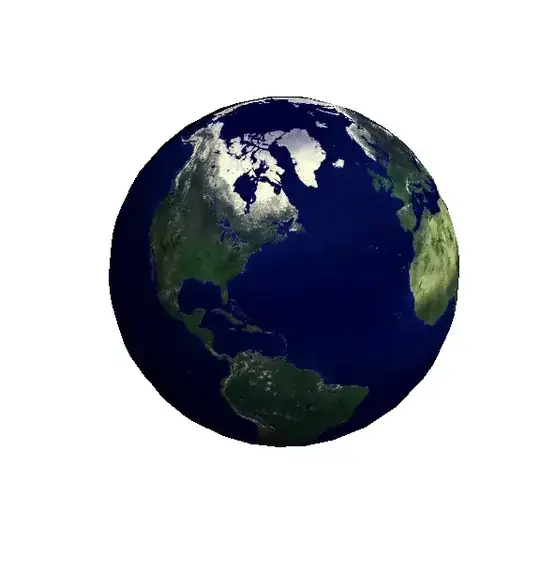
a half-lit globe

J. M.'s missing motivation
  • 124,525
  • 11
  • 401
  • 574