8

I am trying to find the number of countries that have a certain type of industry.

Currently, I have this code:

countries = Flatten[CountryData[]];

listofCountries = Table[countries[[i]], {i, 1, 240}];

industries = Map[{CountryData[#, "MajorIndustries"]} &, CountryData[All]];

data = Table[industries[[i]] -> listofCountries[[i]], {i, 1, 240}];

I am not sure on how to find the number of countries that have an industry (i.e. Coal), or if I am headed in the correct direction.

Could somebody show me the correct way to find the number of countries with an industry?

EDIT: If I were trying to shade in the countries found on the world map with a color, how would I do so? (This is using the CountryData function.) I'm curious to see how much of the world has this industry, and so forth. (EDIT: How could I do it with the world map showing the boundaries of every country?)

EDIT 2: How could I do the edit above with two industries? (i.e. Coal and Copper)

user9876
  • 95
  • 3

4 Answers4

11

Here's another way:

Select[CountryData[], 
  Not @ FreeQ[CountryData[#, "MajorIndustries"], "Coal"] &] // Length

13

OR

Cases[CountryData[#, "MajorIndustries"] & /@ CountryData, {___, "Coal", ___}] // Length

You can also display the countries in question:

Select[countries, 
 Not[FreeQ[CountryData[#, "MajorIndustries"], "Coal"]] &]

Here they are:

{"Afghanistan", "BosniaHerzegovina", "China", "Colombia", "Germany", \
"Kazakhstan", "Nigeria", "Poland", "Russia", "Swaziland", "Ukraine", \
"UnitedKingdom", "Vietnam"}

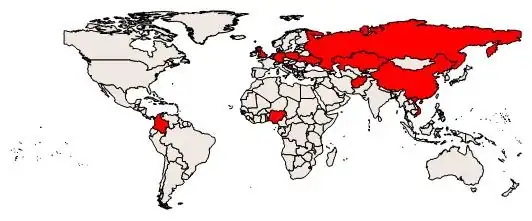
If you want to visualize them as in your edited question, do the following:

Graphics[{EdgeForm[Black], If[MemberQ[CountryData[#, "MajorIndustries"], "Coal"], Red, LightBrown],
CountryData[#, "SchematicPolygon"]} & /@ CountryData[]]

enter image description here

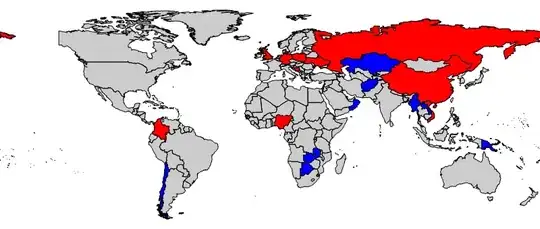
To address your final edit:

Graphics[{EdgeForm[Black],
    Which[MemberQ[CountryData[#, "MajorIndustries"], "Coal"], Red,
          MemberQ[CountryData[#, "MajorIndustries"], "Copper"], Blue,
          True, White], CountryData[#, "FullPolygon"]} & /@ CountryData[]]

enter image description here

Here, red represents coal countries and blue represents copper countries. To get the number of countries that have either coal or copper industry do:

Select[countries, MemberQ[CountryData[#, "MajorIndustries"], "Coal"] || 
   MemberQ[CountryData[#, "MajorIndustries"], "Copper"] &] // Length

This gives:

20

RunnyKine
  • 33,088
  • 3
  • 109
  • 176
  • Thanks! How would I do the question I edited in? – user9876 Oct 07 '13 at 07:30
  • @user9876 See my edit. – RunnyKine Oct 07 '13 at 07:42
  • Is coal really one of the UK's major industries? I thought the government had closed it down... – cormullion Oct 07 '13 at 07:48
  • @cormullion, I guess Wolfram needs to update their data. – RunnyKine Oct 07 '13 at 07:53
  • Two more questions (edited in). First, how can I include the border of all the countries? Second, how can I do this, but with two industries instead of one? – user9876 Oct 07 '13 at 08:05
  • @user9876, see my new answer. Also what do you mean by two industries? Do you want only countries that have both industries or you want to display countries that have at least one of those industries? – RunnyKine Oct 07 '13 at 08:10
  • Wouldn't MemberQ be easier than Not[FreeQ[...]]? – kirma Oct 07 '13 at 08:16
  • @kirma, I actually used MemberQ in my Graphics section. Just felt like using FreeQ – RunnyKine Oct 07 '13 at 08:17
  • 1
    @RunnyKine OK. Just wondering, what calamity is behind disappearance of Alaska on these maps? :) – kirma Oct 07 '13 at 09:31
  • @kirma, I think Russia took back their land. :) – RunnyKine Oct 07 '13 at 09:33
  • Some weird copper data which makes you lose some faith in the sources -- best to use primary sources for serious work I think. Peru is the second biggest producer and not mentioned. We have Zambia but not Congo etc. – Mike Honeychurch Oct 07 '13 at 11:58
  • 1
    @MikeHoneychurch I noticed the "CIA World Factbook" did the same thing. Didn't mention copper for Peru, but did mention "mining". And if you look up mining in CountryData, then indeed Peru is included. So perhaps it's the way people who work with stats categorize things that isn't intuitive, it doesn't mean it's not correct/up to date The factbook puts copper in the mining category for Congo as well, but puts "copper mining" on its own for Zambia. – C. E. Oct 07 '13 at 12:33
  • 1
    @kirma So it seems using FullPolygon brings back Alaska. – RunnyKine Oct 07 '13 at 17:29
  • 1
    @anon We need the NSA factbook, they know everything... – cormullion Oct 07 '13 at 18:27
7

We can approach this with v10 functionalities quite nicely:

countries = EntityList@EntityClass["Country", "Countries"];
coal = Select[countries, MemberQ[CountryData[#, "MajorIndustries"], "Coal"] &]

Mathematica graphics

Use Length to get the number if so desired.

copper = Select[countries, MemberQ[CountryData[#, "MajorIndustries"], "Copper"] &]

Mathematica graphics

 GeoGraphics[{EdgeForm[Black], GeoStyling["OutlineMap", Red], 
  Polygon[coal], GeoStyling["OutlineMap", Blue], Polygon[copper]}, 
 ImageSize -> 800]

Mathematica graphics

OR without background:

GeoGraphics[{EdgeForm[Black], Polygon[countries], 
  GeoStyling["OutlineMap", Red], Polygon[coal], 
  GeoStyling["OutlineMap", Blue], Polygon[copper]}, ImageSize -> 800, 
 GeoBackground -> None]

Mathematica graphics

RunnyKine
  • 33,088
  • 3
  • 109
  • 176
4
Count[Flatten[
  CountryData[#, "MajorIndustries"] & /@ CountryData[]], "Coal"]

13

alephalpha
  • 1,293
  • 8
  • 17
4

Your first approach, using rules, I think is not a bad idea. Here's one way to implement a rules-based solution:

hasIndustry[industry_] := Select[CountryData[], MemberQ[CountryData[#, "MajorIndustries"], industry] &]
industries = Union @@ (CountryData[#, "MajorIndustries"] & /@ CountryData[] /. _Missing -> Sequence[]);
countryIndustries = Dispatch[# -> hasIndustry[#] & /@ industries];

This sets up a list of rules such that "Coal" /. countryIndustries returns all countries that have coal as a major industry. We've used Dispatch on the list so it should be super fast.

Utilitary functions:

hasEither[list_List] := Union @@ (# /. countryIndustries & /@ list)
hasAll[list_List] := Intersection @@ (# /. countryIndustries & /@ list)

So to sum it up, if we want to know what countries have x as a major industry, we used hasIndustry. If we want to know all the countries to have any of {x,y,z} as a major industry, we used hasEither and if we want to select only the countries that have all of {x,y,z} as major industries we use hasAll.

hasAll[{"Carpets", "BuildingMaterials"}]

{"Afghanistan", "Nepal"}

To know how many countries fulfill a certain criteria, we simply use Length the same way RunnyKine has.

RunnyKine has already provided a great answer, I'm just sort of recreating it but differently for the fun of it. So I wrote this as well:

bg = Graphics[{
    RGBColor[0.896`, 0.8878`, 0.8548`], EdgeForm[GrayLevel[0]],
    CountryData[#, "FullPolygon"] & /@ CountryData[]
    }, ImageSize -> 1000];
highlight[industry_] := Graphics[{
    Red, EdgeForm[GrayLevel[0]],
    CountryData[#, "FullPolygon"] & /@ hasIndustry[industry]
    }];
Manipulate[Show[bg, highlight[industry]], {industry, industries}]

map

I wrote another post that deals with maps and interactivity, that you may be interested in. You can find it here.

C. E.
  • 70,533
  • 6
  • 140
  • 264