2

How can I make Mathematica output a fraction as x/2 as opposed to the x on top with a horizontal bar and 2 on the bottom?

Perhaps I need to work more with Riffle but so far I cannot get it. I have tried concatenating strings, but Mathematica reverses the order of the two elements. Specifically, I am trying to put the symbol theta with a subscript i and then a division by 2. It is going onto a figure, and is very difficult to read with the vertical division.

My code is:

Do[
  alabel[i] = 
   Text[StyleForm[Subscript["\[Theta]", i]/2, FontSize -> 10, 
                  FontColor -> Black, FontFamily -> "Times"], 
        {Re[ww[tt[[3]]]], Im[ww[tt[[3]]]]} + .2 {Cos[aloc3[[i]]], Sin[aloc3[[i]]]}, 
        ioffset[i]]
  , {i, 1, 6}];

th3 = Graphics[Table[alabel[j], {j, 1, 6}]];

(The coordinate ww[[tt[[33]]]] is just some point in the plane).

m_goldberg
  • 107,779
  • 16
  • 103
  • 257
user9884
  • 21
  • 2
  • I can't understand what you are trying to accomplish by inserting text with 3D coordinates into a 2D graphics object. Could you clarify your Question regarding that. – m_goldberg Oct 07 '13 at 21:38

3 Answers3

4
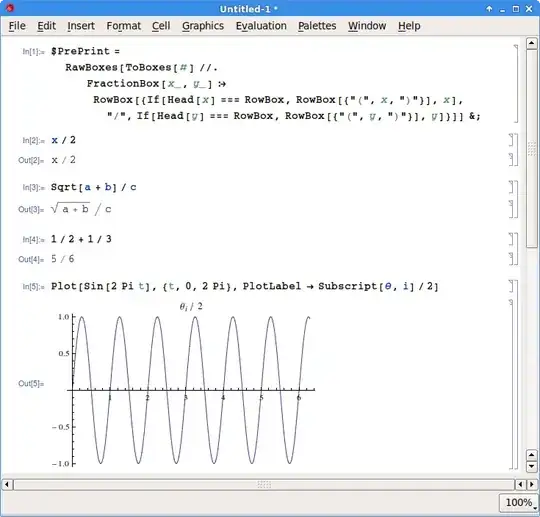
$PrePrint = 
  RawBoxes[ToBoxes[#] //. 
     FractionBox[x_, y_] :> 
      RowBox[{If[Head[x] === RowBox, RowBox[{"(", x, ")"}], x], "/", 
        If[Head[y] === RowBox, RowBox[{"(", y, ")"}], y]}]] &;

Then every fraction in your output will be of the form x/y.

For example:

enter image description here

alephalpha
  • 1,293
  • 8
  • 17
2

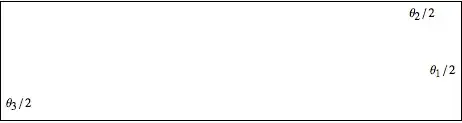
Assuming you want your labels inserted into a 2D Graphic, it can be done like this:

With[{n = 3},
  Module[{pts, lbls},
    SeedRandom@1; pts = RandomReal[1., {n, 2}];
    lbls = 
      Table[
        Text[Row[{Subscript[θ, i], "/\[ThinSpace]2"}, "", 
          BaseStyle -> {"TR", 10}], pts[[i]]], 
        {i, Range @ n}];
    Framed @ Graphics[lbls]]]

lbls.png

The salient points in the above example are in the use of Row with the option BaseStyle and in adding a \[ThinSpace] to adjust the spacing between the slash and the denominator 2. Without the \[ThinSpace] the text looks too tight.

m_goldberg
  • 107,779
  • 16
  • 103
  • 257
1

Here's a way to get the slash to not be written in the standard form:

Plot[Sin[2 Pi t], {t, 0, 2 Pi}, PlotLabel -> Row[{Subscript[θ, i], "/", 2}]]

enter image description here

bill s
  • 68,936
  • 4
  • 101
  • 191